Readable, unique barcodes for every product variant, generated from your own codes
Product and Variant Barcode Generator is an Odoo 19 app that builds a fixed 20 character barcode for every variant from its category, attributes such as colour, size and material, and a date segment. New variants get their barcode on creation, and a background job fills in barcodes for the catalogue you already have.
Hand-typed barcodes drift out of step with the catalogue. One person codes by category, another by supplier, a third leaves the field empty, and a medium and a large end up with the same code. Random numbers are also impossible to read, so counts and picking slow down. The result is stock counts that will not reconcile and pickers who scan the wrong size.
What it does
Segment-based barcode structure
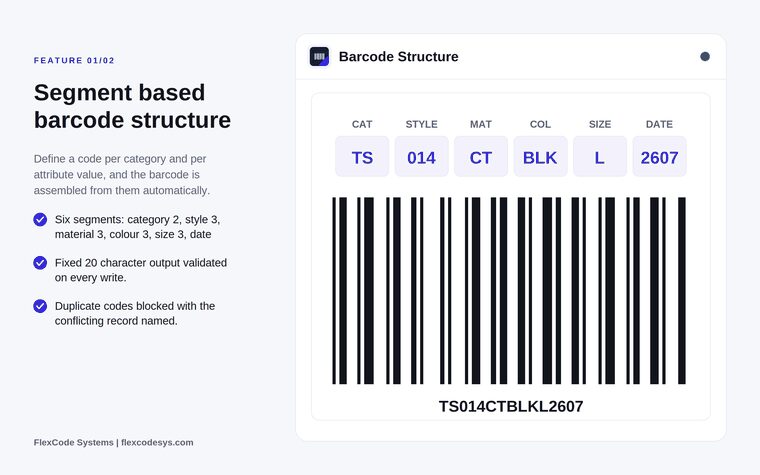
Build each barcode from six segments: category (2 characters), style (3), material (3), colour (3), size (3) and date (6).
Set a code per category and per attribute value, and the barcode is assembled from them automatically.
Choose which level of the category tree the category code comes from.
Set a segment type on each attribute. Colour, size and material are detected automatically.
Fixed length and duplicate protection
Get a fixed 20 character code, validated on every write.
Block duplicate codes across variants. The error names the attribute, the values and the segment in conflict.
Protect registry rows from manual edits.
Generation and backfill
Generate a barcode automatically when a variant is created.
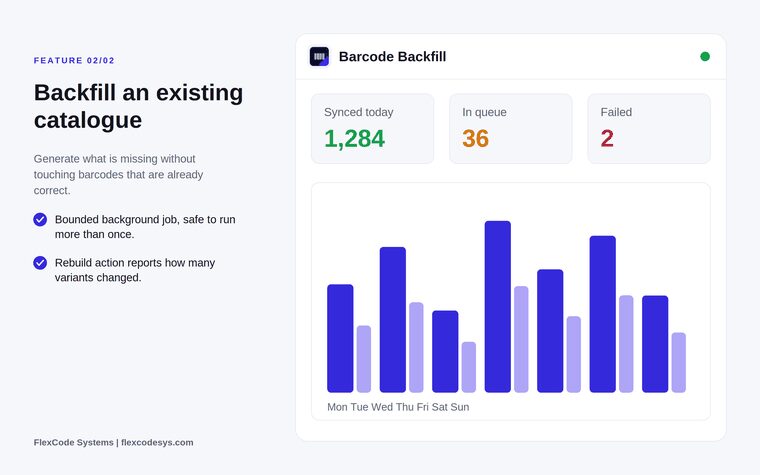
Fill in barcodes for an existing catalogue with a bounded background job that is safe to run more than once.
Leave barcodes that are already correct untouched.
Rebuild the whole catalogue in bulk and see how many variants changed.
Diagnostics
See a barcode breakdown on each variant, segment by segment.
Read clear errors that name the conflicting values.
Each segment comes from a code you set on the category or attribute value. Illustration from the store listing.The backfill job generates missing barcodes in the background. Illustration from the store listing with example figures.
Who it is for
Fashion and retail businesses with large size and colour matrices.
Warehouse teams who want barcodes they can read without a scanner.
Companies cleaning up a product catalogue after a migration.
Odoo partners rolling out barcode scanning for a customer.
Not a fit when:
Teams that need a barcode structure other than the six segments and 20 characters, unless they order a customisation.
Databases on Odoo Online, because Odoo Online does not allow third-party apps.
Label printing. The app creates and assigns barcode values and does not print labels.
Add the module to your Odoo.sh repository or your on-premise addons path.
Update the apps list in Odoo and install Product and Variant Barcode Generator. Odoo installs Inventory and Discuss with it if they are missing.
Each Odoo version is published as its own version of the app, so a licence for Odoo 19 covers the 19.0 release only. Odoo Online does not allow third-party apps, so the app cannot be installed there.
Configure
Set a two character category code on your product categories, and choose which level of the category tree the barcode reads.
Set the segment type on each product attribute, for example colour, size or material. Colour, size and material attributes are detected automatically.
Set a code for each attribute value, such as BLK for black or a code for each size.
Setting
What it does
Category code
Two character code that forms the first segment of the barcode.
Category level
Which level of the category tree the category code is read from.
Attribute segment type
Tells the generator which segment (style, material, colour or size) an attribute fills.
Attribute value code
The characters written into the segment for that value.
How to use it
Add barcodes to an existing catalogue
Set the category and attribute codes described under Configure.
Run the backfill job. It gives a barcode to every variant that has none and leaves correct barcodes untouched.
If generation stops on a conflict, read the error. It names the attribute, the values and the segment that would produce the same code. Change one of the codes and run the job again.
After changing codes, use the rebuild action to regenerate the whole catalogue. It reports how many variants changed.
Create new products and variants
Create the product with its category and attributes as usual.
Each new variant gets its barcode automatically.
Open a variant to see its barcode broken down segment by segment.
Limits
It creates and assigns barcode values and does not print labels. Printing runs through your normal label setup. For Dymo labels without a price, see Dymo Labels Without Price.
The structure is fixed at six segments and 20 characters. A different structure is possible as a customisation.
It cannot be installed on Odoo Online, which does not allow third-party apps.
Frequently asked questions
How do I generate barcodes for product variants in Odoo?
Install Product and Variant Barcode Generator, set a code on each product category and on each attribute value, and every new variant gets its barcode automatically. The barcode is built from the category, style, material, colour, size and date segments.
Can I add barcodes to products that already exist in Odoo?
Yes. Product and Variant Barcode Generator runs a bounded background job that gives a barcode to every variant without one. It leaves correct barcodes untouched and is safe to run more than once.
How do I avoid duplicate barcodes in Odoo?
Product and Variant Barcode Generator checks every code across variants and blocks duplicates. The error names the attribute, the values and the segment in conflict, so you know which code to change before a duplicate reaches the warehouse.
What does a generated barcode look like?
It is a fixed 20 character code assembled from category, style, material, colour, size and date segments. Each segment comes from a code you set on the category or attribute value, so staff can read the code.
Does the Barcode Generator work in multi-company databases?
Yes. Product and Variant Barcode Generator respects the active company and its records and has been tested in multi-company databases. English, German and Arabic translations are included.
Can the app print barcode labels?
No. Product and Variant Barcode Generator creates the codes, and printing stays a separate step in your label setup. If you print on Dymo and want labels without a price, the Dymo Labels Without Price app adds that option.