A second Dymo product label for Odoo, same size and barcode, without the price
Dymo Labels Without Price adds a price-free Dymo product label to Odoo 19, next to the standard Dymo layout. It keeps the same label size and barcode placement and leaves the standard label untouched.
Odoo ships one Dymo product label, and it always prints the price. Many shops price at the till or on shelf edge tags and do not want a price on the item. Editing the standard report changes it for everyone, so teams either print prices they do not want or pay for custom report work.
What it does
A second Dymo format, not a modified one
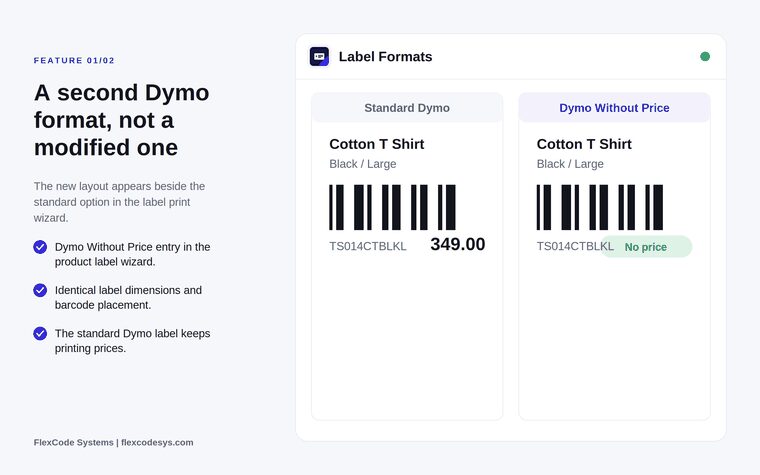
Choose Dymo Without Price in the product label print wizard, next to the standard Dymo option.
Print with the same label dimensions and the same barcode size and position.
Keep the standard Dymo label printing prices exactly as before.
Printing as usual
Print from product and variant list views.
Respect the quantity per product.
Output a PDF through the standard Odoo report pipeline.
Safe and multilingual
Change no existing report actions and no product data.
Use the English, German and Arabic translations; the label text follows the user language.
Work in multi-company databases: the app respects the active company and has been tested there.
Standard Dymo label and Dymo Without Price: same size and barcode, no price. Illustration from the store listing.
Who it is for
Retailers labelling shelf stock without printing prices.
Warehouses tagging goods that must not show a customer price.
Shops that price at the till or on shelf edge tags.
Odoo users who do not want to edit the standard report.
Not a fit when:
Labels that need other changes beyond removing the price: only the price block is omitted.
Databases on Odoo Online (SaaS), which cannot install third-party apps.
Install
Requires: Discuss (mail)
Buy the app on the Odoo Apps Store for Odoo 19.0.
Add the module to your Odoo.sh project or to the addons path of your on-premise server.
Update the apps list in Odoo and install Dymo Labels Without Price. The new label format registers itself automatically.
Odoo Online (SaaS) does not allow third-party apps, so Dymo Labels Without Price cannot be installed there. Use Odoo.sh or an on-premise Odoo 19 database.
Configure
Nothing to configure. After installation, Dymo Without Price appears in the product label print wizard beside the standard Dymo option.
Setting
What it does
Dymo Without Price
Label format in the product label wizard: standard Dymo size and barcode, no price block.
How to use it
Print a Dymo label without price
Select the products or variants to label in the list view.
Open Print Labels.
Choose Dymo Without Price and print as usual. The PDF goes to your Dymo printer through the standard Odoo report pipeline.
Limits
It removes only the price block. Everything else follows the standard Dymo layout.
It cannot be installed on Odoo Online (SaaS).
The release targets Odoo 19 Enterprise. The price covers one Odoo major version.
Frequently asked questions
How do I print a Dymo label without price in Odoo?
Install Dymo Labels Without Price, select your products in the list view, open Print Labels and choose Dymo Without Price. It prints like the standard Dymo label, without the price.
Does it change the standard Dymo label?
No. Dymo Labels Without Price adds a separate print format. The Dymo label that ships with Odoo keeps printing prices exactly as before.
Is the barcode still printed?
Yes. Label dimensions and barcode placement are identical to the standard layout. Only the price block is omitted.
Where do I find the new label format?
In the product label print wizard, beside the standard Dymo option.
Which languages are included?
English, German and Arabic translations ship with the app, and the label text follows the user language. Additional languages can be added on request.
Does it work in multi-company databases?
Yes. The app respects the active company and its records, and has been tested in multi-company databases.