Skip to Content

Inventory & Purchase · Odoo 20, Odoo 19, Odoo 18

New Shelf Life Control

Stop short-dated goods from slipping into stock at receipt

Shelf Life Control gives each lot-tracked product a minimum remaining shelf life. A receipt cannot be validated while a lot has no expiration date, and a lot that expires too soon needs the confirmation of an authorised user, noted in the chatter. Lots also get a production date, from which Odoo's Best Before date is set.

Key features

The problem

A supplier delivers goods that expire far sooner than agreed, and the receipt is validated because nobody compares the date on the box with what the product needs. The short-dated lot goes into stock and is found later, when it can no longer be sold in time. Lots received without any expiration date make the problem invisible altogether.
Screenshots

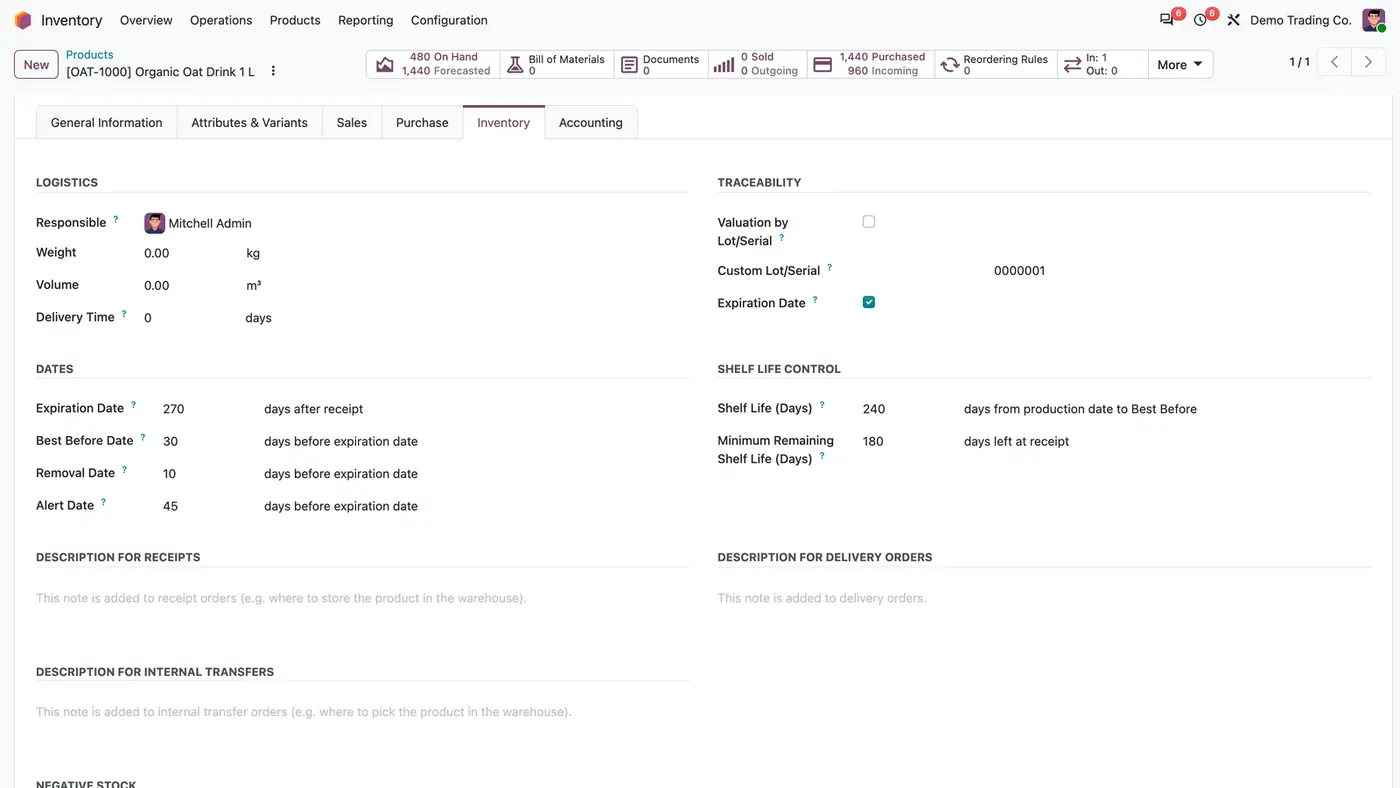
Product Inventory tab with a Shelf Life Control section: Shelf Life 240 days, Minimum Remaining Shelf Life 180 days
Each lot-tracked product gets a shelf life and a minimum remaining shelf life next to Odoo's expiration settings.
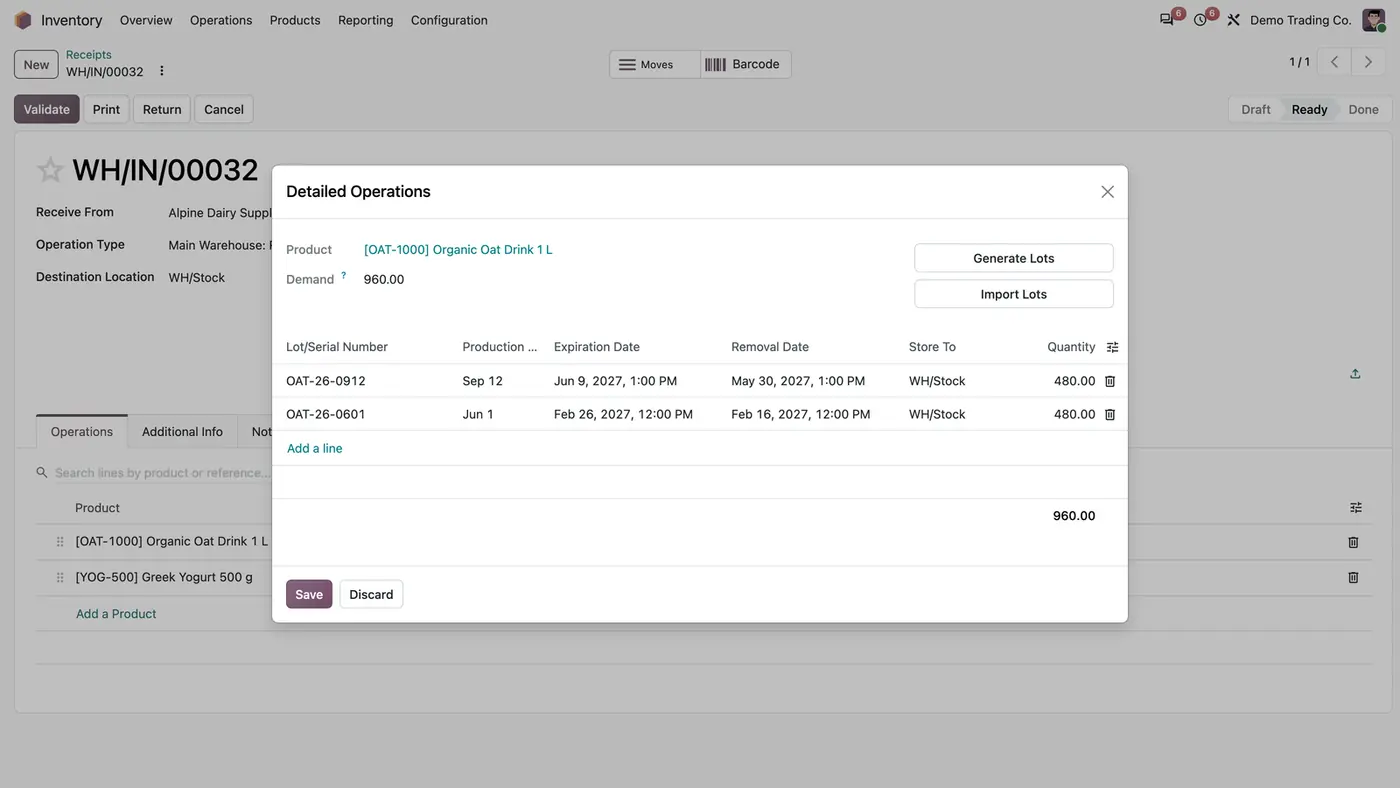
Detailed Operations of a receipt with lots, a Production Date column, expiration and removal dates
The receipt's detailed operations get a Production Date column next to each lot and its expiration date.
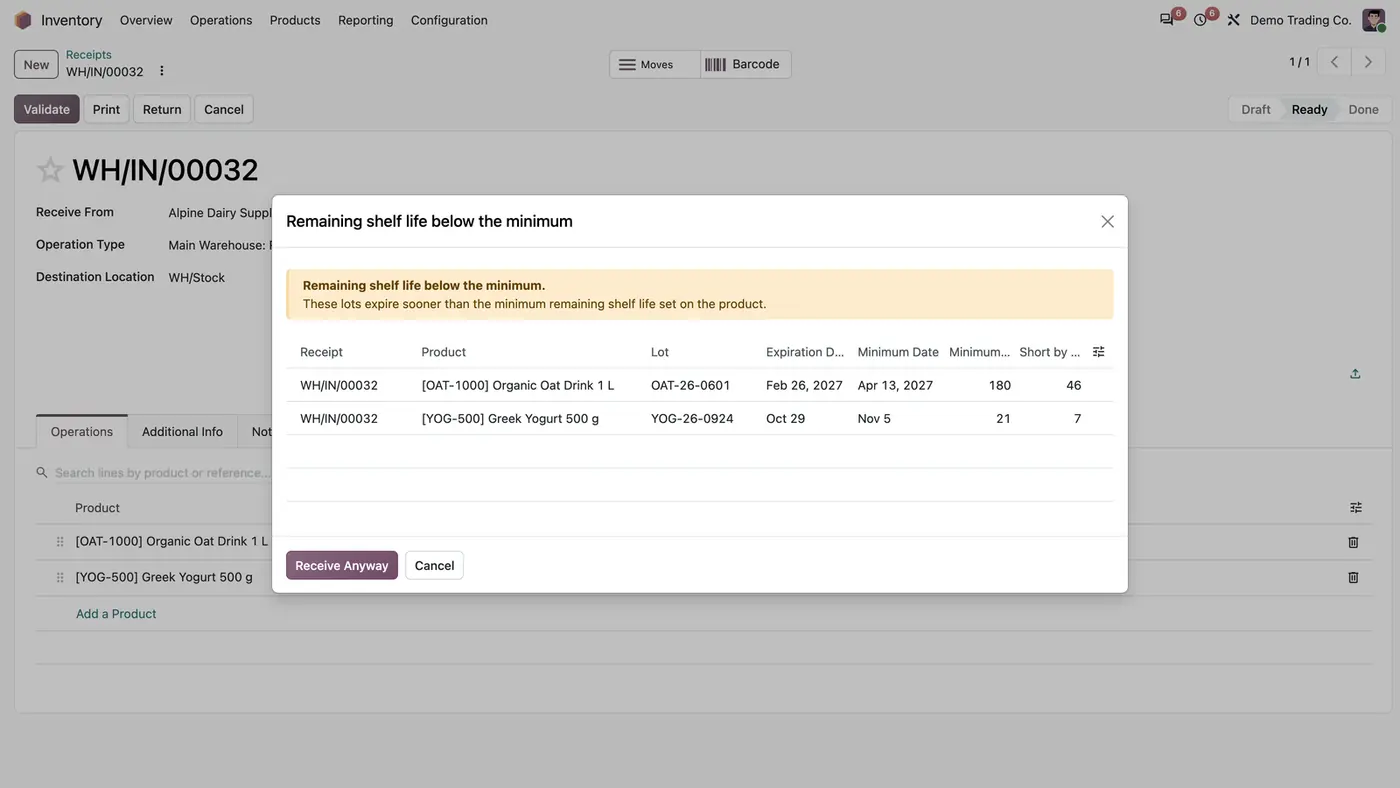
Window Remaining shelf life below the minimum listing two lots short by 46 and 7 days, with Receive Anyway
Validate lists every lot below the minimum with the days it is short; only authorised users can receive anyway.
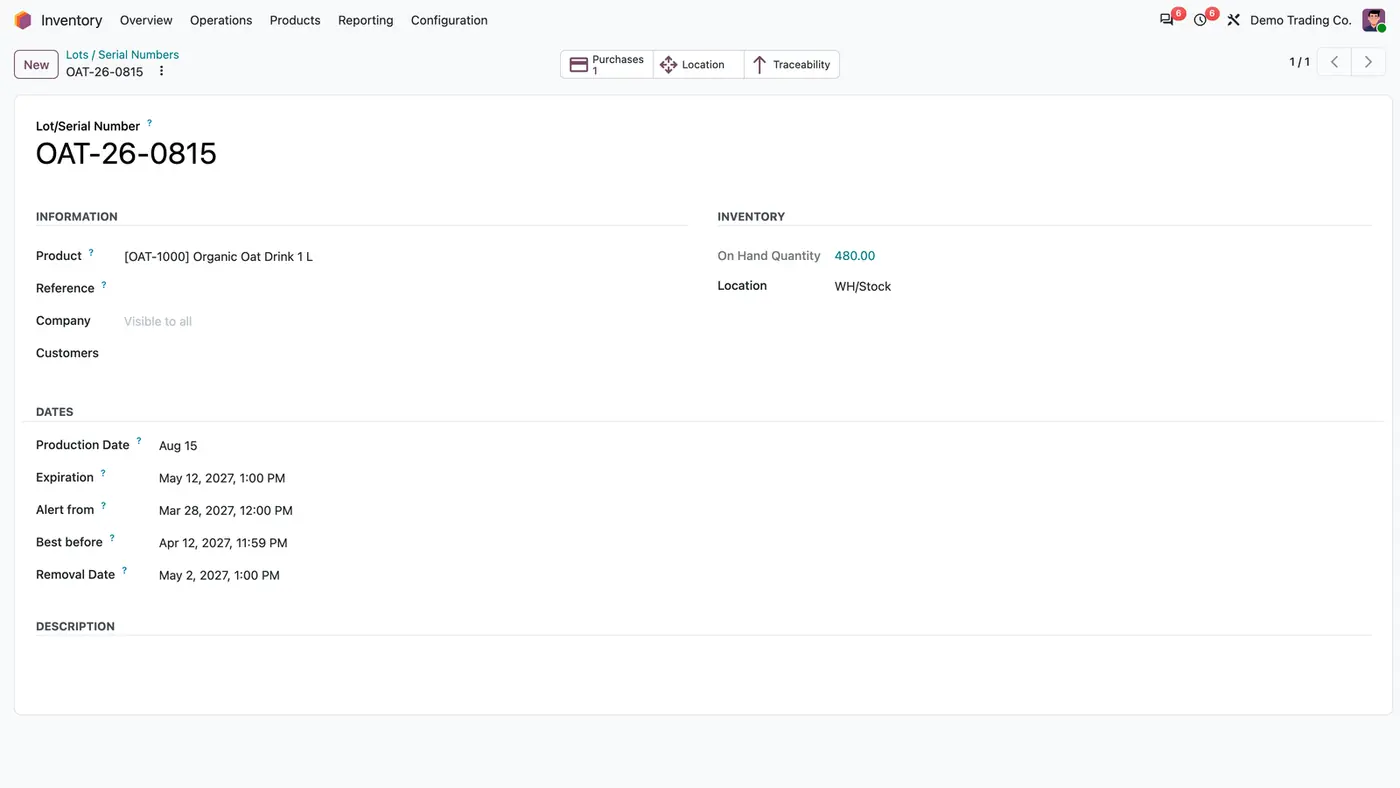
Lot OAT-26-0815 with Production Date Aug 15, Expiration May 12 2027 and Best before Apr 12 2027
On the lot, Best Before is calculated from the production date while the printed expiration date is kept.
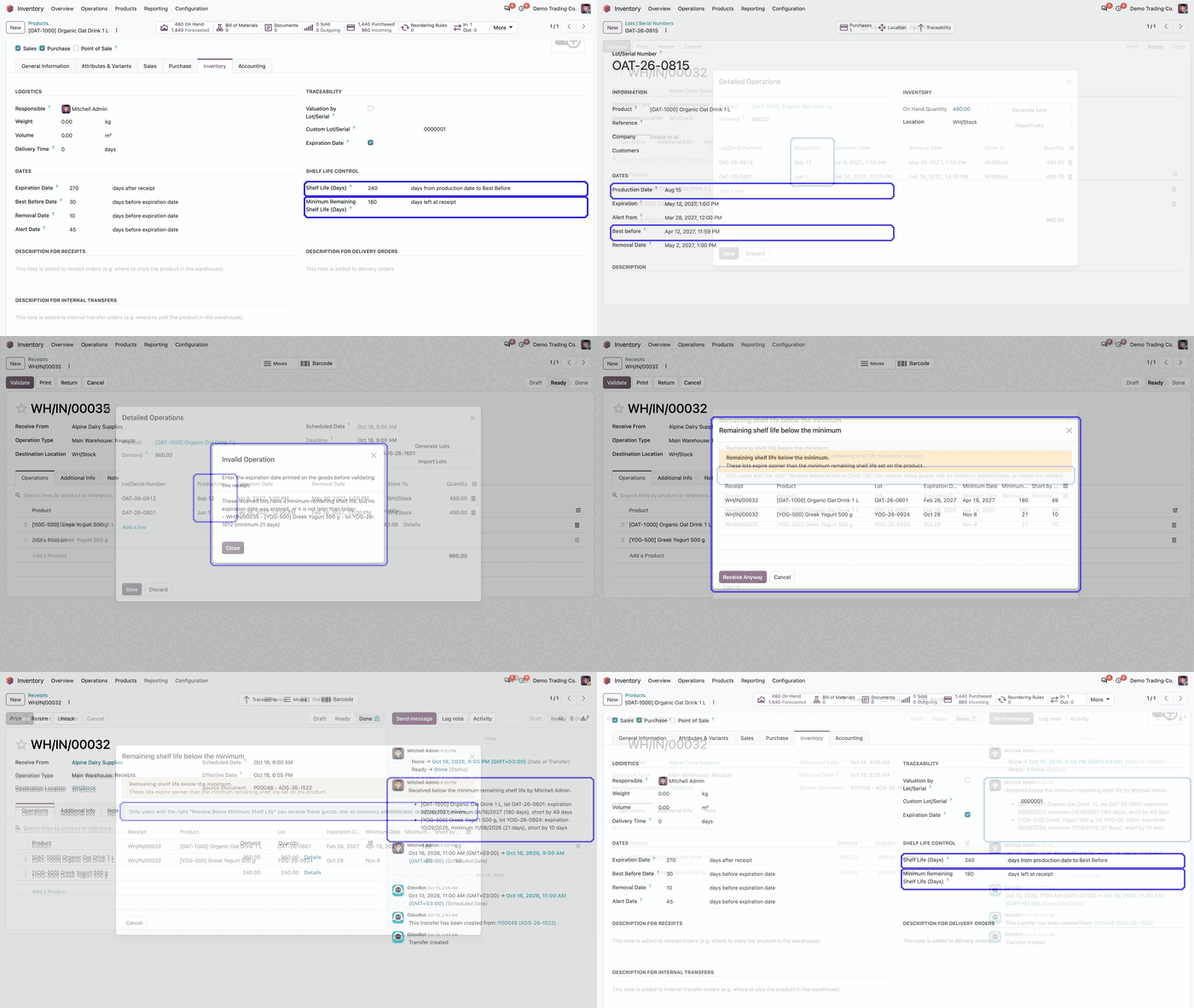
Animated demo: product Inventory tab with Shelf Life (Days) and Minimum Remaining Shelf Life (Days) highlighted Play demo
The demo shows where the two shelf life fields are set on the product.

What it does

Shelf life per product

  • Set Minimum Remaining Shelf Life (Days): how many days a lot must have left at receipt.
  • Set Shelf Life (Days): the days from production date to Best Before.
  • Both fields sit in a Shelf Life Control section on the product's Inventory tab, next to Odoo's own expiration settings.

Receipt check

  • A receipt cannot be validated while a lot has no expiration date.
  • Validate compares each lot's expiration date with the receipt date plus the product's minimum.
  • Lots below the minimum are listed with product, expiration date, minimum date and the days they are short, before anything goes into stock.
  • Dates are compared in the user's time zone.

Approval right

  • Only users with Receive Below Minimum Shelf Life may click Receive Anyway. Other users can only cancel.
  • Inventory administrators have the right by default; give it to other users on their user form.

Audit in the chatter

  • A chatter note lists each short lot and the days missing.
  • The note records who received the goods anyway.

Production date and Best Before

  • Enter a production date on the lot, or in the Production Date column of the receipt's detailed operations. It is copied to the lot at validation.
  • Best Before becomes production date plus Shelf Life (Days).
  • The expiration date printed on the goods stays as entered and is what the receipt check uses.

Who it is for

A good fit for

  • Food, beverage and other businesses that receive lot-tracked goods with expiration dates.
  • Warehouses that must refuse or approve goods arriving with too little shelf life left.
  • Purchasing and quality teams that want a record of who accepted a short-dated lot.
  • Companies that know the production date and want Best Before calculated from it.

Not a fit for

  • Serial-tracked or untracked products: only lots are checked.
  • Deliveries and stock already on hand: the check runs at receipt only.
  • Databases on Odoo Online (SaaS), which cannot install third-party apps.

Install

Requires: Inventory (stock), Discuss (mail)

  1. Buy Shelf Life Control on the Odoo Apps Store for your version: Odoo 18.0, 19.0 or 20.0.
  2. Add the module to your Odoo.sh project or to the addons path of your on-premise server.
  3. Update the apps list in Odoo and install Shelf Life Control. Inventory is installed with it if it is missing.

Odoo Online (SaaS) does not allow third-party apps, so the app cannot be installed there. Use Odoo.sh or an on-premise Odoo 18, 19 or 20 database, Community or Enterprise.

Every purchase includes 90 days of free support from FlexCode Systems.

Configure

  1. In Inventory, Configuration, Settings, Traceability, turn on Lots & Serial Numbers and Expiration Dates. The checks work on lots with an expiration date.
  2. On each product, track it by lots with Expiration Date ticked, then set Minimum Remaining Shelf Life (Days) and, if you want Best Before from the production date, Shelf Life (Days) in the Shelf Life Control section of the Inventory tab.
  3. In Settings, Users & Companies, Users, give Receive Below Minimum Shelf Life under Supply Chain to the users who may accept short lots.
SettingWhat it does
Minimum Remaining Shelf Life (Days)Days a lot must have left at receipt. Products with zero are not checked.
Shelf Life (Days)Days from production date to Best Before.
Receive Below Minimum Shelf LifeUser right to confirm short lots with Receive Anyway. Inventory administrators have it by default.

How to use it

Receive goods

  1. Open the receipt and enter each lot with its expiration date and, if known, its production date in the detailed operations.
  2. Click Validate. Without short lots the receipt is validated as usual.

Handle short lots

  1. If a lot expires sooner than the minimum, a window lists it with the days it is short.
  2. Authorised users click Receive Anyway; the chatter notes the lots and who received them.
  3. Other users click Cancel and pass the receipt to someone with the right.

Limits

  • Only products tracked by lots, with Expiration Date enabled and a minimum above zero, are checked.
  • Serial-tracked and untracked products, deliveries and stock already on hand are not checked.
  • The production date sets only Best Before; it never changes the expiration date.
  • It cannot be installed on Odoo Online (SaaS).

FAQ

Which products are checked at receipt?

Products tracked by lots, with Expiration Date enabled and a Minimum Remaining Shelf Life above zero. Serial-tracked and untracked products are not checked.

Who can receive goods below the minimum?

Users with Receive Below Minimum Shelf Life, which inventory administrators have by default and which can be given to other users on their user form. Other users see the list of short lots and can only cancel.

Does the production date change the expiration date?

No. It sets only Odoo's Best Before date (production date plus Shelf Life). The expiration date printed on the goods stays as entered and is what the receipt check uses.

What does the confirmation show?

Every short lot with its product, expiration date, minimum date and the number of days it is short.

Does it work with multi-company databases?

Yes. The module respects the active company and its records, and has been tested in multi-company databases.

Need it set up or adapted?

We configure our apps for your process, train your team and build the extra pieces you need.