Book Bosta shipments from the Odoo delivery order, print the airway bill, track status
Bosta Shipping adds the Bosta courier to Odoo 19 Inventory. Create a Bosta airway bill straight from a delivery order, print the label, and let a scheduled job keep the delivery status in step with Odoo.
Booking a Bosta courier by hand means copying each address into a portal, pasting the tracking number back into Odoo and checking the status again and again. Cash on delivery amounts get typed twice and do not always match the order. Sales and customer service have no way to see where a parcel is without logging into another system.
What it does
Airway bill from the delivery order
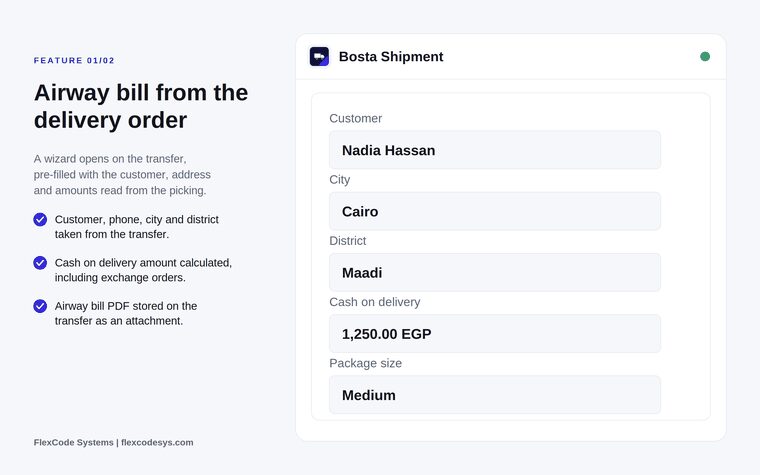
Open a wizard from the delivery transfer, pre-filled with the customer, phone, city, district and amounts read from the picking.
Validate phone, city and district before the shipment is created.
Retrieve the airway bill PDF, attach it to the transfer and reprint it at any time.
Cash on delivery
Send the cash on delivery amount with the shipment.
Recalculate the amount automatically for exchange orders.
Tracking and status synchronisation
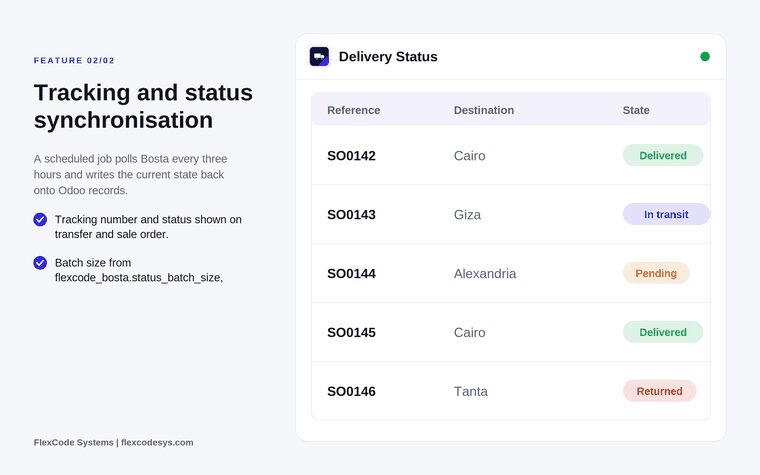
Poll Bosta every three hours with a scheduled job and write the current state back onto Odoo records.
Show the tracking number and status on the transfer, the sale order and the contact.
Control the batch size with the system parameter flexcode_bosta.status_batch_size: 100 by default, capped at 250.
Sync a single shipment on demand.
Addresses and history
Resolve districts against the Bosta city list.
Lock an address so a resync does not overwrite manual edits.
Record what was sent to Bosta as a chatter note.
The airway bill wizard, pre-filled from the delivery order. Illustration from the store listing.Tracking status written back to Odoo by the scheduled sync. Illustration from the store listing.
Who it is for
E-commerce sellers in Egypt shipping with Bosta.
Warehouse teams that book couriers from the delivery order.
Customer service staff who need tracking without a portal login.
Shops running cash on delivery at scale.
Not a fit when:
Companies that do not ship with Bosta.
Databases on Odoo Online (SaaS), which cannot install third-party apps.
Buy Bosta Shipping on the Odoo Apps Store for Odoo 19.0. The store lists the FlexCode Shopify Connector as a required app.
Add the module and its dependencies to your Odoo.sh project or to the addons path of your on-premise server.
Update the apps list in Odoo and install Bosta Shipping.
Odoo Online (SaaS) does not allow third-party apps, so Bosta Shipping cannot be installed there. Use Odoo.sh or an on-premise Odoo 19 database.
Configure
Store your Bosta API key in the system parameters.
Check the pickup address used for your shipments.
Optionally adjust flexcode_bosta.status_batch_size to change how many shipments each status run checks (100 by default, at most 250).
Setting
What it does
Bosta API key
Stored in the system parameters; used for every call to Bosta.
Pickup address
The address Bosta collects your parcels from.
flexcode_bosta.status_batch_size
Number of shipments per scheduled status run: 100 by default, capped at 250.
How to use it
Send a shipment
Open a validated delivery order and press Send to Bosta.
Check the pre-filled customer, phone, city, district and cash on delivery amount, and correct the district if the wizard does not recognise it.
Confirm the wizard. The airway bill is created and its PDF is attached to the transfer for printing.
Track the delivery
Let the scheduled job update the status every three hours, or sync a single shipment on demand.
Follow the tracking number and status on the transfer, the sale order or the contact.
Limits
The listing states that this release targets Odoo 19 Enterprise.
Status updates come from a scheduled job every three hours, or an on demand sync for one shipment.
It requires the FlexCode Shopify Connector, as listed in the store's app dependencies.
It cannot be installed on Odoo Online (SaaS).
Frequently asked questions
How do I create a Bosta shipment from Odoo?
Open the delivery transfer and press Send to Bosta. Bosta Shipping opens a wizard pre-filled from the picking, validates the address and creates the airway bill, which is attached to the transfer as a PDF.
Does the Bosta integration handle cash on delivery?
Yes. The cash on delivery amount is sent with the shipment and is recalculated automatically for exchange orders, so it always matches the order.
How often is the Bosta tracking status updated in Odoo?
A scheduled job polls Bosta every three hours and writes the status back to the transfer, the sale order and the contact. You can also sync a single shipment on demand.
What happens if Bosta does not recognise the district?
The wizard validates the district against the Bosta city list and asks you to correct it before the shipment is created.
Can customer service see Bosta tracking without the Bosta portal?
Yes. The tracking number and status are shown on the transfer, the sale order and the contact, and a chatter note records what was sent to Bosta.
Which Odoo version does Bosta Shipping support?
Odoo 19, on-premise or on Odoo.sh; the store listing states that this release targets Odoo 19 Enterprise. Each Odoo series is published as its own version of the app.