Run your Etsy shop from Odoo, from listings and stock to orders, fees and payouts
Etsy Connector links one or more Etsy shops to Odoo 19 over the Etsy Open API v3. Listings, images, variations and stock go out, receipts come back as sale orders with the buyer as a contact, and payments, fees and payouts can land in accounting.
An Etsy shop and an Odoo database drift apart quickly. Stock sells on Etsy that the warehouse has already shipped elsewhere, and orders are copied into Odoo by hand. The payout that arrives weeks later is one lump sum that someone has to unpick into sales, fees and refunds.
What it does
Listings, variations and stock
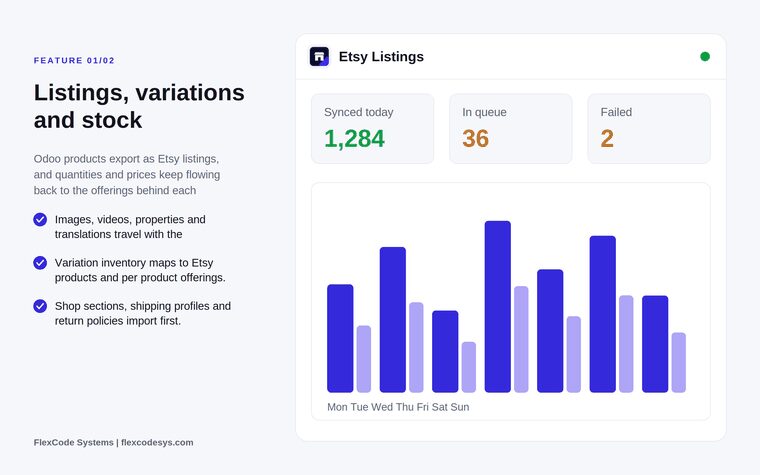
Export Odoo products as Etsy listings, with images, videos, properties and translations.
Map variation inventory to Etsy products and per product offerings, and push stock quantities and sales prices back.
Import shop sections, shipping profiles and return policies first, plus the seller and buyer taxonomy trees with their values.
Receipts as sale orders
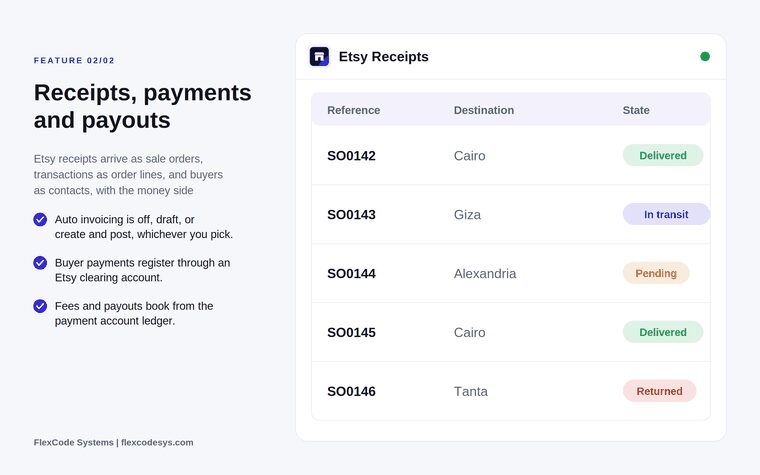
Import Etsy receipts as sale orders, transactions as order lines and buyers as contacts.
Push tracking numbers back to Etsy as shipments.
Payments, fees and payouts
Choose auto invoicing: off, draft, or create and post. It is off by default.
Register buyer payments through an Etsy clearing account.
Book fees, payouts and refunds from the Etsy payment account ledger, so they reconcile instead of arriving as a lump sum.
Reliability
Run every Etsy call through the connector's own persistent job queue, with five retries and exponential backoff, so a slow or failing Etsy never leaves a sync half applied.
Log each API request and read Etsy's remaining per second and per day allowance, throttling before Etsy refuses a call.
No OCA queue_job dependency and no middleware.
Security and several shops
Give access through two groups, Etsy User and Etsy Manager, with the credentials field protected.
Connect several Etsy shops from one database: each shop is a backend record, with multi company record rules.
Listings, variations and stock synced to Etsy. Illustration from the store listing.Etsy receipts as sale orders, with payments and payouts. Illustration from the store listing.
Who it is for
Etsy sellers who already run stock and accounting in Odoo.
Businesses running several Etsy storefronts from one Odoo database.
Sellers in the EU who need OSS aware tax on Etsy orders.
Odoo partners onboarding an established Etsy catalogue.
Not a fit when:
Sellers who do not use Odoo for stock or sales: Odoo is meant to be the system of record.
Databases on Odoo Online (SaaS), which cannot install third-party apps.
Buy Etsy Connector on the Odoo Apps Store for Odoo 19.0.
Add the module to your Odoo.sh project or to the addons path of your on-premise server.
Update the apps list in Odoo and install Etsy Connector. No other queue module is needed.
Odoo Online (SaaS) does not allow third-party apps, so the connector cannot be installed there. Use Odoo.sh or an on-premise Odoo 19 database.
Configure
Register an app with Etsy to get a keystring, and point its callback at your Odoo host.
In Odoo, add an Etsy backend for the shop and run the OAuth flow. Tokens refresh themselves from then on.
Choose how orders are invoiced: off, draft, or create and post.
Assign users to the Etsy User or Etsy Manager group.
Import the shop, then let the job queue run. Jobs are picked up every minute and scheduled work is queued every ten minutes.
Setting
What it does
Etsy keystring
The key of the app you register with Etsy; its callback points at your Odoo host.
Backend
One record per Etsy shop, authorised through OAuth.
Auto invoicing
Off (default), draft, or create and post.
Etsy clearing account
Where buyer payments are registered before payouts settle them.
Etsy User and Etsy Manager
The two access groups for daily work and configuration.
How to use it
Publish and update listings
Import the shop sections, shipping profiles and return policies.
Export your Odoo products as listings with images, videos and properties.
Keep working in Odoo: stock quantities and prices flow back to the offerings behind each variation.
Process Etsy orders
New receipts arrive as sale orders with the buyer as a contact.
Ship in Odoo and let the connector push the tracking number back to Etsy as a shipment.
Invoice automatically or later, depending on your auto invoicing setting.
Reconcile money
Buyer payments register through the Etsy clearing account.
Fees, payouts and refunds book from the Etsy payment account ledger, so each payout breaks down into its parts.
Limits
The listing states that this release targets Odoo 19 Enterprise.
It talks to Etsy through the Etsy Open API v3, so an Etsy app registration and OAuth authorisation are required.
It cannot be installed on Odoo Online (SaaS).
Frequently asked questions
How do I connect my Etsy shop to Odoo 19?
Register an Etsy app to get a keystring and point its callback at your Odoo host, add the backend in Odoo and run the OAuth flow, then import the shop. Etsy Connector keeps listings, stock, orders and payouts in step from there.
Can one Odoo database run several Etsy shops?
Yes. Each Etsy shop is its own backend record in Etsy Connector, and every model carries multi company record rules.
Can I keep Etsy orders out of my accounting?
Yes. Auto invoicing defaults to off. Orders still import as sale orders, and you decide later whether to invoice them as draft or create and post.
How are Etsy fees and payouts booked in Odoo?
Buyer payments register through an Etsy clearing account, and fees, payouts and refunds are booked from the Etsy payment account ledger, so a payout reconciles instead of arriving as one lump sum.
Do I need the OCA queue_job module for the Etsy connector?
No. Etsy Connector ships its own persistent job queue with five retries and exponential backoff, so there is nothing else to install.
What happens when Etsy rate limits the connector?
Every Etsy response carries the remaining per second and per day allowance. The connector reads those headers and throttles itself before Etsy refuses a call.