Send Odoo email through the Resend API instead of SMTP, and see what happened to it
Resend Email Connector sends every email Odoo produces through the Resend API over HTTPS, so no mail port has to be open. Each message gets a delivery status in Odoo, and replies come back to the record they belong to.
Many hosts block SMTP ports 25, 465 and 587, and a blocked port looks like a hang rather than an error, so the Odoo mail queue quietly stalls. Even when SMTP works, it only says the message was accepted: nobody knows whether a quotation was delivered, opened or bounced. And when Odoo sends from an address that is not on a verified domain, SPF and DKIM fail and invoices land in spam.
What it does
Everything goes through Resend
Send every email Odoo produces through Resend: chatter messages, quotations, invoices, mail templates and mass mailings.
Rebuild each message with its text, HTML, attachments, Cc, Bcc and Reply-To and post it to Resend over HTTPS. No mail port is used.
Keep some mail on SMTP if you want: use the global switch, or flag a single outgoing server as a Resend server and leave the others as they are.
Fix the spam folder with one field
Set a default From address on a domain you verified with Resend, and every message inherits it, whatever address Odoo picked. SPF and DKIM stop failing.
Delivery tracking
Track eight delivery states per message: sent, delivered, opened, clicked, delivery delayed, bounced, complained and failed.
Rank the states so a late event never moves a record backwards; bounced, complained and failed always apply.
See a Resend Messages list in Odoo with message id, subject, sender, recipients, status, error and timestamp, and the same status on the record the mail came from.
Replies come home
Rebuild inbound mail with its threading headers intact and hand it to Odoo's mail gateway, so a reply appears in the chatter of the quotation it answers.
Security and reliability
Verify webhooks with HMAC-SHA256 over id, timestamp and body, compared in constant time, once you set the signing secret.
Send each request with an idempotency key built from the message and its recipients, so a retry never sends twice.
Turn an API error into a normal Odoo mail failure with Resend's message; the mail waits for Odoo's usual retry and never falls back to SMTP silently.
Acknowledge unprocessable payloads after rolling back, so Resend does not retry the same payload forever.
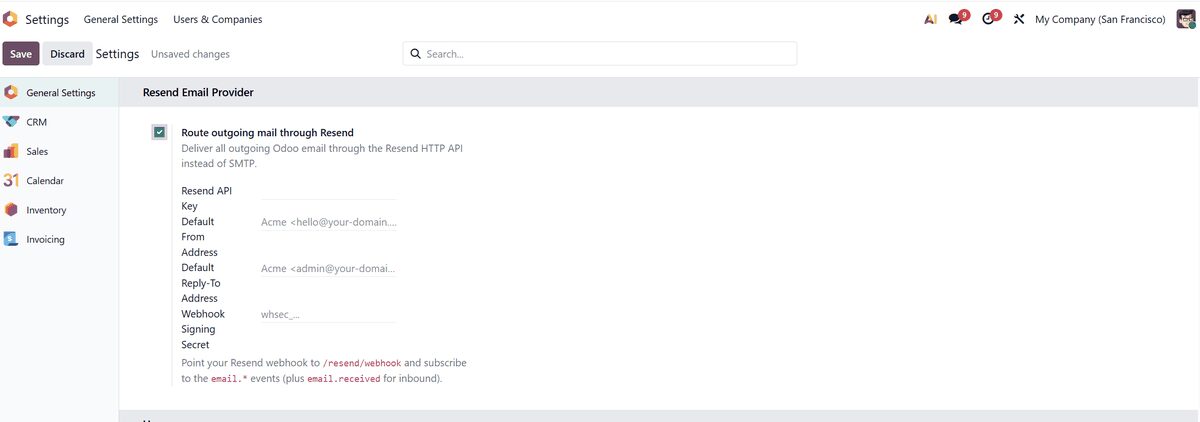
Settings > General Settings > Resend Email Provider in Odoo 19.
Who it is for
Odoo databases on hosts that block SMTP ports.
Teams who need to know whether quotations, invoices and reminders were delivered, opened or bounced.
Companies whose Odoo email lands in spam because the sender domain is not verified.
Administrators who want replies to come back into the right chatter thread.
Not a fit when:
Managing Resend domains, DNS, audiences or contact lists from inside Odoo.
Editing email templates on the Resend side, or using more than one Resend account per database.
Databases on Odoo Online (SaaS), which cannot install third-party apps.
Install
Requires: Discuss (mail)
Buy Resend Email Connector on the Odoo Apps Store for Odoo 19.0.
Add the module to your Odoo.sh project or to the addons path of your on-premise server. The server needs outbound HTTPS to api.resend.com and the Python requests library.
Update the apps list in Odoo and install Resend Email Connector.
Odoo Online (SaaS) does not allow third-party apps, so the connector cannot be installed there. A publicly reachable HTTPS address for Odoo is needed only for delivery status and inbound replies.
Configure
In Resend, verify your sending domain by adding the DNS records Resend gives you, then create an API key. This is the step that fixes SPF and DKIM.
In Odoo, open Settings > General Settings > Resend Email Provider. Tick Route outgoing mail through Resend, paste the API key and set the default From address on the domain you just verified.
Optional: in Resend, point a webhook at the Odoo endpoint /resend/webhook and paste the signing secret into the same settings page, so delivery events and replies are verified.
Setting
What it does
Route outgoing mail through Resend
The global switch. Instead, you can flag a single outgoing server as a Resend server.
API key
The Resend API key; enough on its own for sending.
Default From address
An address on your verified domain that every message inherits.
Default Reply-To address
Optional reply address for outgoing mail.
Webhook signing secret
Verifies incoming delivery events and replies sent to /resend/webhook.
How to use it
Send email as usual
Keep sending quotations, invoices, chatter messages and mailings from Odoo exactly as before.
The connector takes each message and delivers it through Resend from your verified domain.
Check delivery
Open the Resend Messages list to see every email with its recipients, status and any error text.
Open the quotation, invoice or contact to see the delivery status of the mail sent from it.
If the API returns an error, the mail shows a normal Odoo mail failure with Resend's message and is retried by Odoo.
Receive replies
With the webhook configured, replies to your emails arrive in the chatter of the record they answer.
Limits
Sending only needs the API key; delivery status and inbound replies need the webhook and a publicly reachable HTTPS address for Odoo.
There is deliberately no fallback to SMTP when the Resend API fails.
One Resend account per database. Domains, DNS, audiences and templates are managed in Resend, not in Odoo.
Email content passes through Resend, an independent service with its own terms and privacy policy. The module sends nothing to its author.
It cannot be installed on Odoo Online (SaaS).
Frequently asked questions
Why is my Odoo email not sending over SMTP?
Often because the host blocks ports 25, 465 and 587, which looks like a hang rather than an error. Resend Email Connector sends mail over HTTPS through the Resend API instead, so no mail port has to be open.
Does the Resend connector replace my outgoing mail server in Odoo?
It intercepts it. Odoo still shows a configured outgoing server, because the module provisions a "Resend (API)" record, but no SMTP connection is made. You can also keep some mail on SMTP by flagging only one server as a Resend server.
How can I see if an Odoo email was delivered or bounced?
With the Resend webhook configured, each message gets one of eight states, from sent and delivered to opened, clicked, bounced or complained. The status appears in the Resend Messages list and on the record the mail came from.
What happens if the Resend API is down?
The send raises a normal Odoo mail failure with the error Resend returned, and the mail stays in the queue for Odoo's usual retry. It does not silently fall back to SMTP.
Will retries send duplicate emails?
No. Each request carries an idempotency key derived from the message and its recipients, so a genuine retry is deduplicated by Resend.
Which Odoo versions and hosting does the Resend connector support?
Odoo 19.0, Community and Enterprise, on-premise or on Odoo.sh. It needs outbound HTTPS to api.resend.com and the Python requests library. Odoo Online cannot install third-party apps.