Returns, exchanges and credit notes from the sale order, reconciled with the invoice
Sale Returns, Exchanges and Credit Notes adds a controlled returns and exchanges workflow to Odoo 19 sale orders. A wizard creates the return transfer, an exchange creates the replacement order and delivery, and the credit note posts itself once the warehouse validates the return.
In standard Odoo one customer return turns into three manual jobs: a receipt in the warehouse, a credit note in accounting and a spreadsheet to track what was refunded. Exchanges add a second sale order on top. Steps get skipped, refunds go out twice or not at all, and return fees are quietly absorbed. Finance then spends month end matching returns to invoices by hand.
What it does
Returns that reconcile themselves
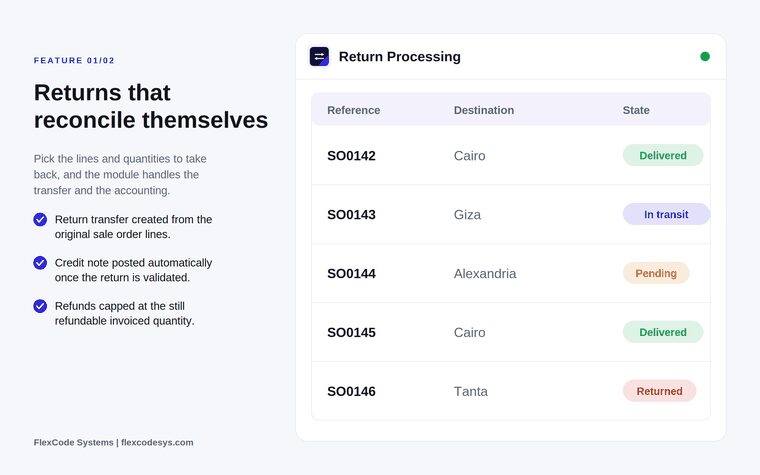
Create the return transfer from the original sale order lines, choosing lines and quantities.
Receive the goods as a draft receipt at the warehouse you choose.
Post the credit note automatically against the original invoice once the return is validated.
Cap every refund at the still refundable invoiced quantity, so nothing is refunded twice.
Exchanges in a single step
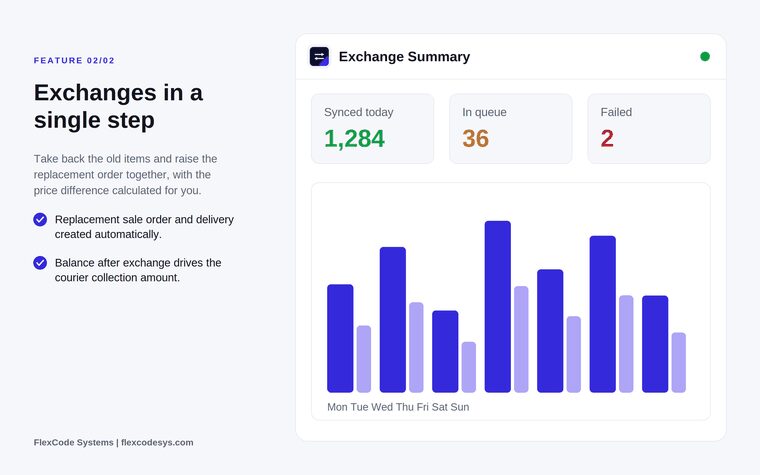
Take back the old items and create the replacement sale order and its delivery in the same wizard.
Let the app calculate the price difference between returned and replacement items.
Link the replacement order to the original order.
Return fees
Add a return fee in the wizard as a service line on the original order.
Recalculate the net refund after the fee.
Bosta shipping
Book a Bosta customer return pickup from a wizard.
Create a Bosta exchange shipment, with the balance after the exchange used as the courier collection amount.
Traceability
See return and exchange counts on the sale order.
Open each credit note from the return transfer it belongs to.
Returns tracked per sale order with their current state. Illustration from the store listing.Exchanges handled in one step, with the replacement order created automatically. Illustration from the store listing.
Who it is for
Retail and fashion sellers with a high volume of returns.
Customer service teams that handle returns directly from the sale order.
Finance teams that want credit notes posted without re-entering data.
Warehouses that receive customer returns every day.
Not a fit when:
Databases on Odoo Online (SaaS), which cannot install third-party apps.
Odoo Community: the listing's FAQ says this release targets Odoo 19 Enterprise.
Make sure the two FlexCode apps it depends on, Bosta Shipping and Shopify Connector, are available in your addons path, as the store lists them as dependencies.
Add the module to your Odoo.sh project or the addons path of your on-premise server.
Update the apps list and install Sale Returns, Exchanges and Credit Notes. Missing standard apps such as Inventory and Sales are installed with it.
Odoo Online (SaaS) does not allow third-party apps, so this app cannot be installed there. Use Odoo.sh or an on-premise Odoo 19 database.
Configure
Decide which warehouse receives customer returns, so the draft receipts land in the right place.
Agree internally when a return fee applies and how much it is, since the fee is entered in the return or exchange wizard.
If you ship with Bosta, set up the Bosta connection so return pickups and exchange shipments can be booked from the wizard.
Setting
What it does
Return warehouse
The warehouse where the draft receipt for returned goods is created, chosen in the wizard.
Return fee
Optional amount added as a service line on the original order; it reduces the net refund.
Bosta pickup and shipment
Optional wizards to book a Bosta return pickup or an exchange shipment with the calculated collection amount.
How to use it
Process a return
Open the sale order and choose Return.
Pick the lines and quantities the customer sends back, and add a return fee if one applies.
Let the warehouse validate the draft receipt when the goods arrive.
The credit note is posted automatically against the original invoice, limited to the still refundable quantity.
Process an exchange
Open the sale order and choose Exchange.
Select the items coming back and the replacement items.
The app creates the replacement sale order and its delivery and calculates the price difference.
If you ship with Bosta, create the exchange shipment so the courier collects the balance.
Follow up
Check the return and exchange counts on the sale order.
Open the credit note from the return transfer to see how a refund was settled.
Limits
It cannot be installed on Odoo Online (SaaS).
The store lists Bosta Shipping and Shopify Connector as dependencies, so both must be available in your database's addons.
Refunds are capped at the still refundable invoiced quantity; it does not refund goods that were never invoiced.
The price covers one Odoo major version; each future version is sold separately.
Frequently asked questions
How do I process a customer return in Odoo?
With Sale Returns, Exchanges and Credit Notes you open the sale order, choose Return and pick the lines and quantities. The app creates the return transfer, and once the warehouse validates it, the credit note is posted against the original invoice.
Does Odoo create the credit note automatically after a return?
With this app, yes. As soon as the return transfer is validated, a credit note is created and posted against the original invoice, limited to the quantity that can still be refunded.
What is the difference between a return and an exchange?
A return takes goods back and refunds them. An exchange also creates a new sale order for the replacement items and its outgoing delivery, and calculates the price difference.
Can I charge a return fee in Odoo?
Yes. A fee entered in the return wizard is added as a service line on the original sale order, and the net refund is recalculated after the fee.
Does it work with Bosta for return pickups?
Yes. The app includes a wizard to book a Bosta customer return pickup and to create an exchange shipment where the balance after the exchange becomes the courier collection amount.
Which Odoo versions and languages are supported?
This release targets Odoo 19 Enterprise on Odoo.sh or on-premise, and each Odoo series is published as its own version of the app. English, German and Arabic translations are included, and it has been tested in multi-company databases.