Skip to Content

Sales & Customers · Odoo 20, Odoo 19, Odoo 18

New CRM Mail Triage

Only real customer requests reach your CRM pipeline

CRM Mail Triage checks every e-mail that arrives on a CRM alias against your own rules before a lead is created. Newsletters, auto-replies and other junk are dropped or parked in a folded Quarantine stage, real requests get their priority and tags at once, and a quarantined lead goes back into the pipeline with one click. Every decision is written to a classification log.

Key features

The problem

Every message to info@ or sales@ becomes a lead in Odoo CRM, including newsletters, out-of-office replies, bulk webinar invitations and spam reports. Salespeople scroll past junk to find the real requests, and a complaint or an urgent quote request looks the same as a marketing mail until someone opens it. Deleting junk by hand takes time, and a real request deleted by mistake is gone.
Screenshots

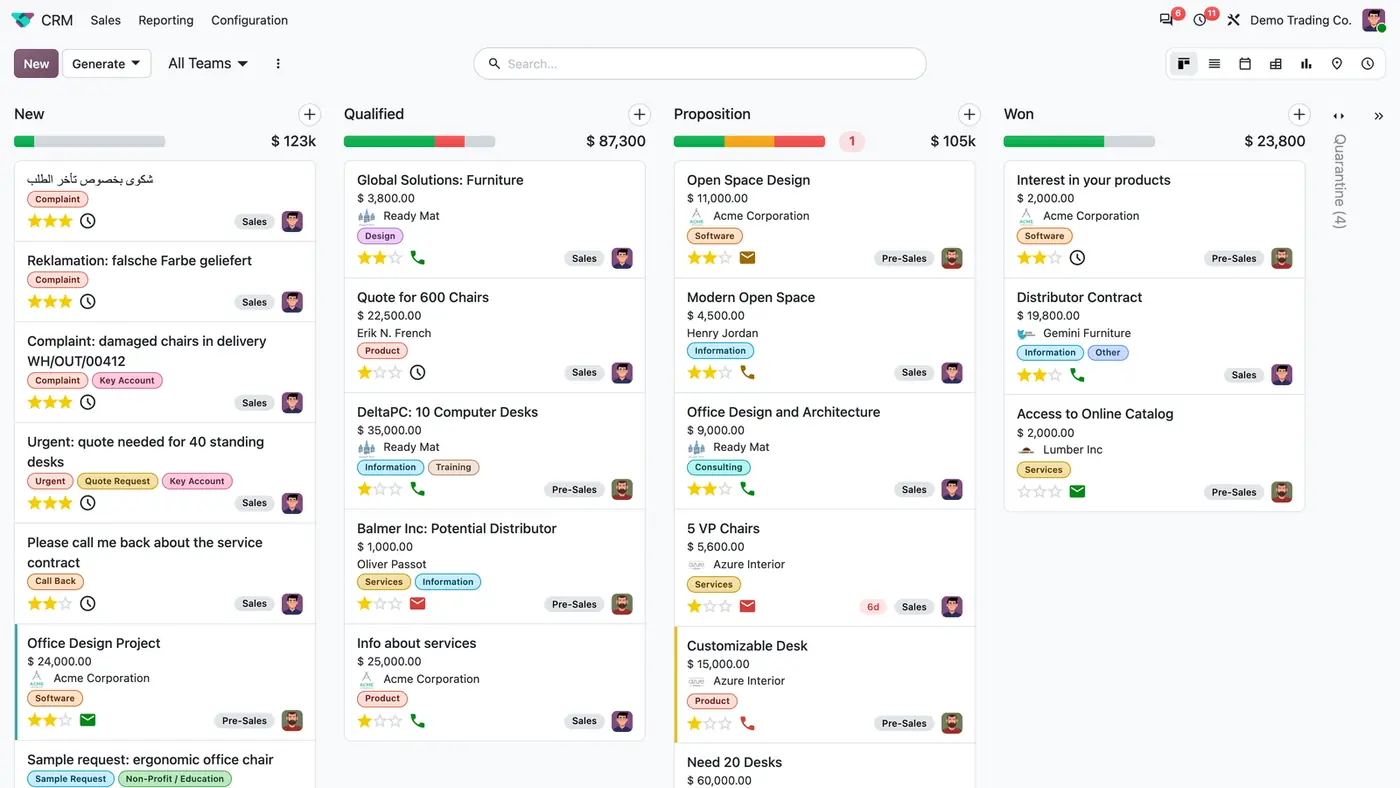
CRM pipeline with tagged complaints and quote requests in New and a folded Quarantine (4) column
Requests arrive with priority and tags already set, while junk waits in the folded Quarantine column.
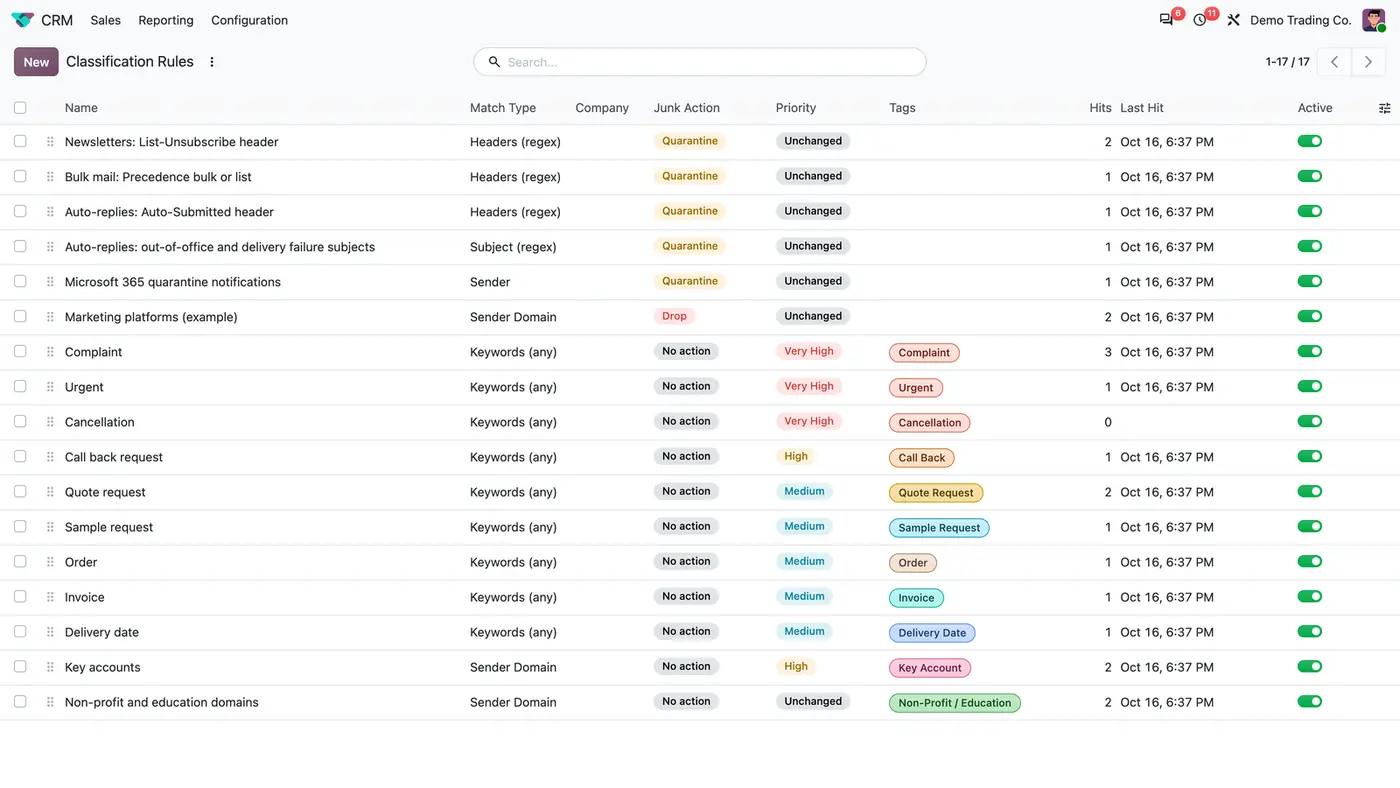
List of 17 classification rules with match type, junk action, priority, tags and hit counters
Each classification rule combines a match type, a junk action, a priority and tags, and counts its hits.
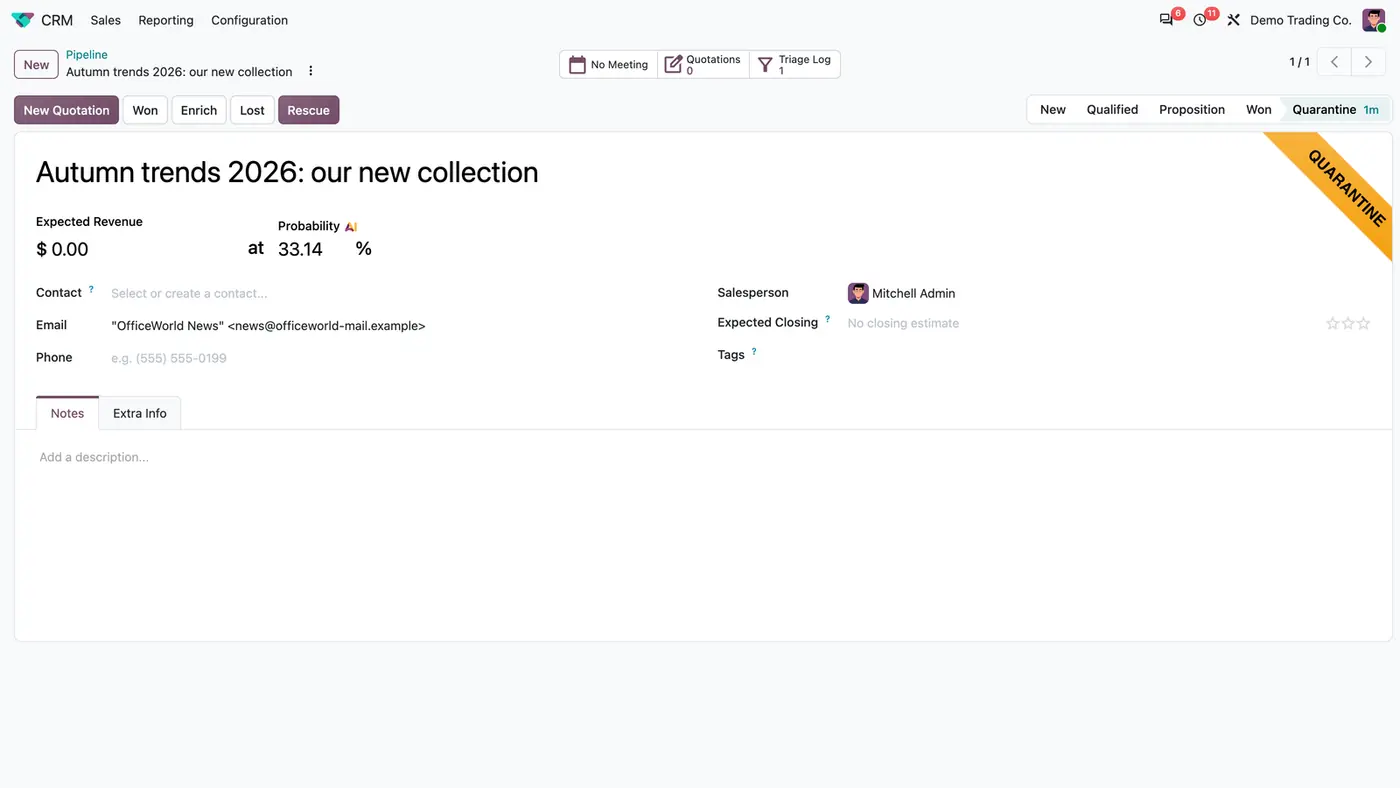
Newsletter lead in the Quarantine stage with a Quarantine ribbon, Rescue button and Triage Log button
A quarantined newsletter sits outside the pipeline and can be moved back with the Rescue button.
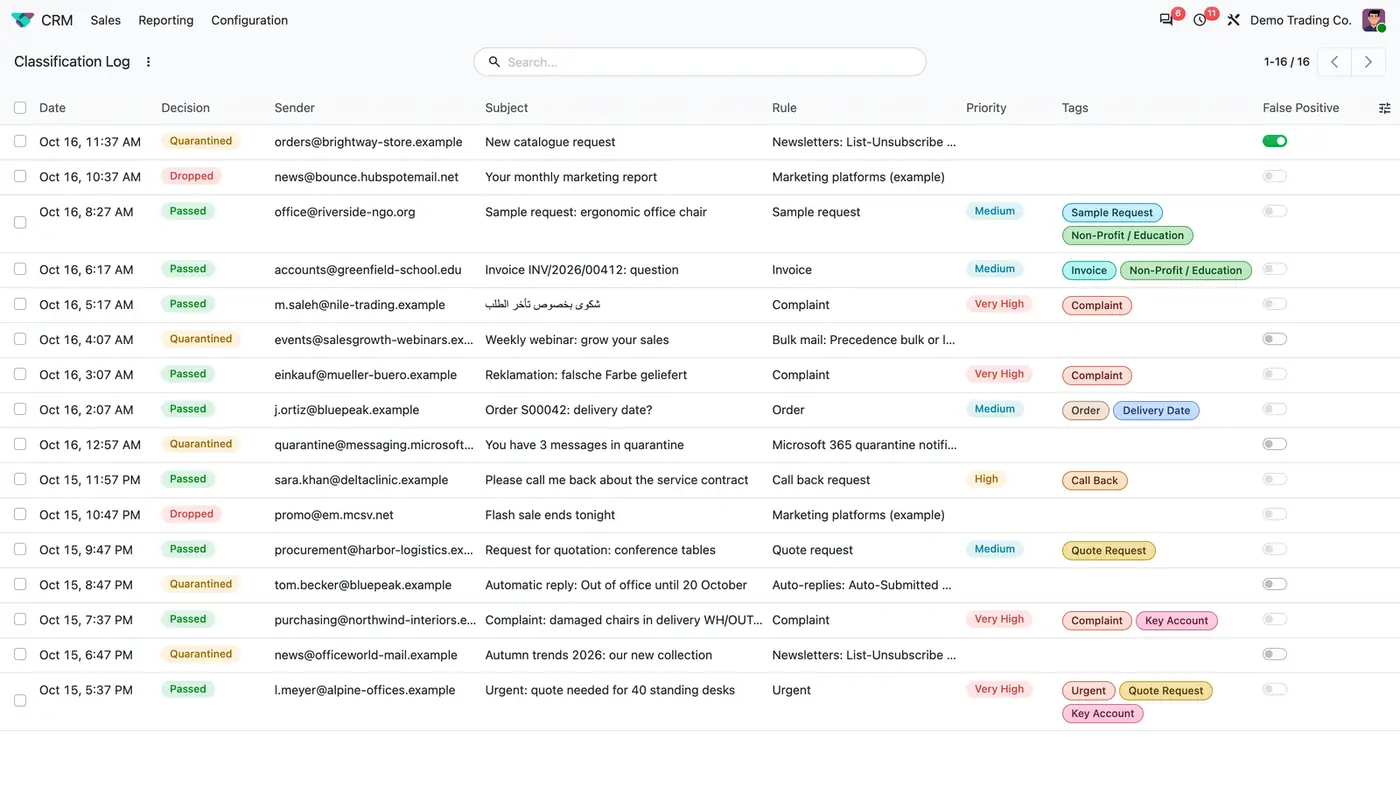
Classification log with Passed, Quarantined and Dropped decisions, rules, tags and a False Positive toggle
The classification log records every decision; a rescued lead is marked as a false positive.
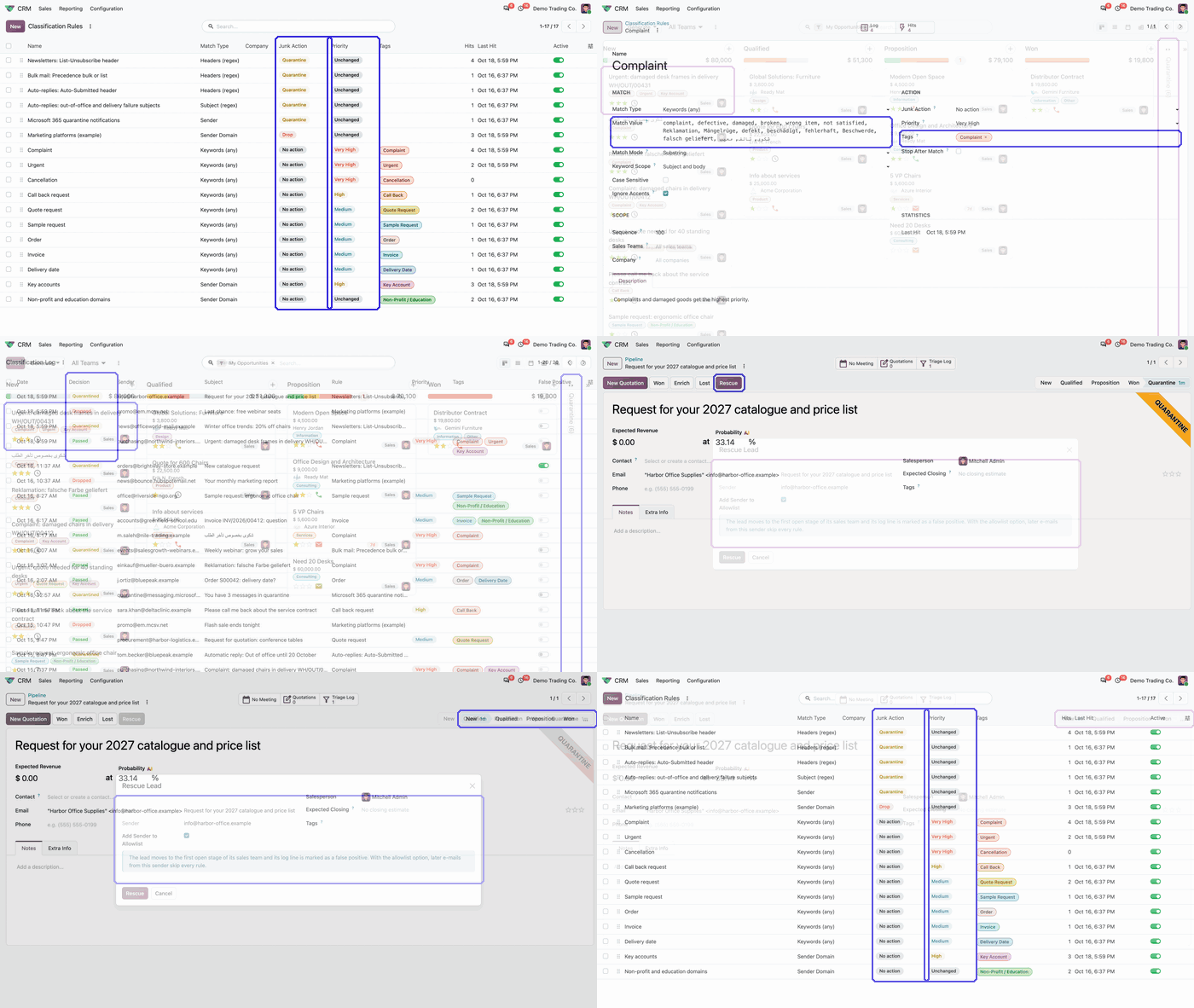
Animated demo: classification rules list with the Junk Action and Priority columns highlighted Play demo
The demo shows how each rule decides the junk action and the priority of incoming e-mails.

What it does

Match what identifies junk

  • Match on sender, sender domain (with subdomains), subject, body or mail headers.
  • Match by substring, whole word or regular expression, or by a list of keywords where any or all must appear.
  • Ignore accents if you want, so Mängel also matches Mangel.
  • Limit a rule to certain sales teams and to a company; empty means everywhere.

Out of the pipeline, not lost

  • Quarantine: the e-mail still becomes a lead, but in a folded Quarantine stage outside the pipeline.
  • Drop: no lead is created at all, only a line in the classification log.
  • Quarantined leads older than 30 days are archived, never deleted. You choose how long quarantine and log are kept.

Real requests sorted on arrival

  • The same rules raise the lead priority and add tags. The highest matching rule wins, and a priority is never lowered.
  • Ready-made rules cover complaints, urgent requests, cancellations, call backs, quotes, samples, orders, invoices and delivery dates in English, German and Arabic.
  • Example rules quarantine newsletters, bulk mail and auto-replies by their headers and drop mail from marketing platforms.

One click back into the pipeline

  • A Rescue button on a quarantined lead moves it to the first open stage of its sales team.
  • Rescue marks the log line as a false positive and can add the sender to the allowlist.
  • Addresses on the allowlist skip every rule and always create a normal lead.

Every decision visible

  • The classification log shows date, sender, subject, rule, decision, priority and tags, with filters and grouping by decision, rule, team and sender.
  • Each rule shows its hit count and last hit.
  • Each sales team leader gets a daily digest of the last 24 hours.
  • A Reclassify action applies the current rules to existing leads.

Who it is for

A good fit for

  • Sales teams whose CRM aliases such as info@ or sales@ create leads from newsletters and auto-replies.
  • Companies that want complaints and urgent requests flagged with priority and tags as they arrive.
  • Teams that receive requests in English, German and Arabic.
  • Sales managers who want a log of why each e-mail did or did not become a lead.

Not a fit for

  • Replies on an existing lead or other mailboxes: only e-mails that would create a new lead are checked.
  • AI classification: every decision comes from your own rules.
  • Databases on Odoo Online (SaaS), which cannot install third-party apps.

Install

Requires: CRM (crm), Discuss (mail), Calendar (calendar), Contacts (contacts)

  1. Buy CRM Mail Triage on the Odoo Apps Store for your version: Odoo 18.0, 19.0 or 20.0.
  2. Add the module to your Odoo.sh project or to the addons path of your on-premise server.
  3. Update the apps list in Odoo and install CRM Mail Triage. CRM is installed with it if it is missing.

Odoo Online (SaaS) does not allow third-party apps, so the app cannot be installed there. Use Odoo.sh or an on-premise Odoo 18, 19 or 20 database, Community or Enterprise.

Every purchase includes 90 days of free support from FlexCode Systems.

Configure

  1. Open CRM, Configuration, Mail Triage, Classification Rules. Unarchive the example rules you need and add your own senders and words.
  2. Open CRM, Configuration, Sales Teams and set the Mail Triage fields of each team. Empty fields use the shared Quarantine stage and the team leader as digest recipient.
  3. Add trusted senders under CRM, Configuration, Mail Triage, Allowlist.
  4. Under CRM, Configuration, Settings, Mail Triage, choose how long quarantined leads and log lines are kept.
SettingWhat it does
Match typeSender, sender domain, subject, body or headers, by substring, whole word, regular expression or keyword list.
Junk actionDrop (no lead, only a log line), Quarantine, or no action.
Priority and tagsSet on the lead when the rule matches; a priority is never lowered.
Sales teams and companyLimit a rule; empty means everywhere.
Quarantine stage and digest recipientPer sales team; empty uses the shared Quarantine stage and the team leader.
RetentionBy default quarantined leads are archived after 30 days and log lines deleted after 365 days.

How to use it

Work the pipeline

  1. New requests land in the first stage with their priority and tags already set.
  2. Junk waits in the folded Quarantine column and does not get in the way.

Rescue a quarantined lead

  1. Open the lead in the Quarantine stage.
  2. Click Rescue. The lead moves to the first open stage of its team and the log line is marked as a false positive.
  3. Add the sender to the allowlist if their mail should always create a normal lead.

Apply rules to existing leads

  1. Select leads in the list view.
  2. Run the action Reclassify with Mail Triage Rules. Sales managers can use it.

Limits

  • Only e-mails that would create a new lead are checked. Replies on an existing lead and other mailboxes are not touched.
  • Leads that existed before the installation are not touched until you reclassify them.
  • Only sales managers can change the rules. Salespeople can read rules and the log and rescue their quarantined leads.
  • It cannot be installed on Odoo Online (SaaS).

FAQ

Does it use AI or send my e-mails anywhere?

No. Every decision comes from your own rules inside Odoo. No e-mail content leaves your database.

What is the difference between Drop and Quarantine?

Drop creates no lead, only a line in the classification log. Quarantine creates the lead in a folded Quarantine stage, where it can be rescued into the pipeline with one click.

Can a rule apply to one sales team or company only?

Yes. Each rule can be limited to sales teams and to a company; empty means everywhere. Each sales team can also use its own quarantine stage and digest recipient.

What about leads that existed before the installation?

They are not touched at installation. Select them in the lead list and use the action Reclassify with Mail Triage Rules to apply the current rules to them.

Does it work with multi-company databases?

Yes. The module respects the active company and its records, and has been tested in multi-company databases.

Need it set up or adapted?

We configure our apps for your process, train your team and build the extra pieces you need.