Skip to Content

Accounting & Finance · Odoo 20, Odoo 19, Odoo 18

New VIES VAT Re-verification

Know when each EU customer's VAT number was last confirmed in VIES

VIES VAT Re-verification records the date of the last successful VIES check on every EU business customer in Odoo 18, 19 and 20, and adds a Verify VAT now button on the contact and on draft invoices. When the last check is older than the interval set per company, a daily job gives the salesperson a VAT Re-verification activity, and draft invoices to that customer show a warning.

Key features

The problem

Odoo checks an EU VAT number in VIES only when it is entered or changed. After that, nobody sees when the number of a long-standing customer was last confirmed, and there is no reminder to check it again before the next invoice goes out.
Screenshots

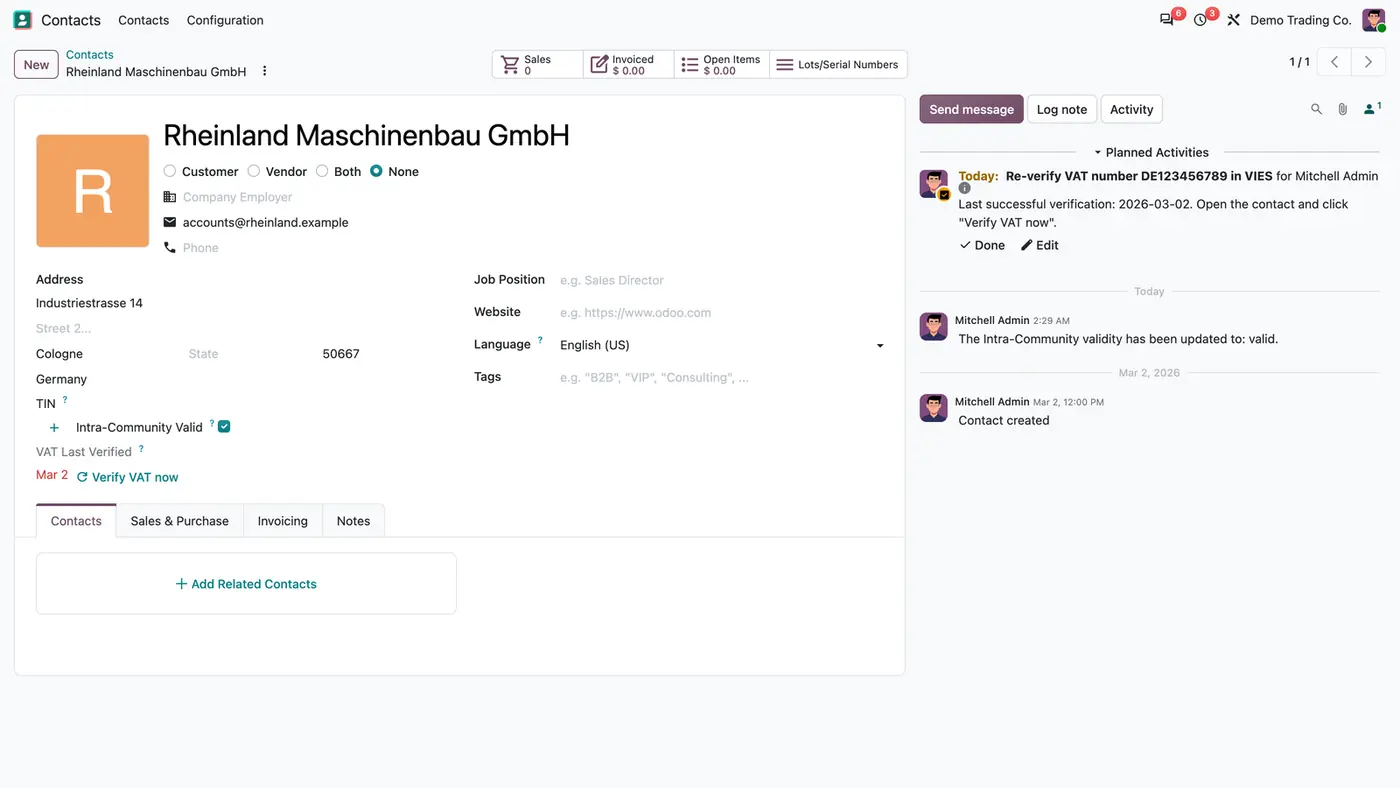
Contact Rheinland Maschinenbau GmbH: VAT Last Verified Mar 2 in red, Verify VAT now and a planned re-verify activity
A customer due for a new check: the date turns red and a reminder activity is planned.
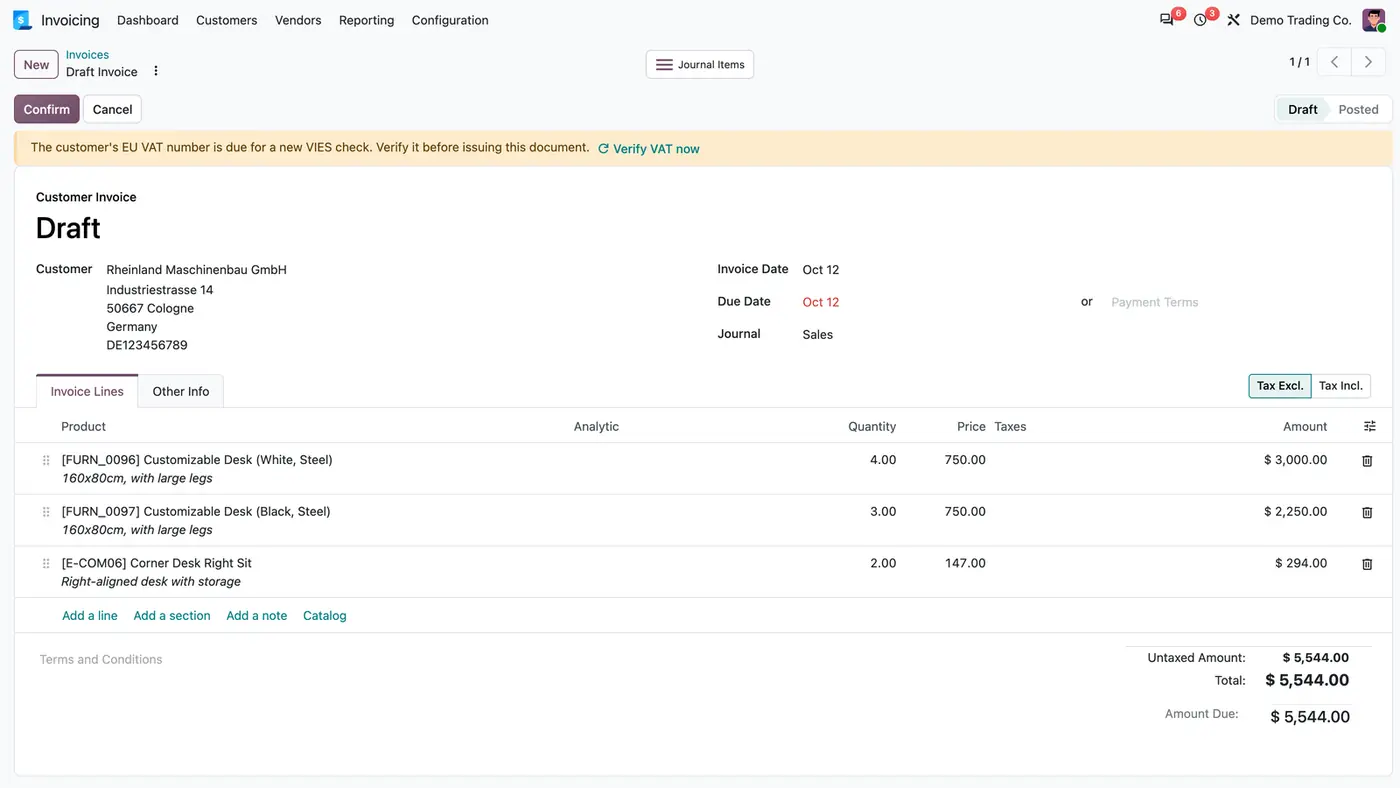
Draft customer invoice with a yellow banner: EU VAT number due for a new VIES check, and a Verify VAT now link
Draft invoices to a due customer show a warning with Verify VAT now; posting is not blocked.
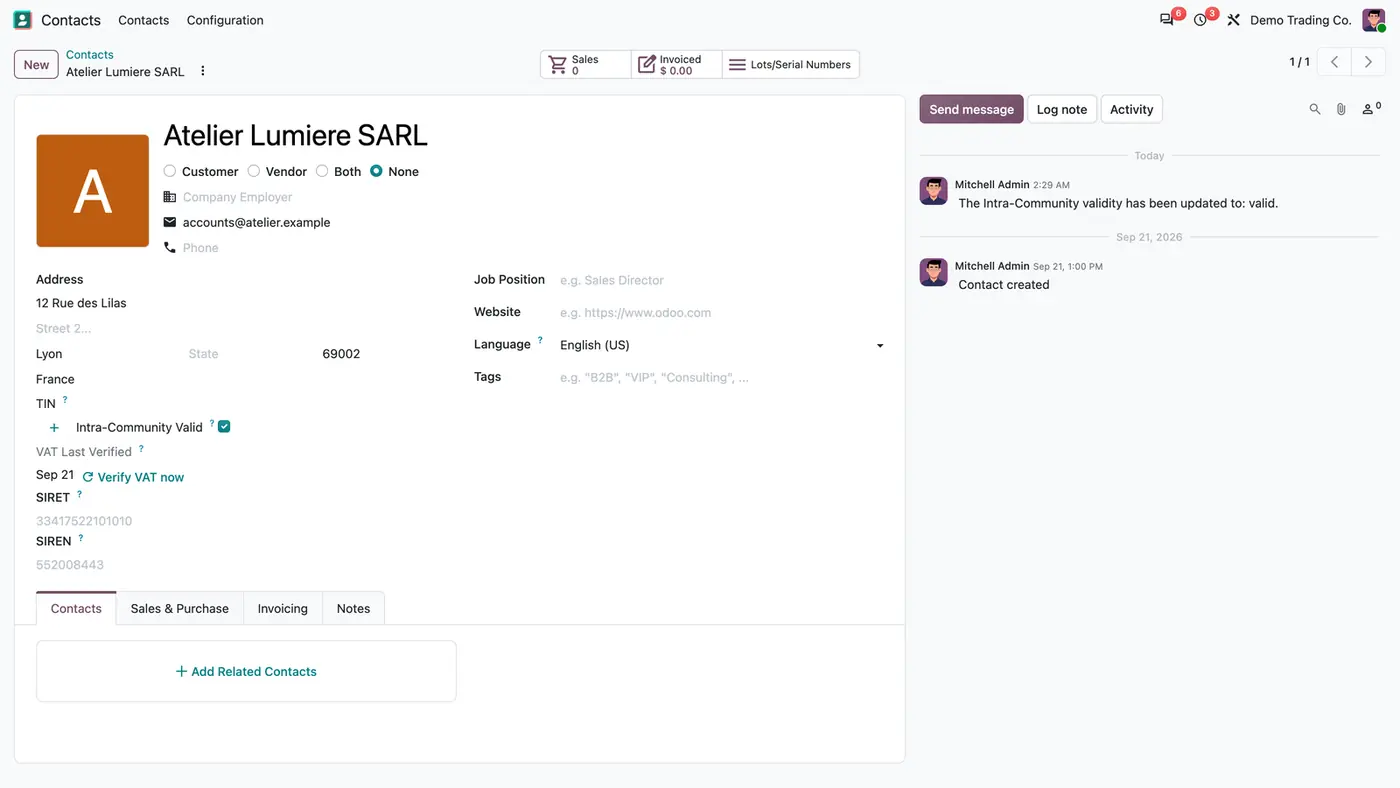
Contact Atelier Lumiere SARL: VAT Last Verified Sep 21 in black, Intra-Community Valid ticked, VIES result logged
After a recent check the date stays black, nothing is planned, and the chatter keeps the VIES result.
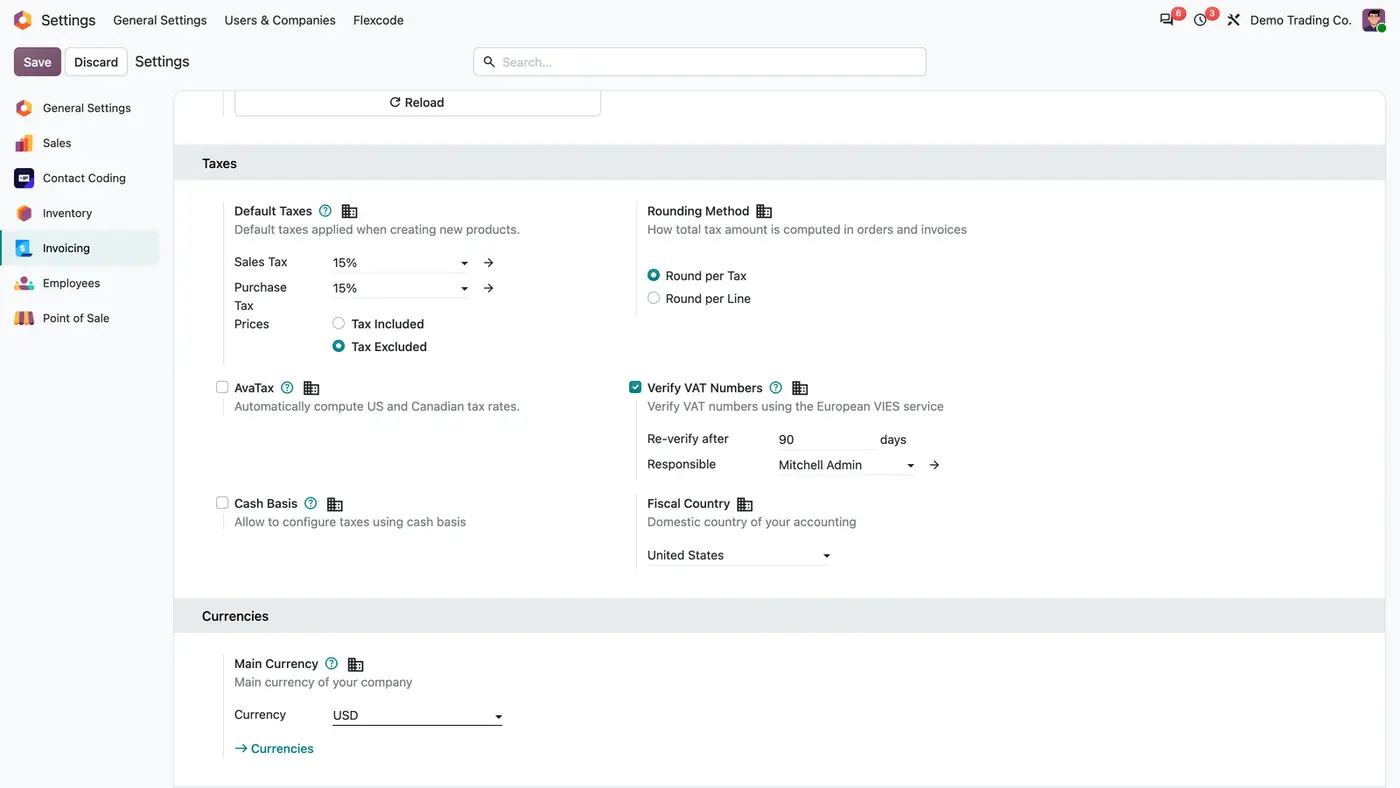
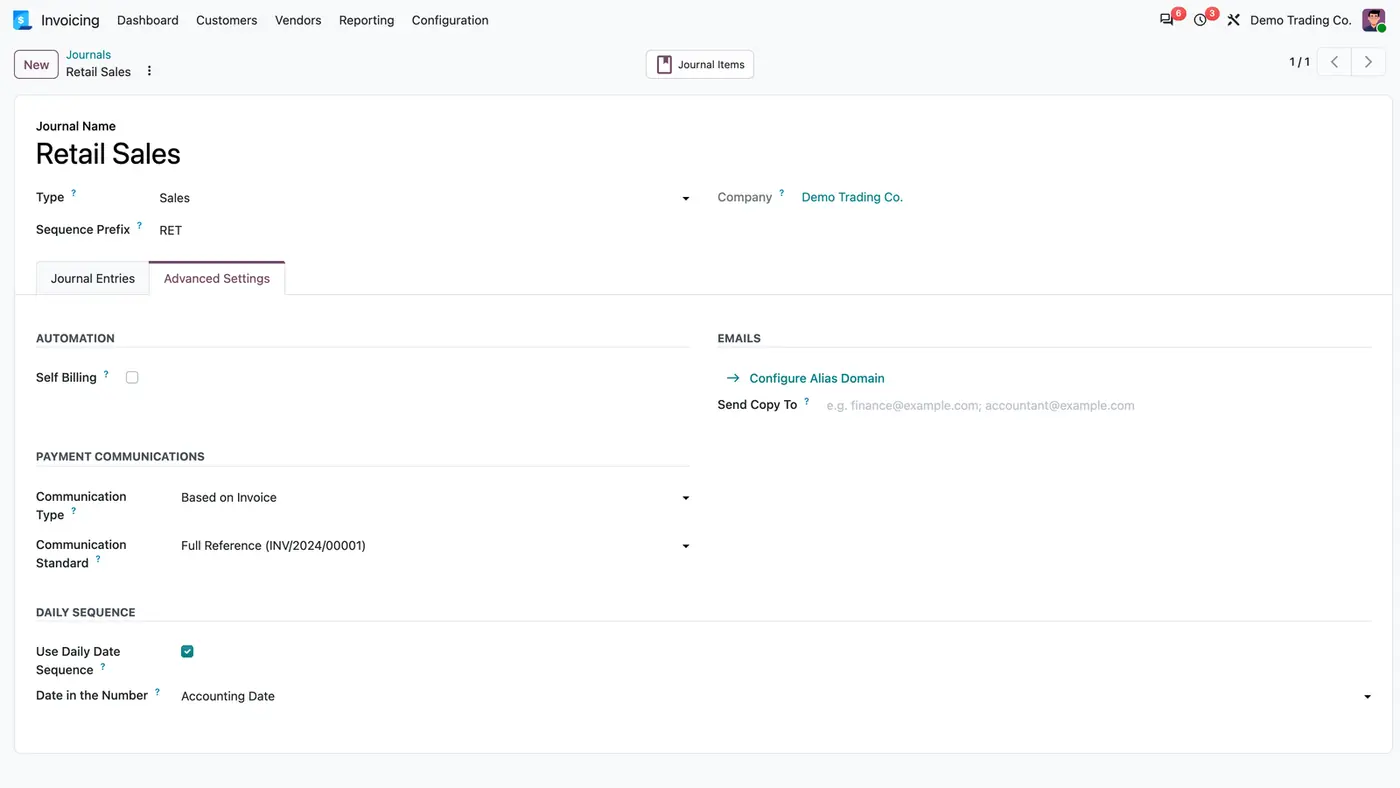
Invoicing settings, Taxes: Verify VAT Numbers ticked, Re-verify after 90 days, Responsible Mitchell Admin
Each company sets how often numbers are re-checked and who gets the reminders.
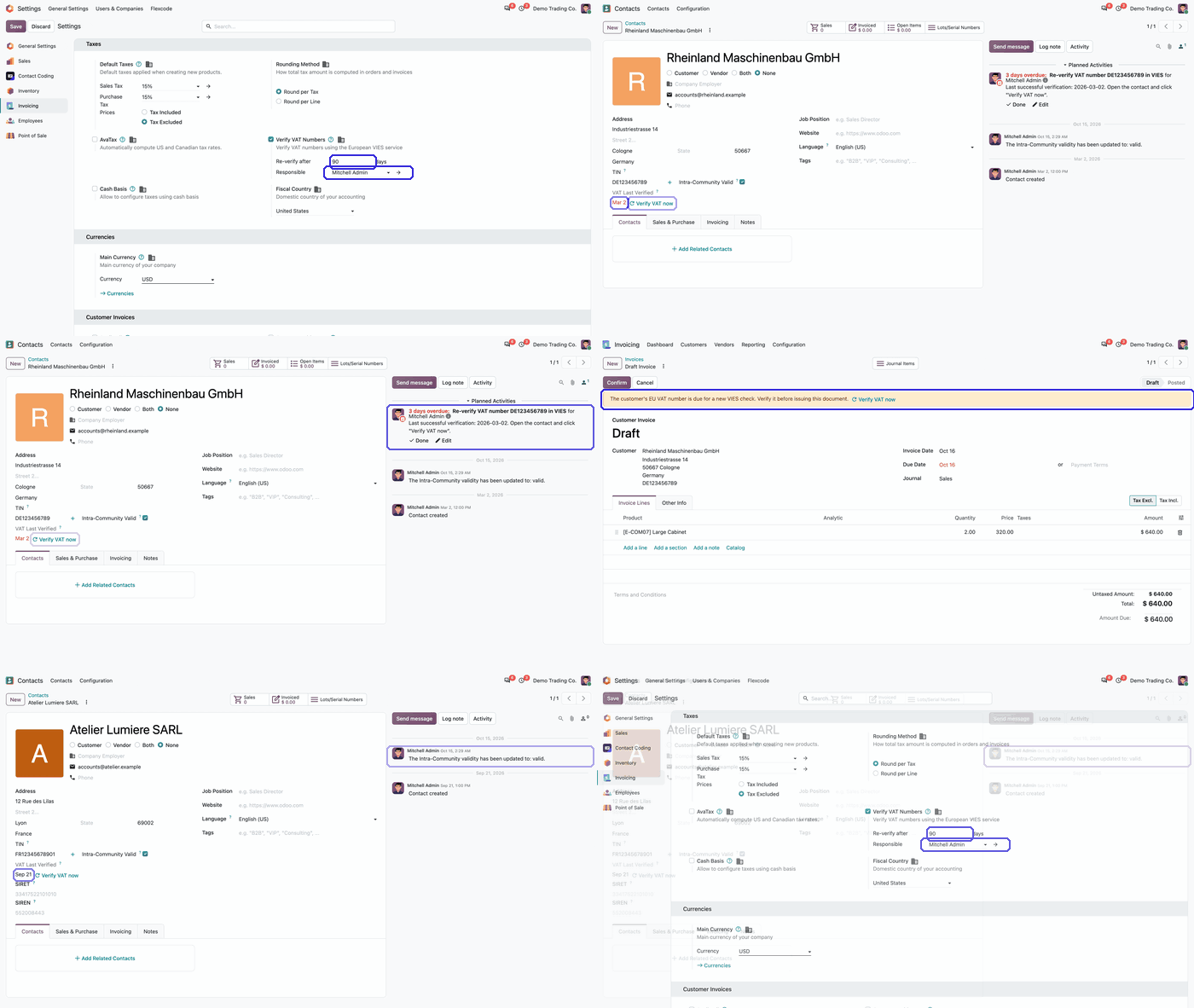
Animated demo: overdue contact with Verify VAT now, invoice warning, a recent check and the interval settings Play demo
From an overdue reminder on the contact to the invoice warning and the company settings.

What it does

Proof of the last check

  • VAT Last Verified shows the date of the last successful VIES check next to the Tax ID on the contact.
  • Every successful VIES result sets the date: when the number is entered or changed, when a pending check is answered, and when Verify VAT now is clicked.
  • A failed or pending result leaves the last date unchanged.
  • The VIES result is tracked in the chatter.

Verify on demand

  • A Verify VAT now button sits next to the date on the contact.
  • The same button is available on draft customer invoices.

Reminders when a check is due

  • Each company sets a re-verification interval, 90 days by default.
  • A daily job gives one VAT Re-verification activity per due customer to the salesperson. Customers without a salesperson go to the Responsible set for the company, else to the administrator.
  • The next valid check closes the activity.
  • The date on the contact turns red when the last check is older than the interval.

Warning on draft invoices

  • Draft customer invoices and credit notes for a due customer show a banner with Verify VAT now.
  • Posting is not blocked.

Multi-company

  • Each company with Verify VAT Numbers turned on is checked with its own interval and its own responsible.
  • Only VAT numbers of EU countries other than the company's own fiscal country are covered.
  • A guide opens inside Odoo once after installation, with the flow, a live setup checklist, daily use, roles and FAQ.

Who it is for

A good fit for

  • Companies that invoice EU business customers in other member states and want a recorded date for each VIES confirmation.
  • Accounting teams that want a reminder before invoicing a customer whose last check is old.
  • Multi-company databases where each company sets its own interval and responsible.

Not a fit for

  • Blocking invoices: the app only warns and reminds, and posting stays possible.
  • A separate VIES account: it uses Odoo's own VIES service.
  • Databases on Odoo Online (SaaS), which cannot install third-party apps.

Install

Requires: Invoicing (account), VAT VIES Validation (base_vat), Discuss (mail)

  1. Download VIES VAT Re-verification free of charge from the Odoo Apps Store for Odoo 18.0, 19.0 or 20.0.
  2. Add the module to your Odoo.sh project or to the addons path of your on-premise server.
  3. Update the apps list in Odoo and install VIES VAT Re-verification. The in-app guide opens once after installation.

Odoo Online (SaaS) does not allow third-party apps, so the app cannot be installed there. Use Odoo.sh or an on-premise database, Community or Enterprise.

Questions: info@flexcodesys.com.

Configure

  1. Turn on Odoo's VIES check per company under Invoicing / Accounting > Configuration > Settings > Taxes > Verify VAT Numbers.
  2. Set Re-verify after and a Responsible in the same place.
  3. Open Invoicing / Accounting > Customers > Customers, filter on VAT Never Verified and click Verify VAT now on each customer. A valid result records the first date; after that the reminders take over.
SettingWhat it does
Verify VAT NumbersOdoo's own VIES setting, per company. The app only checks companies where it is on.
Re-verify afterInterval in days after which a successful check is due again. 90 days by default.
ResponsibleGets the reminders of customers without a salesperson.

How to use it

Re-verify a due customer

  1. Open the VAT Re-verification activity or the contact. The VAT Last Verified date is shown in red.
  2. Click Verify VAT now. A valid result sets a new date, is logged in the chatter and closes the activity.

Invoice a due customer

  1. On a draft invoice or credit note, read the banner that the customer's EU VAT number is due for a new VIES check.
  2. Click Verify VAT now in the banner, then post as usual.

Who can do what

  1. Accounting administrator: turns on Verify VAT Numbers and sets Re-verify after and the Responsible per company.
  2. Salesperson of the customer: gets the activity and clicks Verify VAT now on the contact.
  3. Billing or accounting user: sees the warning on draft invoices, verifies from the invoice and posts as usual.
  4. Re-verification Responsible: gets the reminders of customers without a salesperson.

Limits

  • Posting is never blocked; the app warns and reminds only.
  • Only customer companies with a VAT number in an EU country other than the company's fiscal country are covered.
  • Only companies with Verify VAT Numbers turned on are checked.
  • It cannot be installed on Odoo Online (SaaS).

FAQ

Which customers get reminders?

Customer companies with a VAT number in an EU country other than the company's fiscal country, whose last successful check is missing or older than the interval, in companies that have VIES verification switched on.

Does it block posting an invoice?

No. Draft customer invoices and credit notes show a warning with a Verify VAT now button; posting stays possible.

Which checks set the date?

Every successful VIES result: when the VAT number is entered or changed, when a pending check is answered, and when Verify VAT now is clicked. A failed or pending result leaves the last date unchanged.

Who gets the reminder?

The salesperson of the customer. A customer without a salesperson goes to the Responsible set in the settings of the company, else to the administrator.

Is every company in the database checked?

Each company that has Verify VAT Numbers turned on is checked with its own interval and its own responsible, and only for VAT numbers of EU countries other than its own fiscal country.

Need it set up or adapted?

We configure our apps for your process, train your team and build the extra pieces you need.