Plan months of production without filling the schedule cell by cell
MPS Production Planning adds production plans to the Master Production Schedule of Odoo Enterprise. A plan spreads a quantity of a product over 3, 6 or 12 months, the planning manager adjusts any month, and Confirm Plan puts the months on the schedule. Material Needs shows what the plans need against stock and incoming quantities and orders what is short in one click.
The Master Production Schedule works cell by cell: to plan 1,200 units over six months, someone types every month for every product by hand. When a month changes, the rest has to be recalculated so the total still fits. Whether the raw materials will be there is a separate exercise, usually in a spreadsheet next to Odoo.
Screenshots
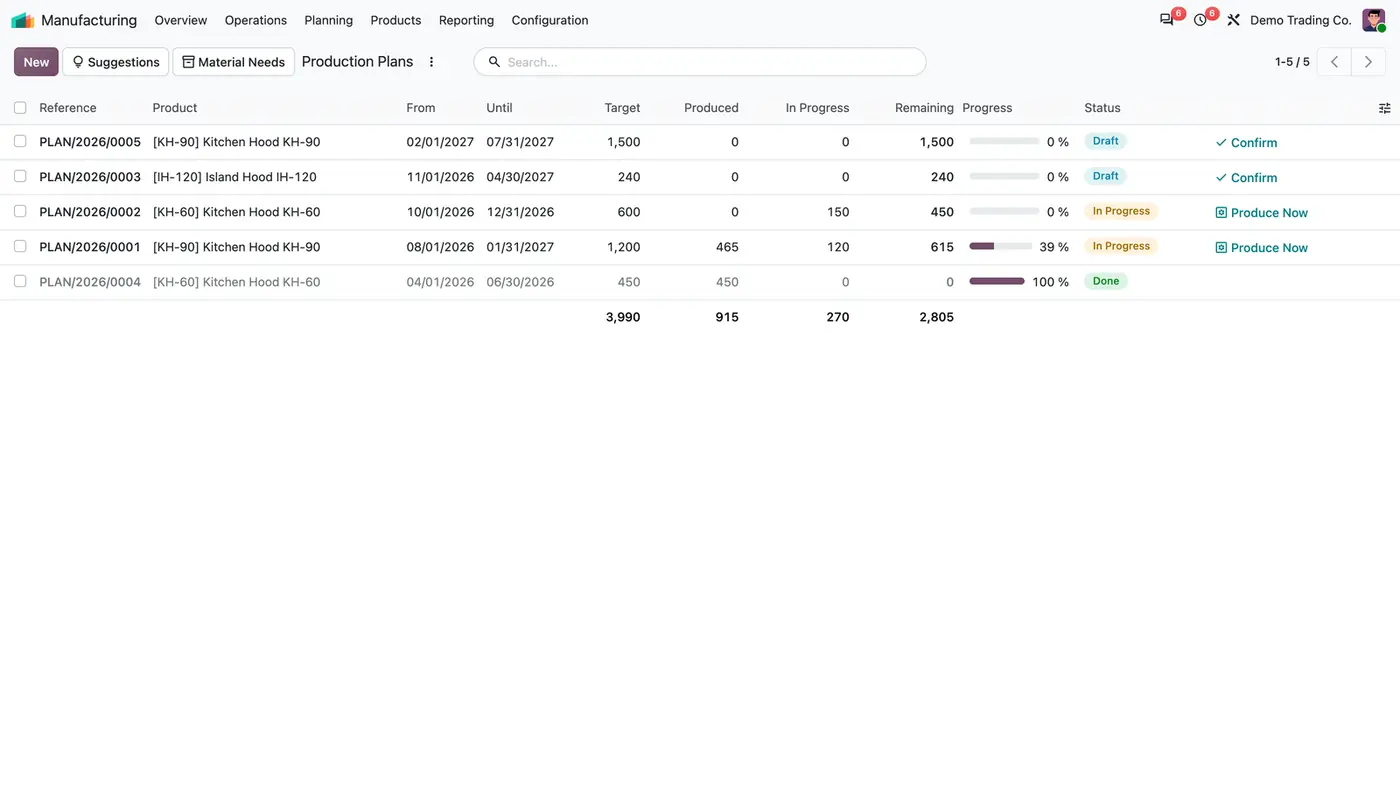
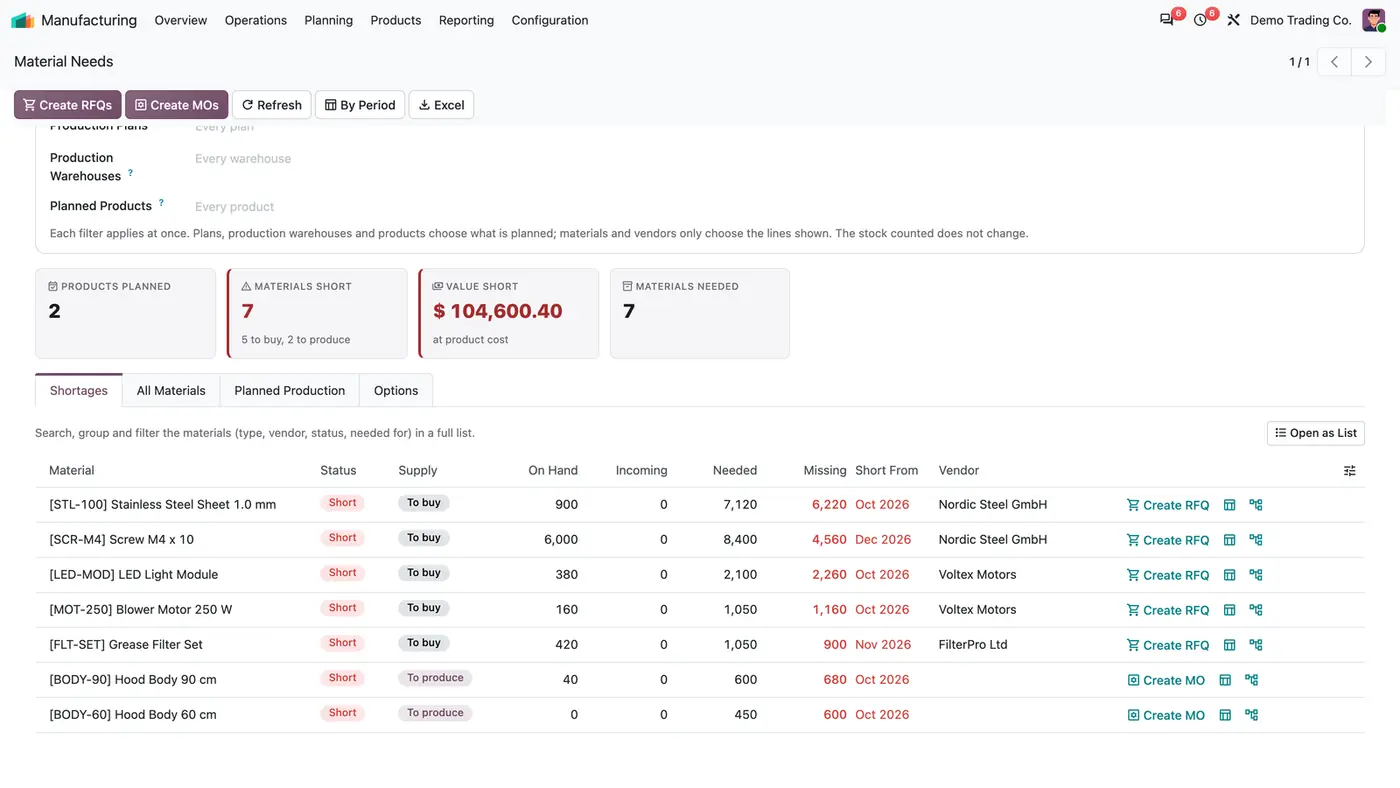
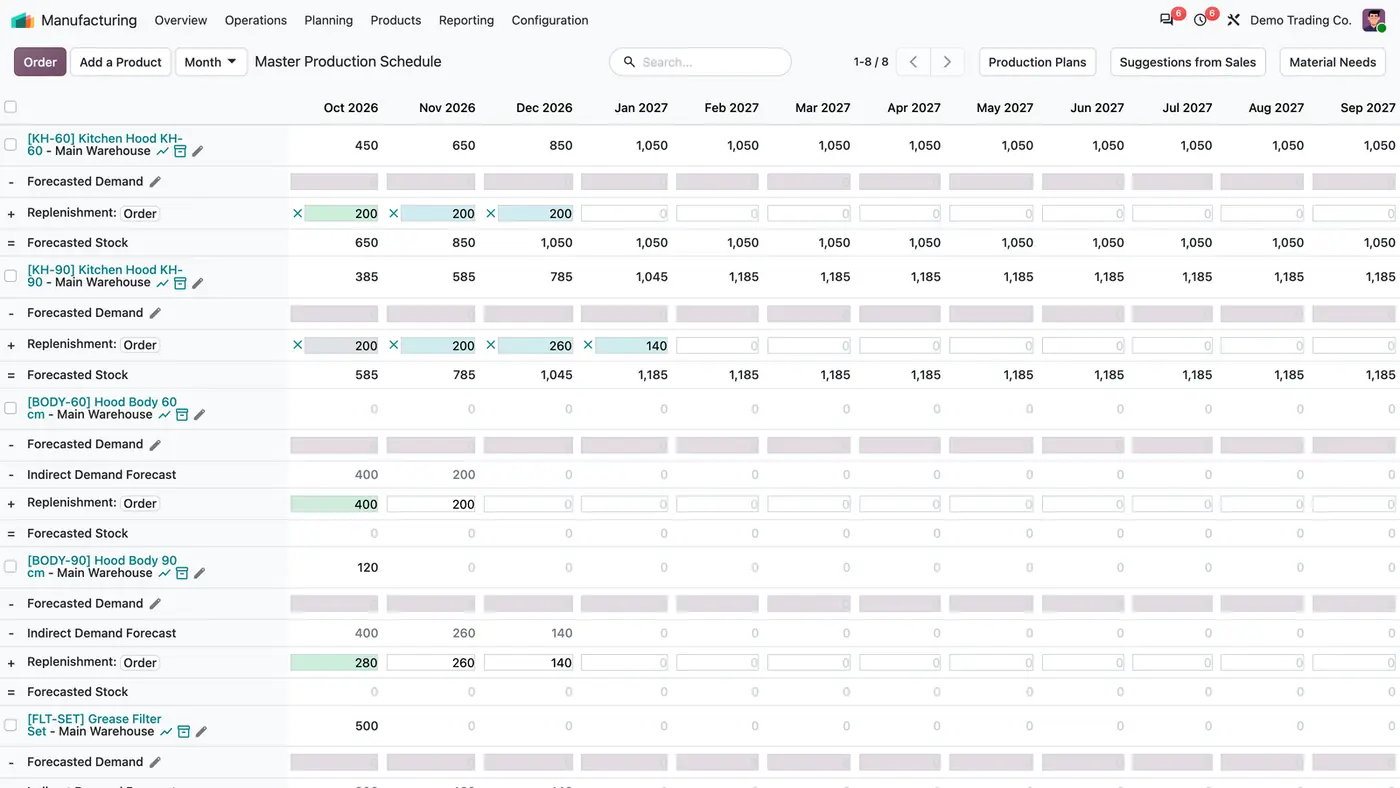
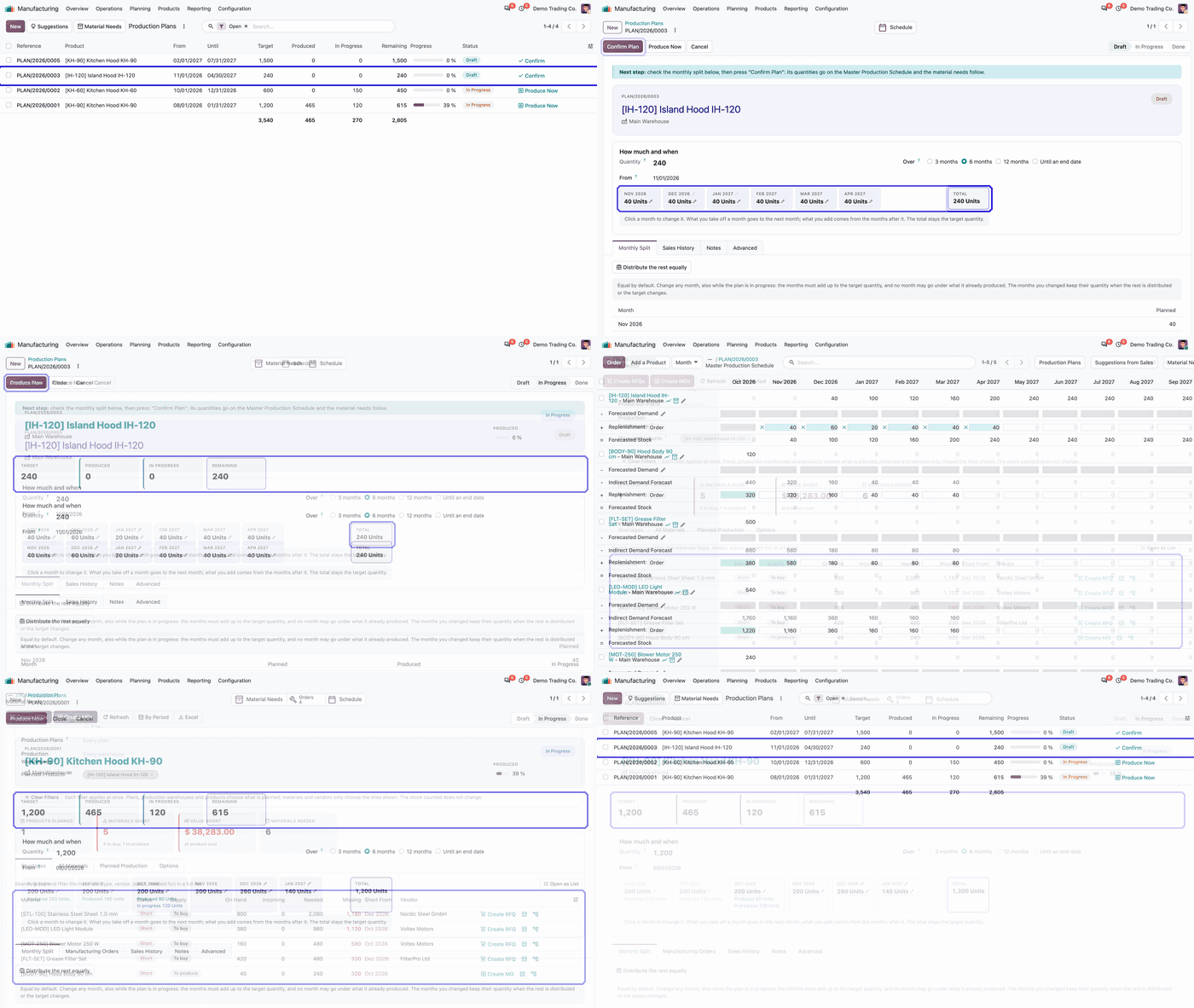
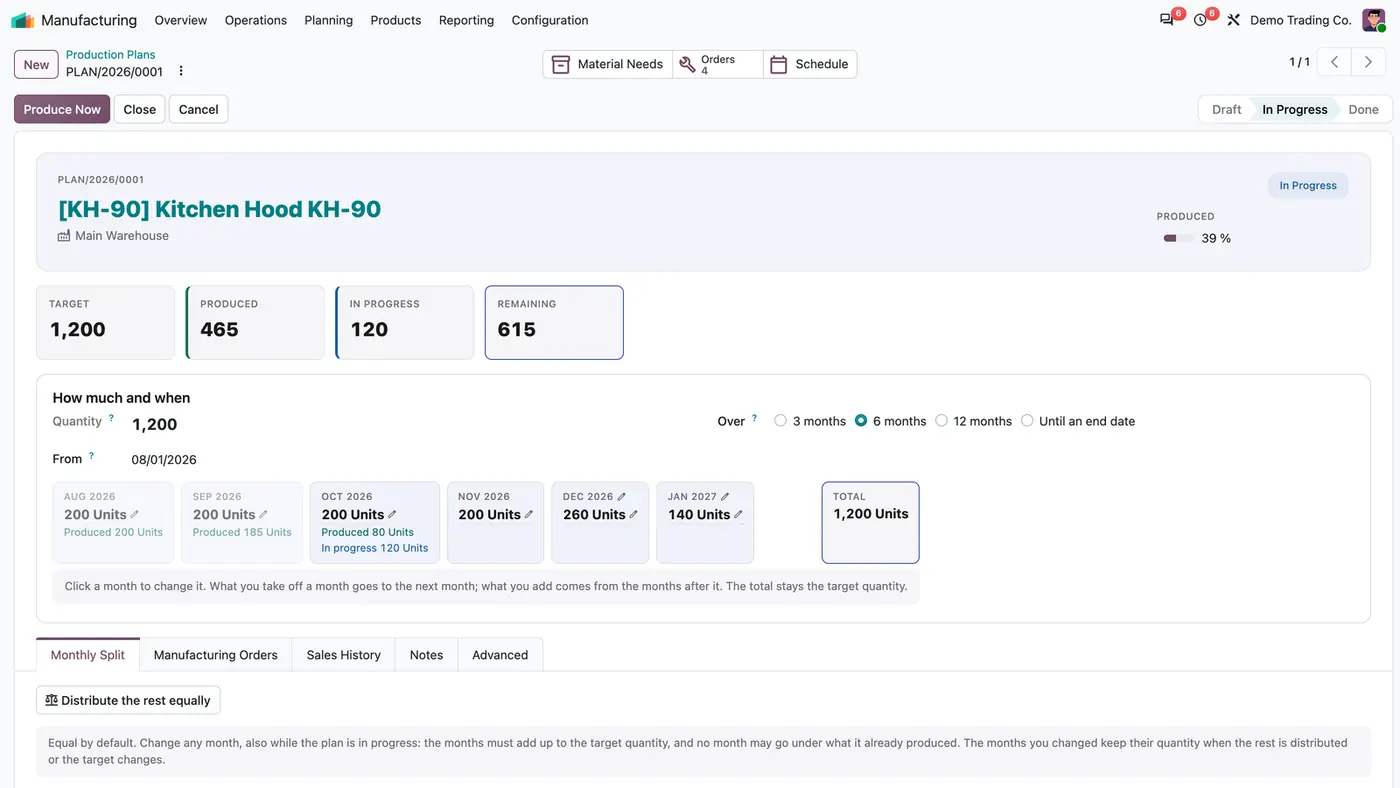
A plan spreads 1,200 units over six months; each month shows planned, produced and in-progress quantities.The plans list shows every plan with its progress and status, with Confirm or Produce Now on each row.Material Needs compares the plans with stock and incoming quantities and orders the shortages per line or all at once.Confirmed months appear on the Master Production Schedule as replenishment, and components follow as indirect demand. Play demoA short demo of working with production plans.
What it does
Production plans with a monthly split
Spread a quantity of a product over 3 months, 6 months, 12 months or until an end date, equal by default.
Change any month, also while the plan is in progress. What you take off a month goes to the next month, and the total stays the target quantity.
A month never goes under what it already produced, and months you changed keep their quantity when the rest is distributed again.
Each plan shows Target, Produced, In Progress and Remaining, with Produce Now, Close and Cancel in the header.
On the Master Production Schedule
Confirm Plan puts each month on the Master Production Schedule as the quantity to replenish, including the months changed by hand.
Components follow as indirect demand.
The MPS creates manufacturing orders in draft by default, so the production manager confirms each one. Draft orders count as replenishment, so nothing is ordered twice.
Production Plans, Suggestions from Sales and Material Needs buttons sit on the schedule.
Sales history and suggestions
See sales per month, quarter or year with the change, on plans, suggestions and MPS rows.
Suggestions from Sales give a recommended quantity per manufactured product.
Add a suggestion to a plan in one click.
Material Needs
Compare what the plans need with the stock at the start of each period, incoming receipts, manufacturing orders and requests for quotation, and quantities already committed.
See On Hand, Incoming, Needed, Missing and Short From per material, with the vendor. A shortage is carried to the next periods.
Create RFQs and Create MOs for what is short, per line or all at once.
Export the report to Excel, or open By Period as a list or pivot table to group and filter.
Roles and warehouses
Production Planning Viewers see the plans, the schedule, the suggestions and the material needs. Managers also change them and create orders.
Choose the warehouses that count in production planning, so showrooms stay out of the figures.
Who it is for
A good fit for
Manufacturers on Odoo Enterprise who plan production for months ahead on the MPS.
Planning managers who want to spread a yearly or half-yearly quantity instead of typing every cell.
Teams that need to see material shortages per month and order them from the same screen.
Companies with several warehouses where only some should count for planning.
Not a fit for
Ordering on its own: RFQs and manufacturing orders are created only when a planning manager clicks.
Replacing the Master Production Schedule: it builds on it.
Odoo Community, because the Master Production Schedule is part of Odoo Enterprise.
Databases on Odoo Online (SaaS), which cannot install third-party apps.
Buy MPS Production Planning on the Odoo Apps Store for Odoo 18.0, 19.0 or 20.0.
Add the module to your Odoo.sh project or to the addons path of your on-premise Enterprise server.
Update the apps list in Odoo and install MPS Production Planning. Manufacturing, Purchase and the other dependencies are installed with it if they are missing.
Odoo Online (SaaS) does not install custom apps from the Apps Store, so the app cannot be installed there. Use Odoo.sh or an on-premise Odoo Enterprise database.
Every purchase includes 90 days of free support from FlexCode Systems.
Configure
Choose the warehouses that count: Manufacturing > Configuration > Production Planning Warehouses, tick Counts in Production Planning for the factory and the main warehouses and leave showrooms unticked.
Give the planning roles: Settings > Users & Companies > Users > user > Supply Chain > Production Planning, Viewer or Manager.
Decide whether MPS orders stay in draft: Manufacturing > Configuration > Settings > Planning > MPS Orders in Draft. It is on by default.
Setting
What it does
Counts in Production Planning
Per warehouse: whether its stock and moves count in plans and material needs.
Production Planning (user role)
Viewer sees the plans; Manager changes them and creates orders.
MPS Orders in Draft
Company setting, on by default: manufacturing orders from the MPS wait in draft for confirmation.
How to use it
Create a plan
Open Manufacturing > Planning > MPS > Production Plans and create a plan, or add a product from Suggestions.
Enter the quantity, the start month and the period, then adjust any month in the Monthly Split.
Click Confirm Plan. The months appear on the Master Production Schedule.
Check and order materials
Open Material Needs to see what is short and from which month.
Click Create RFQs or Create MOs for all shortages, or per line.
Follow the plan
Each month card shows what is planned, produced and in progress.
Change a month when demand moves; the difference is carried to the next months and the schedule is updated on save.
Limits
Nothing is ordered automatically; a planning manager creates RFQs and manufacturing orders.
Other Manufacturing users without a planning role do not see the plans; a Manufacturing Administrator without a role sees the schedule read-only.
Odoo Enterprise only, because it builds on the Master Production Schedule.
It cannot be installed on Odoo Online (SaaS).
FAQ
Does it replace the Master Production Schedule?
No. It builds on it: plans write their monthly quantities into the MPS rows, and the MPS keeps working as usual for everything else.
Can a month be changed after the plan is confirmed?
Yes. The planning manager may change any month of a draft or running plan. The difference is carried to the next months so the total stays the target, a month never goes under what it already produced, and the schedule is updated when the plan is saved.
Are manufacturing orders from the MPS really left in draft?
Yes, by default, so the production manager confirms them. The company setting MPS Orders in Draft turns it off. Draft orders count as replenishment either way.
What does Material Needs compare the plans with?
With the stock at the start of each period, the incoming receipts, manufacturing orders and requests for quotation, and the quantities already committed, in the production planning warehouses. A shortage is carried to the next periods.
Can I take the material needs to Excel?
Yes. The Excel button exports the report, and By Period opens the figures as a list or a pivot table that you can group and filter.