Skip to Content

HR & Payroll · Odoo 20, Odoo 19, Odoo 18

Employee Custody

Track staff advances and petty cash per employee, with real journal entries

Employee Custody is an app for Odoo 18, 19 and 20 for staff custody and petty-cash advances, with a monthly custody entry per employee and opening and closing balances. Every issue and return posts a real journal entry, and staff can pay expenses from their custody through the Expenses app.

Key features

The problem

Petty cash and staff advances are easy to hand out and hard to account for. Without a proper record, nobody can say how much cash each employee still holds, returns and spending get booked late or not at all, and expenses paid from an advance end up mixed with normal reimbursements. Auditors then ask for a trail from the balance to each journal item that does not exist.
Screenshots

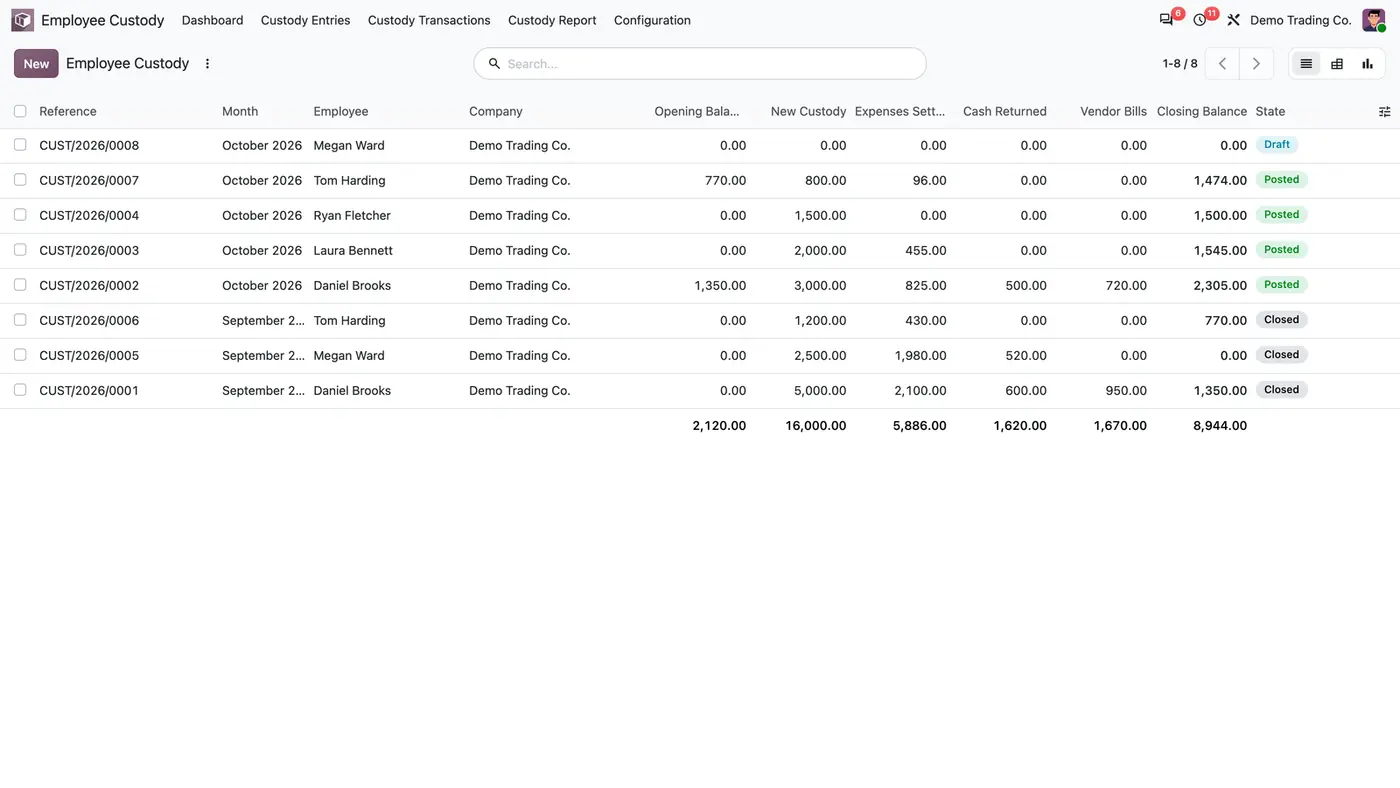
Employee Custody list with monthly entries per employee, amount columns, totals row and Draft, Posted, Closed states
Each employee has one custody entry per month, from opening balance to closing balance, with totals per column.
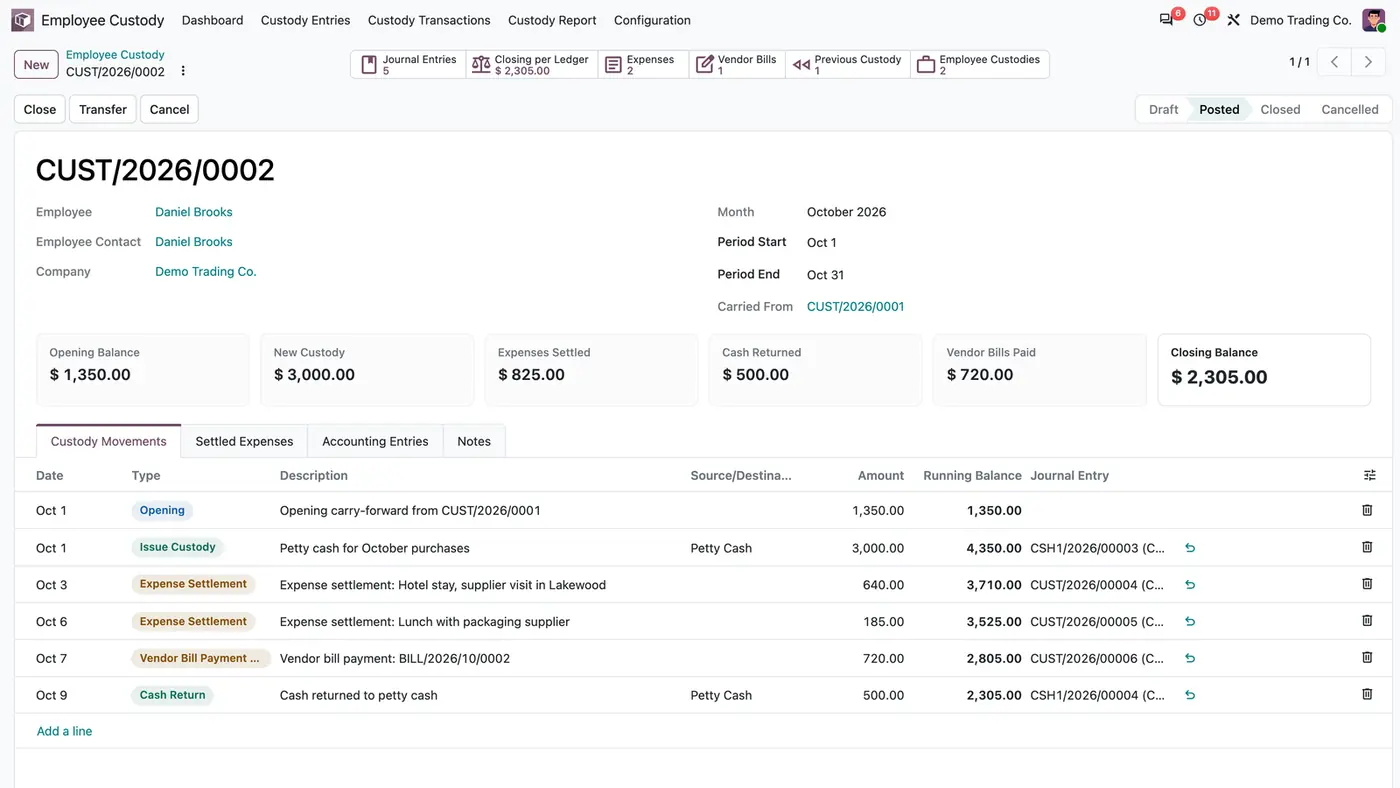
Posted custody CUST/2026/0002 with balance cards and movements: opening, issue, expenses, vendor bill and cash return
A posted custody entry lists every movement with its running balance and its own journal entry.
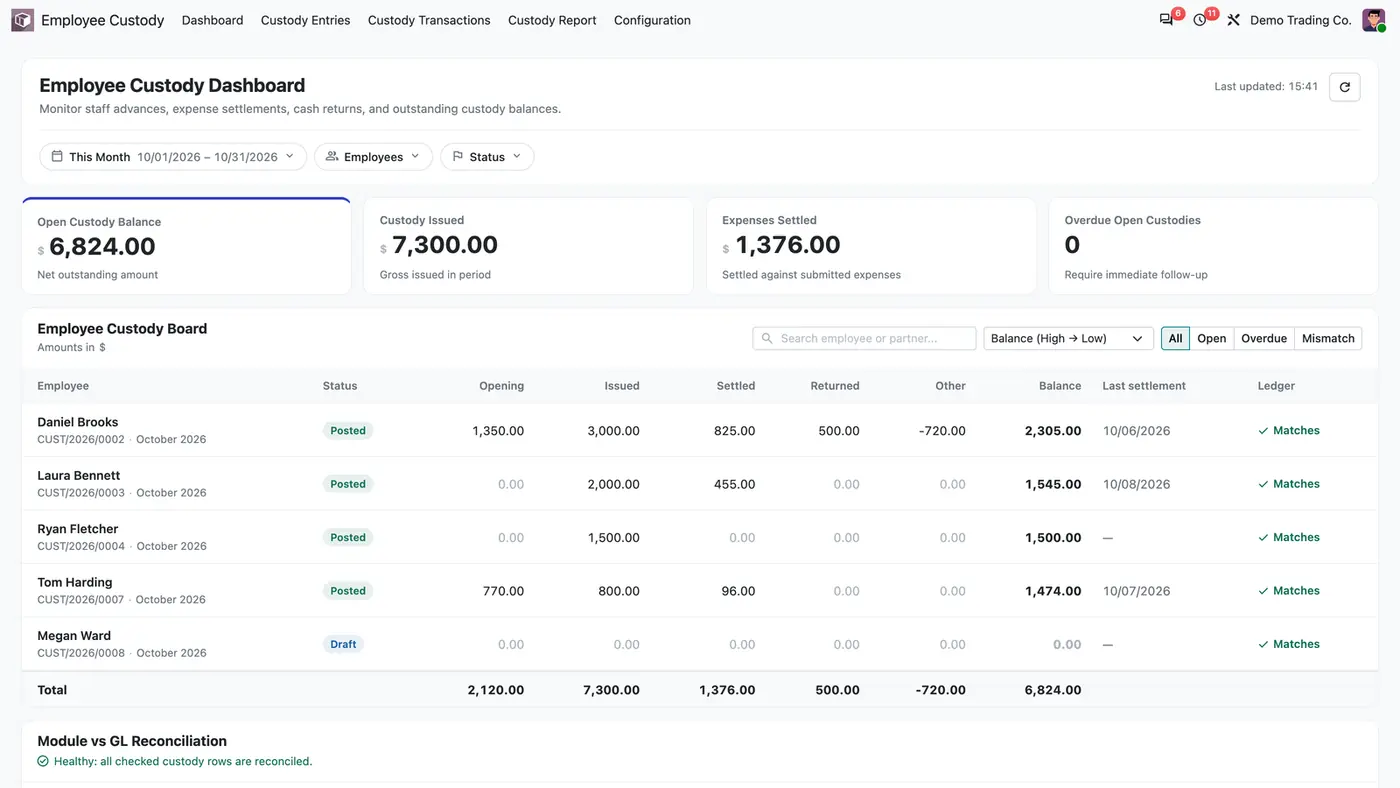
Employee Custody Dashboard with period totals and a board per employee with a Ledger check column
The dashboard shows open custody per employee and checks each balance against the general ledger.
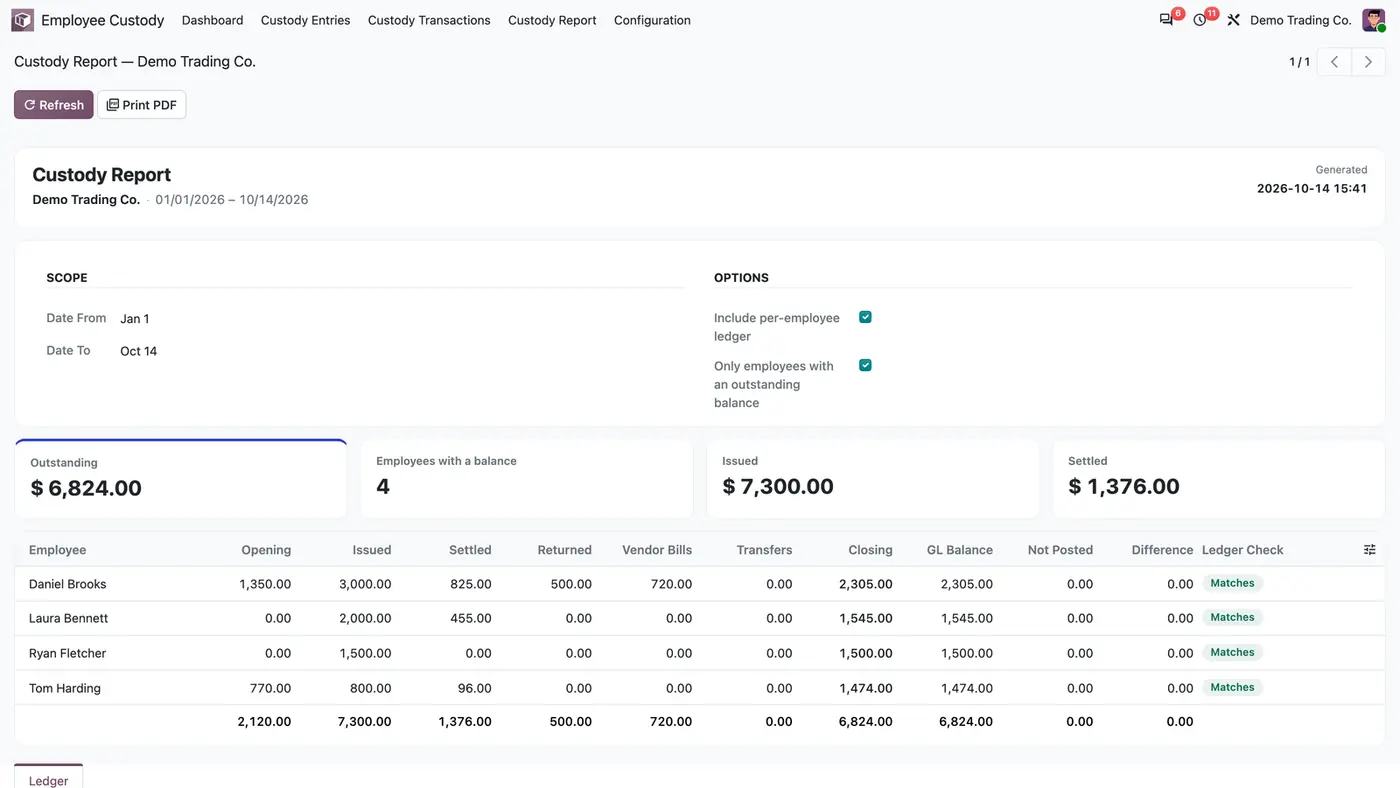
Custody Report for a period with outstanding custody per employee, GL Balance, Difference and Ledger Check columns
The Custody Report compares each employee's closing balance with the custody account in the general ledger.
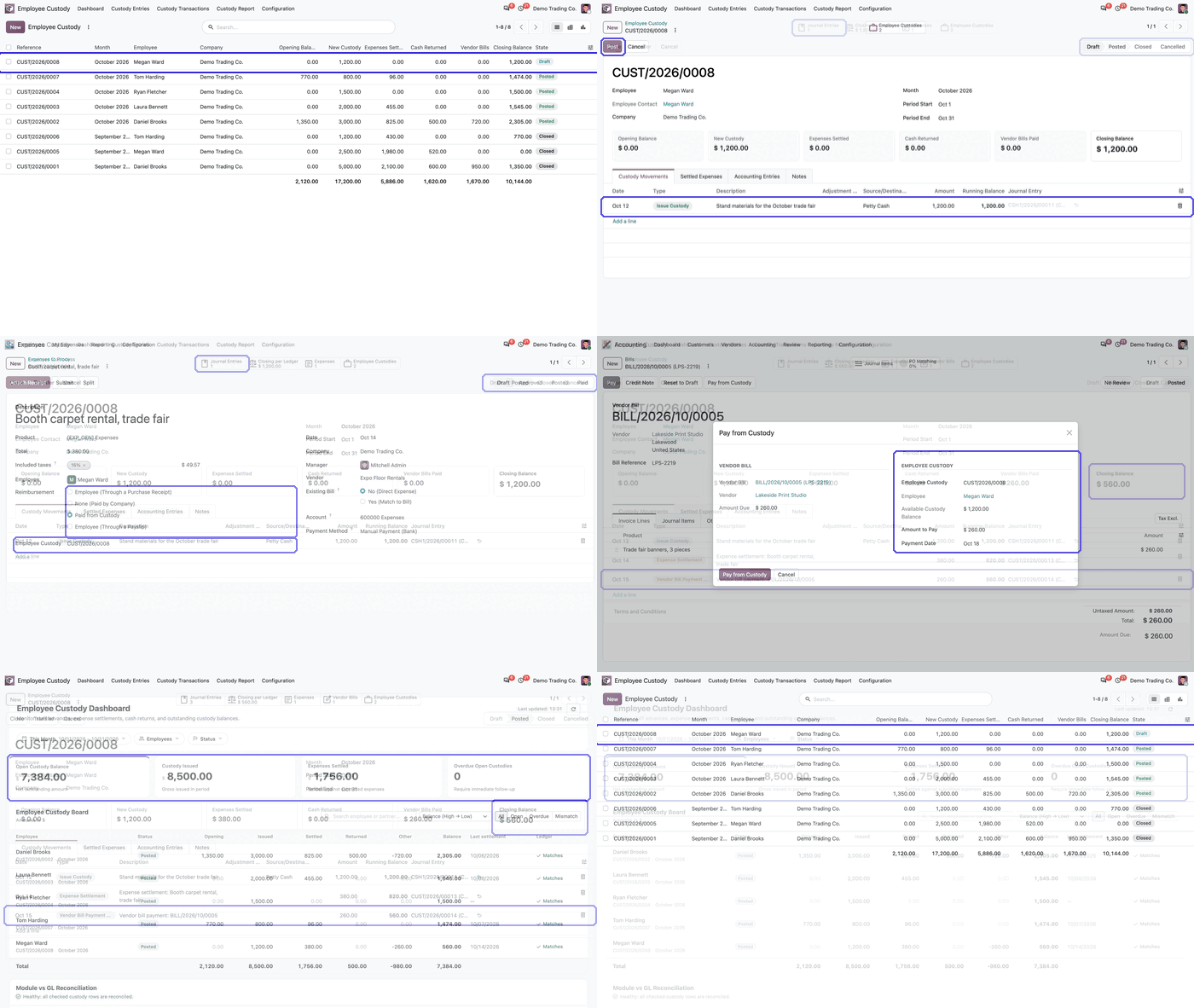
Animated demo: the Employee Custody list with a draft custody entry highlighted Play demo
The demo opens a monthly custody entry and works through its movements.

What it does

Monthly custody per employee

  • Keep one custody record per employee per month, with the opening balance carried forward and a closing balance.
  • Post controlled custody issues and cash returns as real accounting entries.
  • Use a shared custody account with partner-based separation on the journal items.

Expenses paid from custody

  • Let staff pay expenses from their custody through a custody-paid expense flow that keeps native company and reimbursable behaviour intact.
  • See the settled expenses read-only, linked to the posted expense records.

Accounts and dashboard

  • Use one shared Default Employee Custody Account, with each employee kept apart on it by partner.
  • See every employee's custody balance on a custody dashboard.

Traceability and security

  • Follow a clean audit trail from the custody balance to each journal item.
  • Control access with dedicated access groups and record rules, in multi-company databases too.

Who it is for

A good fit for

  • Finance teams that manage staff advances and petty cash.
  • Companies where employees spend from a standing custody or float.
  • Organisations that need clean accounting traceability for cash handed to staff.
  • Multi-company businesses that need custody kept per company.

Not a fit for

  • Databases on Odoo Online (SaaS), which cannot install third-party apps.
  • Teams that want custody deducted from salaries. An open balance is spent, returned in cash or carried to the next month.

Install

Requires: Employees (hr), Expenses (hr_expense), Invoicing (account), Discuss (mail)

  1. Buy Employee Custody on the Odoo Apps Store for your Odoo version (18.0, 19.0 or 20.0).
  2. Add the module to your Odoo.sh project or to the addons path of your on-premise server.
  3. Update the apps list in Odoo and install Employee Custody. Employees, Expenses, Invoicing and Discuss are installed with it if they are missing.

Odoo Online (SaaS) does not allow third-party apps, so Employee Custody cannot be installed there. Use Odoo.sh or an on-premise Odoo database, Community or Enterprise.

Every purchase includes 90 days of free support from FlexCode Systems.

Configure

  1. Set the Default Employee Custody Account under Employee Custody > Configuration > Settings > Custody Accounting. Each employee is kept apart on it by partner.
  2. Name the Custody Accountants under Settings > Users & Companies > Users > Employee Custody. Only they post, close and transfer; Managers prepare entries in draft.
  3. Open the first custody entry: choose the employee and month, add an Issue Custody line with the amount, then Post.
SettingWhat it does
Default custody accountOne shared account for custody. Each employee is kept apart on it by partner.
Custody AccountantThe only role that posts, closes, transfers and cancels posted custody entries.
Access groupsDedicated groups and record rules that control who can see and manage custody.

How to use it

Open the month

  1. Create a custody record for the employee for the month.
  2. Check the opening balance, carried forward from the previous month.

Issue, return and settle

  1. Record a custody issue when cash is handed to the employee.
  2. Record a cash return when the employee gives money back.
  3. Settle expenses the employee paid from custody. Each of these steps posts a journal entry.

Close and carry forward

  1. Review the closing balance on the custody dashboard.
  2. Start the next month; the closing balance carries forward as its opening balance.

Limits

  • It depends on Employees, Expenses and Invoicing, and is sold for Odoo 18, 19 and 20.
  • It cannot be installed on Odoo Online (SaaS).
  • Settled expenses are shown read-only on the custody; they are managed in Expenses.

FAQ

How do I manage employee advances and petty cash in Odoo?

Employee Custody gives each employee a monthly custody record with opening and closing balances. You record custody issues and cash returns, each posting a journal entry, and the closing balance carries forward to the next month.

Can employees pay expenses from their custody in Odoo?

Yes. Employee Custody adds a custody-paid expense flow that keeps Odoo's native company and reimbursable logic intact, with read-only traceability to the posted expense.

How is each employee's custody kept separate?

All custody is booked on one shared custody account, and each employee is kept separate on it by partner.

Does Employee Custody post real accounting entries?

Yes. Every custody issue and cash return posts a journal entry, so you can trace each balance back to its journal items.

Is Employee Custody multi-company aware?

Yes. Custody accounts, sequences and records are multi-company aware, and access is controlled by dedicated groups and record rules.

Which Odoo versions and editions does Employee Custody support?

It is sold for Odoo 18, 19 and 20, Community and Enterprise, on-premise and on Odoo.sh. Odoo Online cannot install third-party apps. You pay once per Odoo major version and get 90 days of free support.

Need it set up or adapted?

We configure our apps for your process, train your team and build the extra pieces you need.