Salary advances that repay themselves on the payslip and clear the ledger
Employee Loan Payroll runs salary advances and employee loans inside Odoo Payroll on Odoo 18 and 20 Enterprise. A request goes through manager and HR approval within a limit per employee, is paid with a posted journal entry, and is then repaid on the payslip, where each due installment is deducted and the advance receivable is reconciled with the payment.
Salary advances are often handled outside Odoo: an e-mail for approval, a manual bank transfer, a spreadsheet of who still owes what, and a deduction someone has to remember to add to each payslip. The advance receivable in accounting stays open until someone reconciles it by hand, and nobody can say at a glance how much an employee still owes.
Screenshots
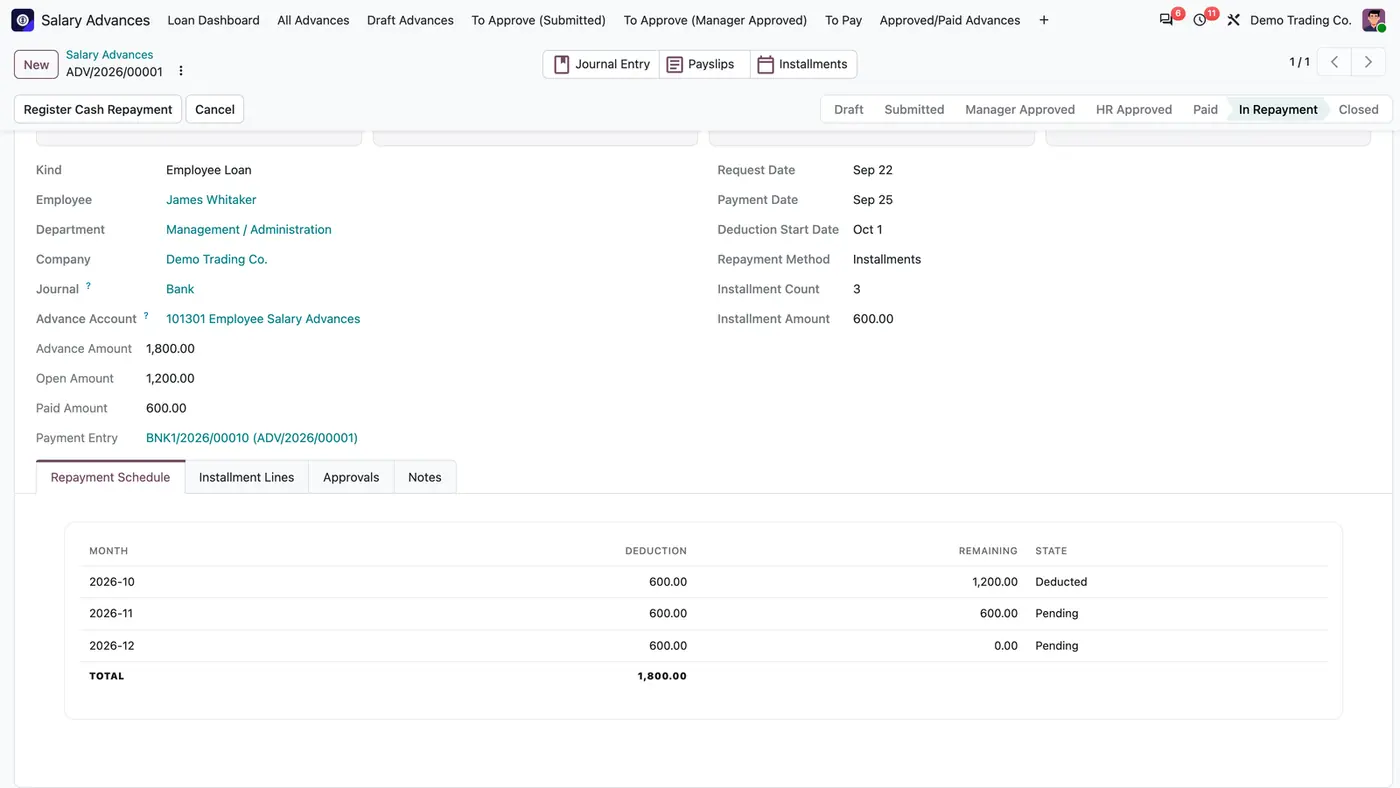
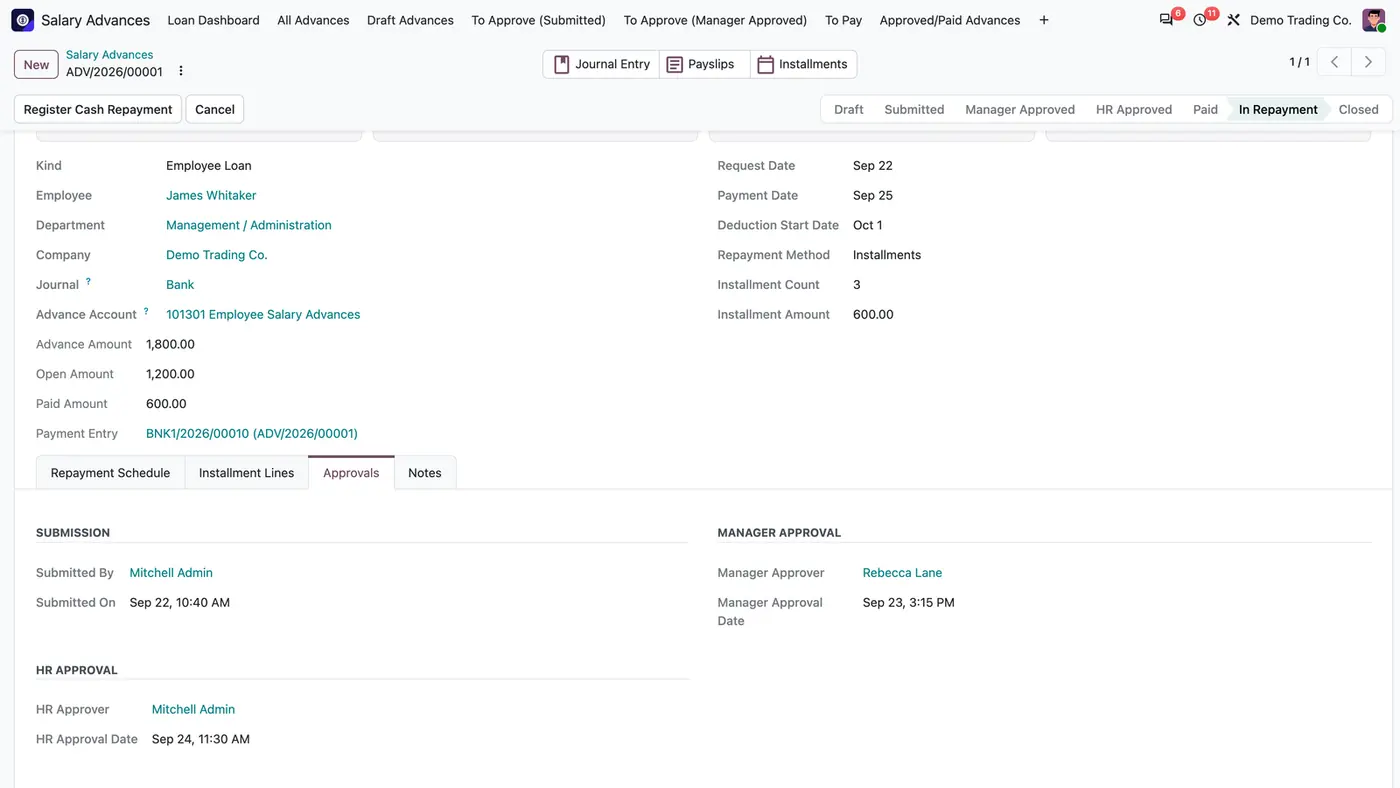
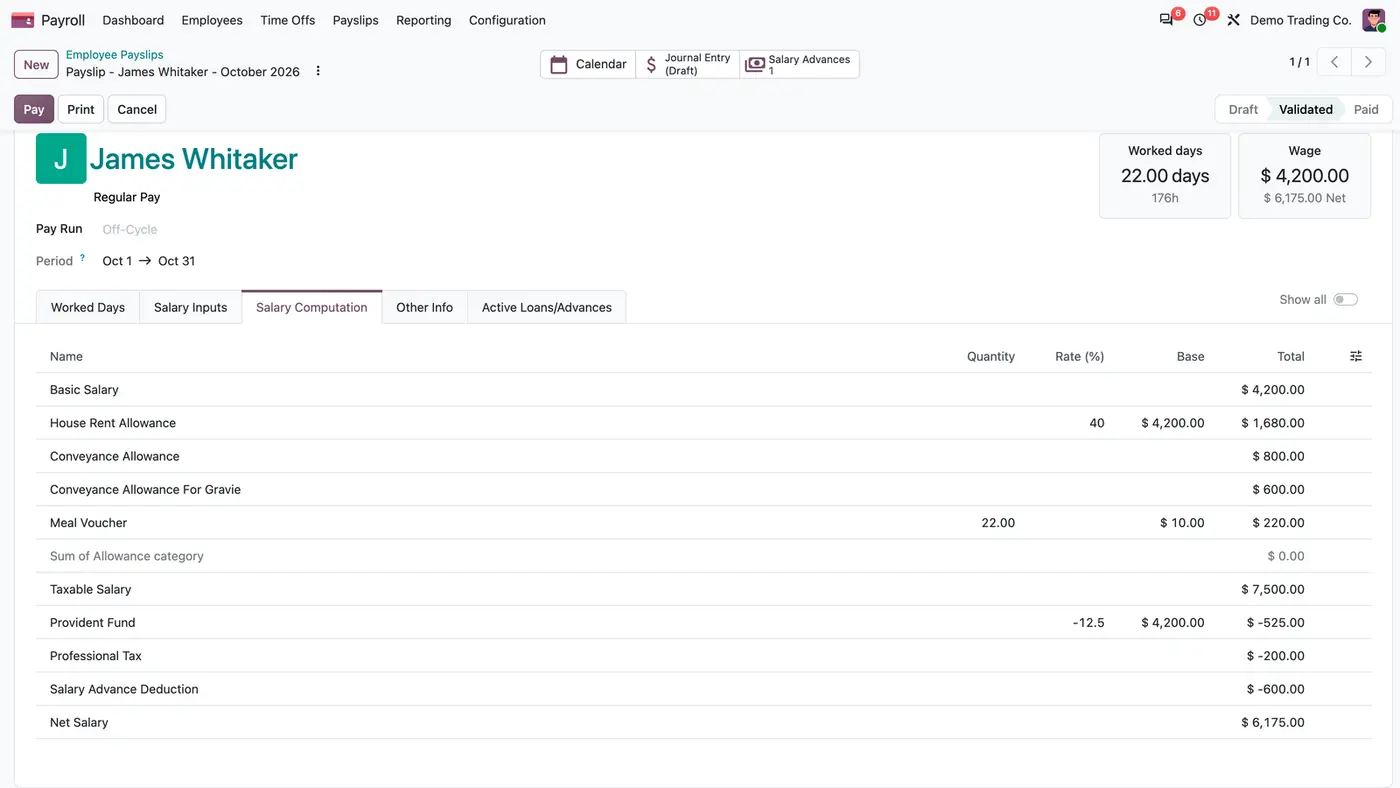
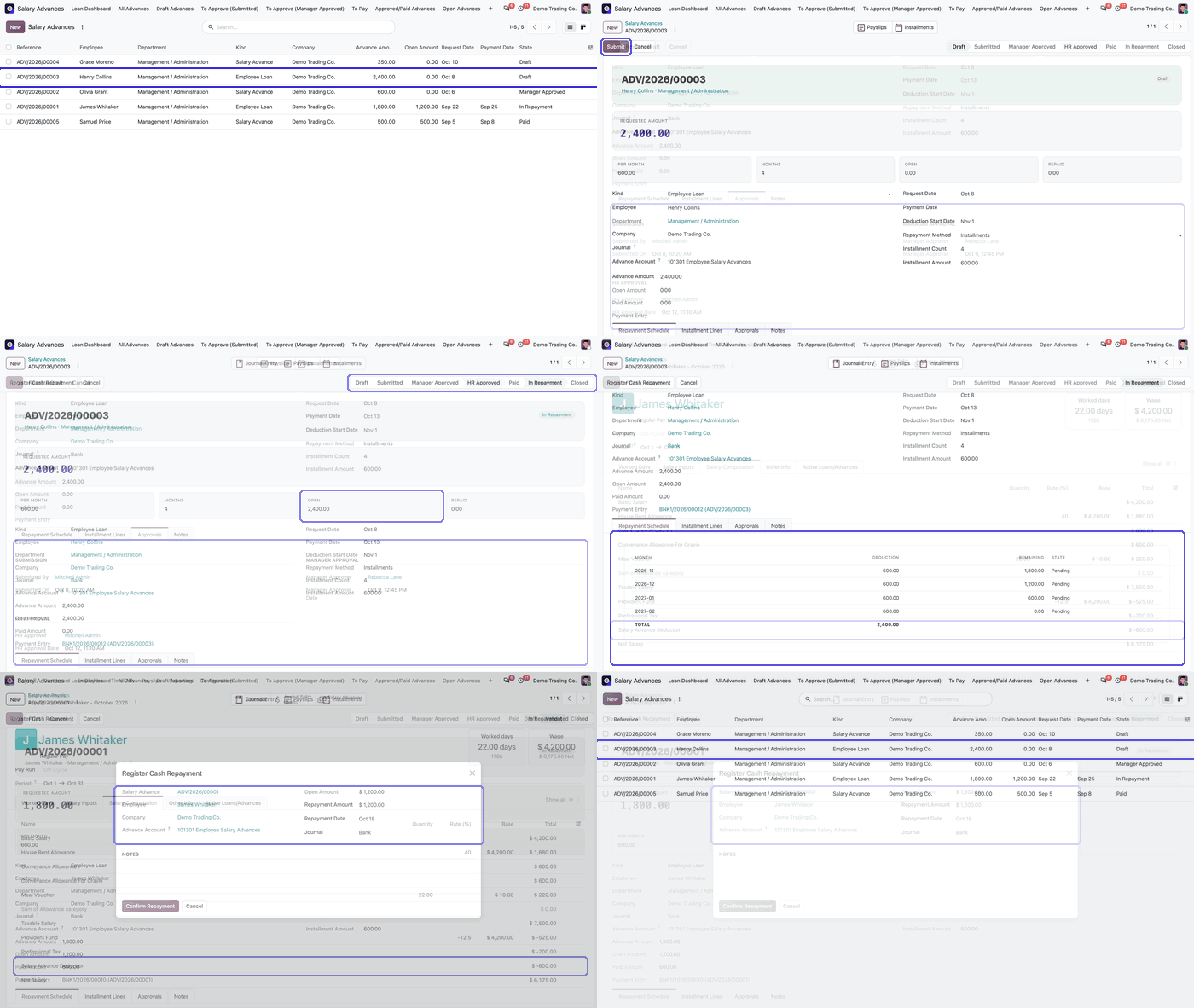
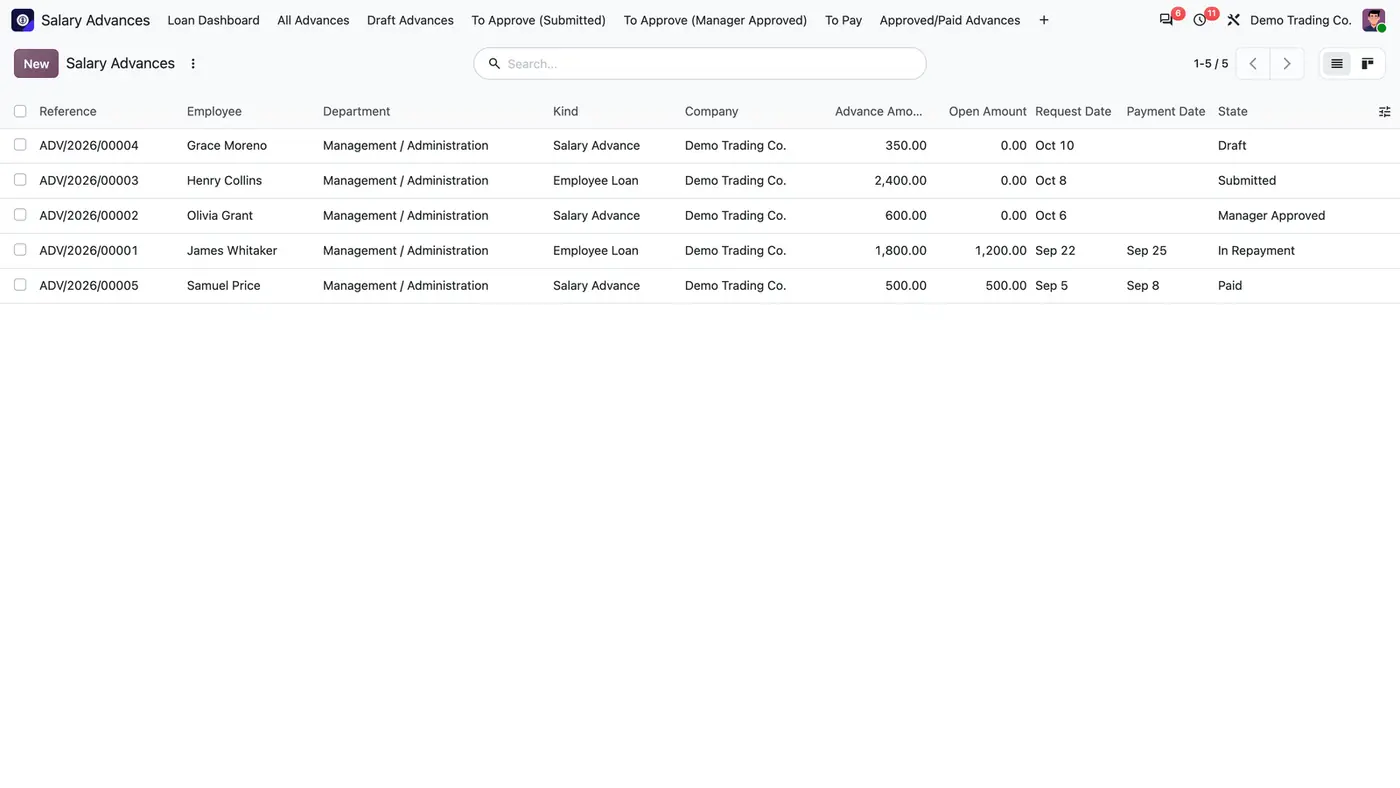
Salary advances and employee loans in one list, from Draft to Paid, with the amount still open.A loan repaid in three monthly installments: October deducted, November and December pending.The approval trail records who submitted the request and who approved it as manager and as HR.The due installment is added to the payslip automatically and reduces the net salary. Play demoA loan from approval to payslip deduction and early cash repayment.
What it does
Multi-step, role-gated approval
A request moves through submit, manager approval, HR approval and payment, each checked by role on the server.
Nobody can approve their own request.
The Approvals tab records who submitted and who approved as manager and as HR, each with date and time.
Three roles are available: User: Own Requests, Manager: Approvals, and HR: Full Approvals & Payment.
Per-employee advance limit
HR sets a limit percentage on the employee, applied to the last payslip net or to a manual net amount.
HR approval is refused when the request exceeds that limit less what the employee still owes.
Payment and receivable
Paying posts a journal entry to the Advance Receivable account.
Each posted payslip entry credits that account and is reconciled with the original payment.
The payment journal defaults to the company's first bank journal, so HR can approve without picking one.
Installments on the payslip
An advance is repaid once or in monthly installments from a deduction start date.
When a draft payslip is computed, due installments are added as ADV_DED inputs and the Salary Advance Deduction rule deducts them before net pay.
An installment missed by an earlier payslip is caught up on the next one.
The payslip shows an Active Loans/Advances tab and a Salary Advances smart button.
Minimum net pay and early repayment
A Minimum Net Pay Floor can be set per company. A deduction that would take net pay below it is reduced, and the rest becomes a new installment one month later.
With no floor set, the full installment is deducted.
Register Cash Repayment settles an advance early in cash: it posts the entry, reconciles it with the payment and settles the last pending installments first.
Who it is for
A good fit for
Companies on Odoo Enterprise that run payroll in Odoo and grant salary advances or employee loans.
HR teams that want a documented approval trail and a limit per employee.
Accounting teams that want the advance receivable cleared automatically from the payslip.
Not a fit for
Interest-bearing loans: the app charges no interest.
Loans to anyone other than employees: an advance is repaid on the payslip or in cash.
Odoo Community, because the Payroll apps are part of Odoo Enterprise.
Databases on Odoo Online (SaaS), which cannot install third-party apps.
Buy Employee Loan Payroll on the Odoo Apps Store for Odoo 18.0 or 20.0.
Add the module to your Odoo.sh project or to the addons path of your on-premise server.
Update the apps list in Odoo and install Employee Loan Payroll. A company with a chart of accounts gets a default advance receivable account at install.
Odoo Online (SaaS) does not allow third-party apps, so the app cannot be installed there. Use Odoo.sh or an on-premise Odoo Enterprise database.
Every purchase includes 90 days of free support from FlexCode Systems.
Configure
Check the advance account under Settings > Salary Advances > Salary Advance Defaults > Default Advance Receivable Account. Optionally set a Minimum Net Pay Floor.
Allow advances per employee under Employees > Management > employee > Payroll > Salary Advance Settings > Salary Advance Enabled, and choose the net source and the limit percentage.
Give the approval roles under Settings > Users & Companies > Users > user > Human Resources > Salary Advances.
Setting
What it does
Default Advance Receivable Account
The account that paying an advance debits and posted payslip entries credit.
Minimum Net Pay Floor
Optional, per company. Deductions that would take net pay below it are reduced and the rest is deferred to the next month.
Salary Advance Enabled
On the employee: allows advances, with the net source (last payslip net or manual net amount) and the limit percentage.
Salary Advances role
User: Own Requests, Manager: Approvals, or HR: Full Approvals & Payment.
How to use it
Request and approve
Create a request under Salary Advances > All Advances with the amount, once or in installments, and the deduction start date, then submit it.
The employee's direct manager with Manager: Approvals, or HR, gives the manager approval.
A user with HR: Full Approvals & Payment approves it within the limit and pays it under Salary Advances > To Pay. Paying posts the journal entry.
Repay on the payslip
Compute the employee's payslip as usual. The due installment appears as the Salary Advance Deduction line.
Post the payslip entry. The advance receivable is reconciled with the payment and the schedule shows the installment as Deducted.
Follow the open amount and the remaining installments on the advance's Repayment Schedule tab.
Repay early in cash
On a paid advance, click Register Cash Repayment.
Confirm the amount. The wizard posts the cash entry, reconciles it with the payment and shortens the schedule.
Limits
No interest is charged.
Only employees can receive advances.
Requires Odoo Enterprise with the Payroll and Payroll Accounting apps.
It cannot be installed on Odoo Online (SaaS).
FAQ
How is the advance repaid?
By deductions on the payslip. When a draft payslip is computed, the due installments are added as ADV_DED inputs, the salary rule deducts them before net pay, and the receivable is reconciled against the original payment when the payslip entry is posted.
What stops a deduction taking too much of net pay?
The Minimum Net Pay Floor in Settings. A deduction that would take net pay below the floor is reduced, and the rest becomes a new installment one month later. With no floor set, the full installment is deducted.
How much can an employee borrow?
HR sets a limit percentage on the employee, applied to the last payslip net or a manual net amount. HR approval is refused when the request exceeds that limit less what the employee still owes.
Does it need Odoo Enterprise?
Yes. It builds on the Payroll apps (hr_payroll and hr_payroll_account), which are part of Odoo Enterprise.
Can an employee repay early in cash?
Yes. On a paid advance, Register Cash Repayment posts the cash entry, reconciles it with the payment and settles the last pending installments first.