Skip to Content

Connectors · Odoo 20

New DHL Paket Germany

Labels, returns and Packstation delivery from the delivery order

DHL Paket Germany connects Odoo 20 to the DHL Post and Parcel Germany APIs. You print a DHL label for every package straight from the delivery order, raise customs papers for destinations outside the EU, send return labels, and a scheduled job keeps the parcel status current.

Key features

The problem

Odoo holds the order, the DHL business portal prints the label, and the tracking numbers sit in a spreadsheet that somebody pastes back by hand. The address on the transfer is retyped into the portal, and every typo is a parcel sent to the wrong street. A parcel leaving the EU needs a declaration with every item, its value, weight and commodity code, which is copied out of Odoo line by line. When a customer asks where the parcel is, the person in Sales has neither the portal nor the e-mail open.
Screenshots

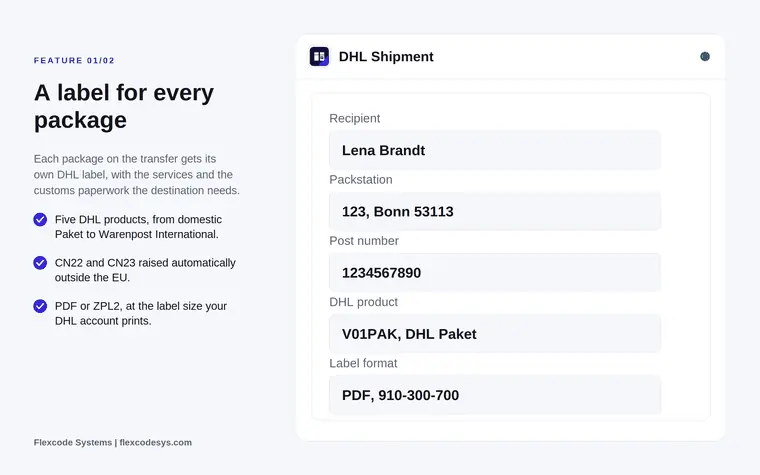
Listing graphic of a DHL shipment with recipient, Packstation, post number, product V01PAK and label format PDF
A label for every package, here addressed to a Packstation with the customer's post number.
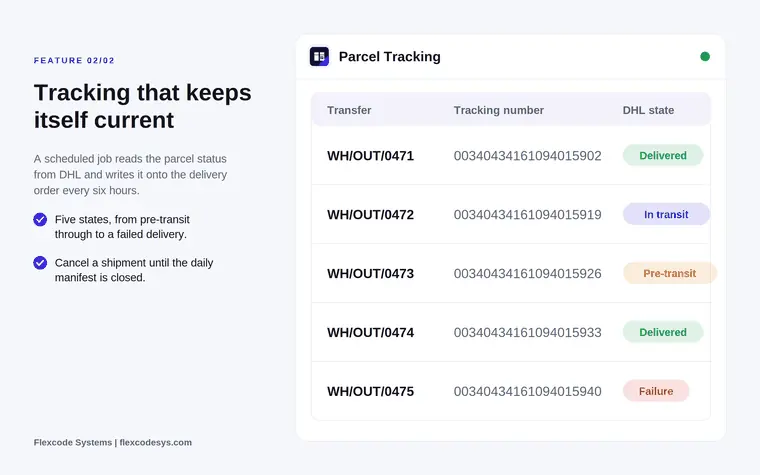
Listing graphic of parcel tracking with transfers, tracking numbers and DHL states Delivered, In transit, Failure
The DHL state of each parcel, refreshed on the delivery order every six hours.

What it does

Five DHL products, one setting

  • Ship DHL Paket within Germany, Paket International and Europaket abroad, and Warenpost and Warenpost International for small goods.
  • The weight ceiling and the customs rule follow the product you pick on the delivery method.
  • Get one label per package on the transfer, as PDF or ZPL2, at the label size your DHL account prints.

Customs papers from the goods

  • For any destination outside the EU, CN22 and CN23 are raised from the products in the package.
  • Value, weight, origin and commodity code come from Odoo instead of being typed again.

Packstation, parcel shop and post office

  • The customer picks a pick-up point during checkout, within a search radius you set.
  • A Packstation is addressed on the label with the customer's DHL post number, which is checked before the parcel is booked.
  • Post numbers, locker numbers and the search radius are checked against DHL's own ranges before the call.

Returns and contract services

  • Create a return label as a printable PDF, as a QR code the customer shows at the counter, or both, against a return receiver kept on the delivery method.
  • Switch on the services your contract covers where DHL allows them for the product: Premium, bulky goods, named person only, no neighbour delivery, visual age check, parcel outlet routing, GoGreen Plus and cash on delivery.

Tracking and the daily manifest

  • A scheduled job writes the parcel status onto the delivery order every six hours, in five states from pre-transit to a failed delivery.
  • A button on the delivery order fetches the status on demand.
  • Close the daily manifest from Odoo and keep its document. Until it is closed a shipment can be cancelled; afterwards a label can still be reprinted.

Built for the bad days

  • Addresses are validated before the call, and a German address DHL cannot machine-encode can be refused outright.
  • Tracking takes a fixed page of parcels per run, so a backlog cannot turn into a burst of API calls.
  • Copying the production database to staging clears the API key, secret, portal login and billing number and turns the production flag off.
  • Addresses in a Location Finder query string are kept out of the logs, and your database talks to DHL and nothing else: no middleware, no licence server, no telemetry.

Who it is for

A good fit for

  • German sellers shipping with a DHL business customer account.
  • Shops delivering into Germany that need Packstation as an option.
  • Warehouse teams that want to print labels from the transfer they already open.
  • Odoo partners replacing a manual DHL portal workflow.

Not a fit for

  • Live price enquiries: DHL Paket Germany publishes no rate service, so shipping costs come from the delivery method's pricing rules in Odoo.
  • DHL Express, which is a different API and a different contract.
  • Carriers other than DHL Post and Parcel Germany.
  • Booking a courier collection, which stays in the DHL portal.
  • Databases on Odoo Online (SaaS), which cannot install third-party apps.

Install

Requires: Inventory (stock), Delivery (stock_delivery), Invoicing (account), Discuss (mail)

  1. Buy DHL Paket Germany on the Odoo Apps Store for Odoo 20.0.
  2. Add the module to your Odoo.sh project or to the addons path of your on-premise server.
  3. Update the apps list in Odoo and install DHL Paket Germany. The Inventory app is installed with it if it is missing.

Odoo Online (SaaS) does not allow third-party apps, so the connector cannot be installed there. Use Odoo.sh or an on-premise Odoo 20 database, Community or Enterprise.

Every purchase includes 90 days of free support from FlexCode Systems.

Configure

  1. Get an API key and secret from developer.dhl.com, and the business customer portal (Geschäftskundenportal) login and billing number from your DHL contract.
  2. Create a DHL Paket delivery method in Odoo and paste the credentials. The billing number format is checked before you can save.
  3. Pick the DHL product, the label format and the services your contract includes.
  4. Set the return receiver for return labels and, if you offer pick-up points, turn on pick-up locations and set the search radius.
SettingWhat it does
API key and secretFrom developer.dhl.com.
Portal user and billing numberYour Geschäftskundenportal login and the billing number from your DHL contract.
ProductDHL Paket, Paket International, Europaket, Warenpost or Warenpost International, for example V01PAK for DHL Paket.
Label formatPDF or ZPL2, at the label size your DHL account prints.
ServicesThe additional services your contract covers, where DHL allows them for the product.
Pick-up locations and search radiusLets the customer choose a Packstation, parcel shop or post office within the radius you set.
Return receiverKept on the delivery method; return labels are raised against it.
Extra dataAnything DHL accepts that the form does not expose, merged into the request.

How to use it

Ship a parcel

  1. Put the goods in packages on the transfer as usual.
  2. Validate the transfer. One label per package is attached to it, with the tracking numbers on the picking.
  3. For destinations outside the EU, the CN22 or CN23 is raised from the products in each package.

Follow and correct shipments

  1. The parcel status is updated on the delivery order every six hours, or on demand with the button on the delivery order.
  2. Cancel a shipment if needed before the daily manifest is closed.
  3. Close the daily manifest from Odoo and keep its document. A label can still be reprinted afterwards.

Send a return label

  1. Create the return label as a PDF, as a QR code, or both.
  2. The customer prints the PDF or shows the QR code at the counter.

Limits

  • No live price enquiry: shipping costs come from the delivery method's own pricing rules in Odoo.
  • DHL Express and carriers other than DHL Post and Parcel Germany are not covered.
  • Courier collections are booked in the DHL portal, and postage is billed by DHL on your billing number.
  • Needs a DHL business account with a warehouse address in Germany. A shipper outside Germany can book only DHL Paket International or Warenpost International.
  • It cannot be installed on Odoo Online (SaaS).

FAQ

Does it quote shipping prices from DHL?

No. DHL Paket Germany publishes no price enquiry service. Shipping costs come from the delivery method's own pricing rules in Odoo, as with any carrier without a rate API.

Is this DHL Express?

No. This is DHL Post and Parcel Germany, the domestic and European parcel business. DHL Express is a separate contract on a separate API and is not covered.

What do I need from DHL before it works?

A business customer account, an API key and secret from developer.dhl.com, your business customer portal login and a billing number.

Can customers have the parcel sent to a Packstation?

Yes. Turn on pick-up locations and the customer chooses a Packstation, parcel shop or post office within a radius you set. A Packstation needs the customer's DHL post number, which is validated on the contact before the parcel is booked.

Can I cancel a parcel after printing the label?

Yes, until the daily manifest is closed. After that the shipment is with DHL, though the label can still be reprinted from Odoo.

Need it set up or adapted?

We configure our apps for your process, train your team and build the extra pieces you need.