Track every cheque from receipt to clearance, with journal entries on the real date
Cheque Management is an app for Odoo 18, 19 and 20 that keeps two registers in Odoo, Received Cheques and Sent Cheques. Each step books its journal entry on the date you enter, and due dates stay in view.
Many finance teams still track cheques in a spreadsheet next to Odoo. Due dates get missed, journal entries are posted on the wrong day, and bank reconciliation turns into detective work. Nobody can say at a glance which cheques are due, deposited, cleared or bounced. Each of those gaps costs time at month end and puts the audit trail at risk.
Screenshots
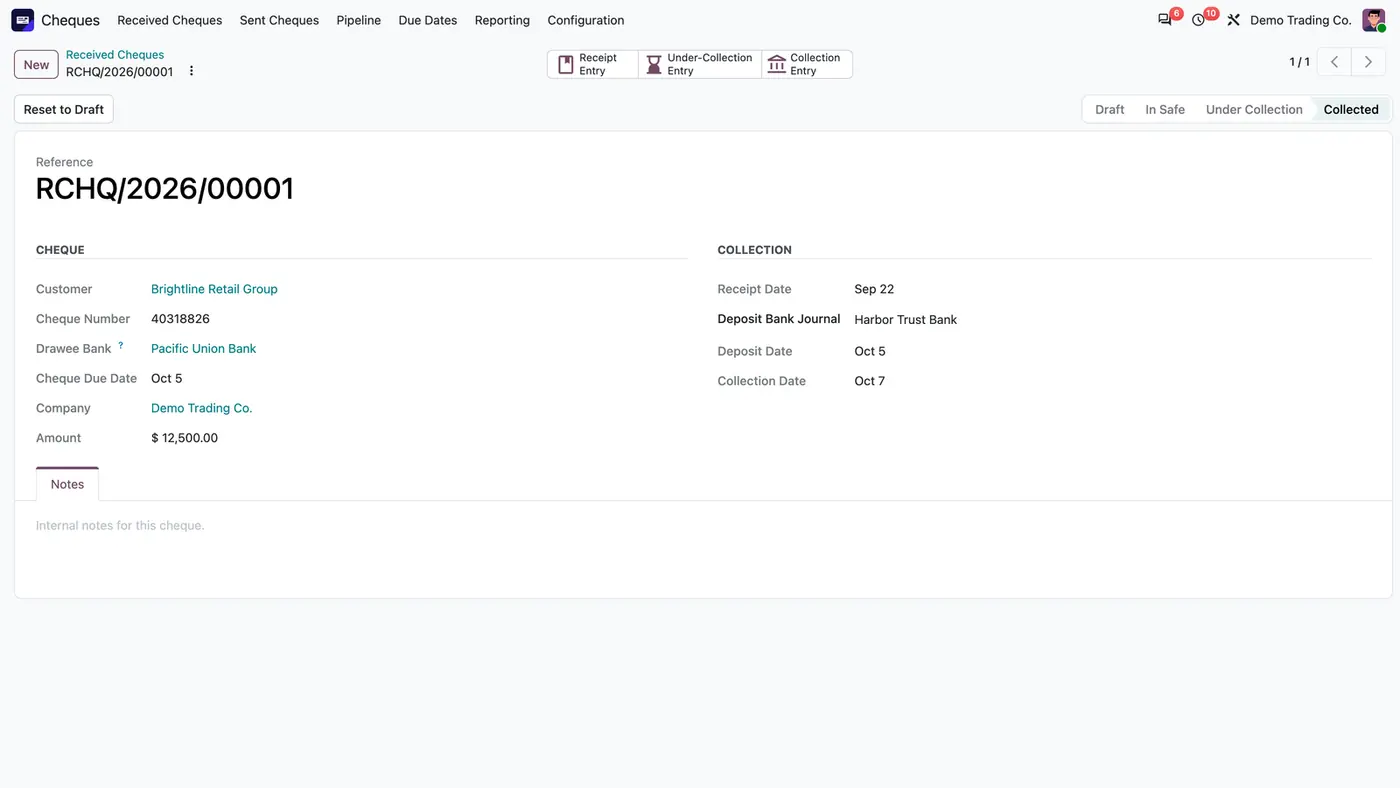
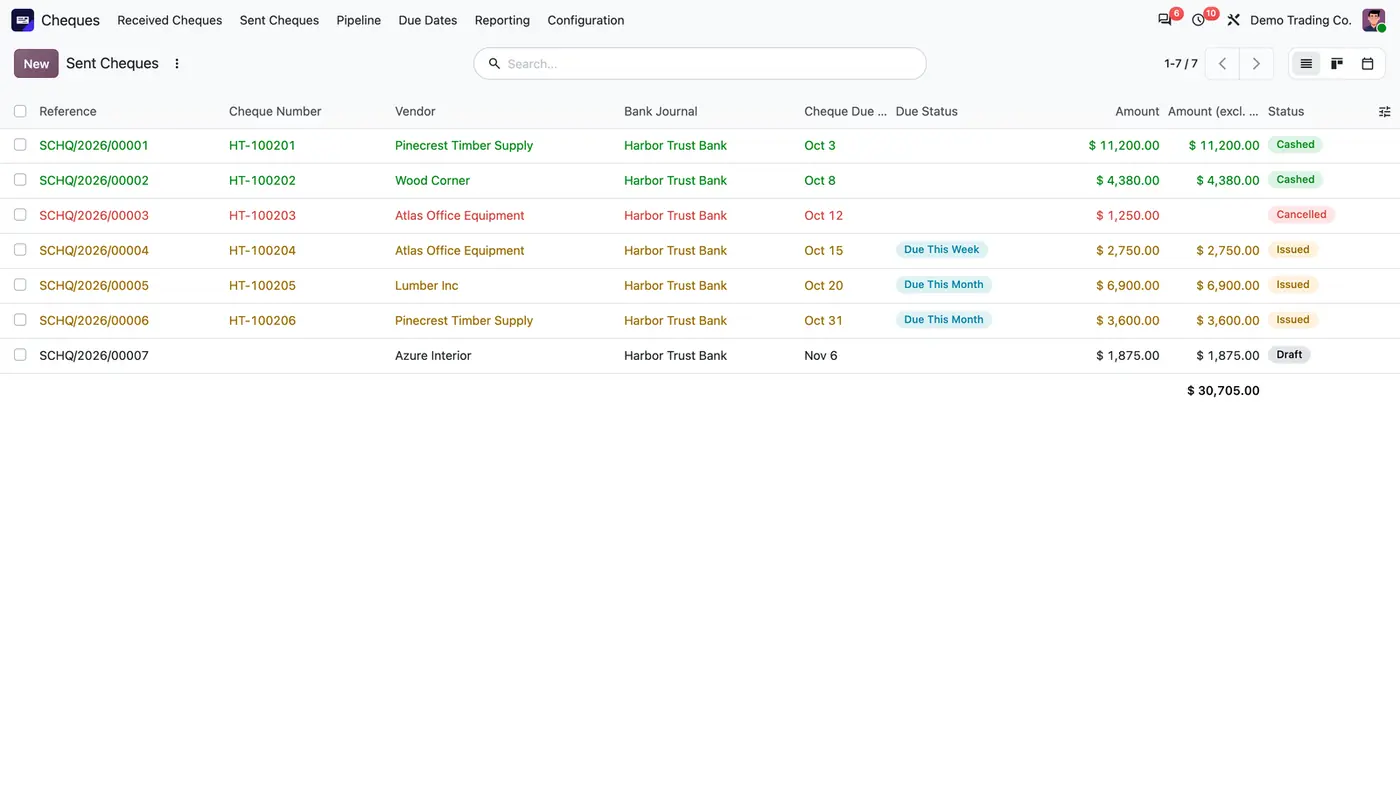
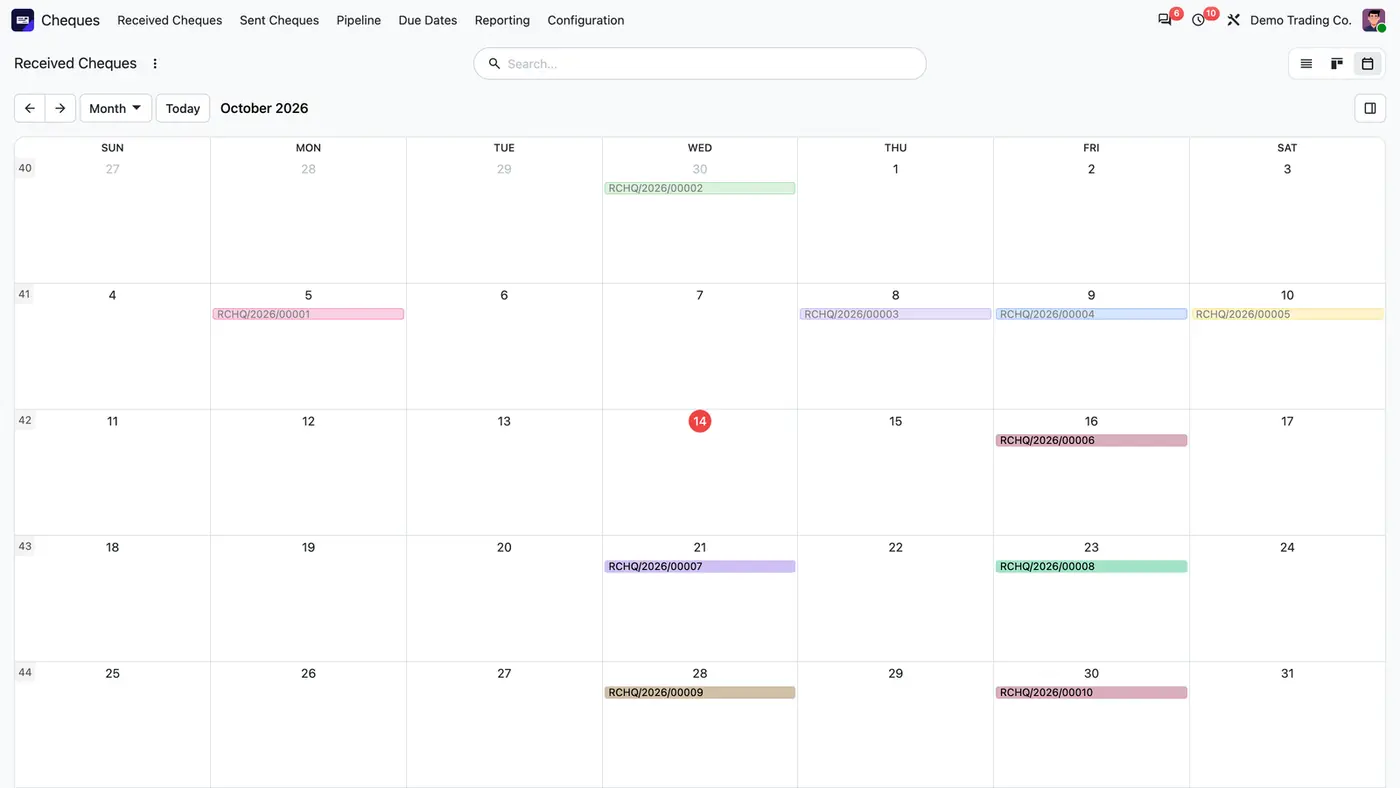
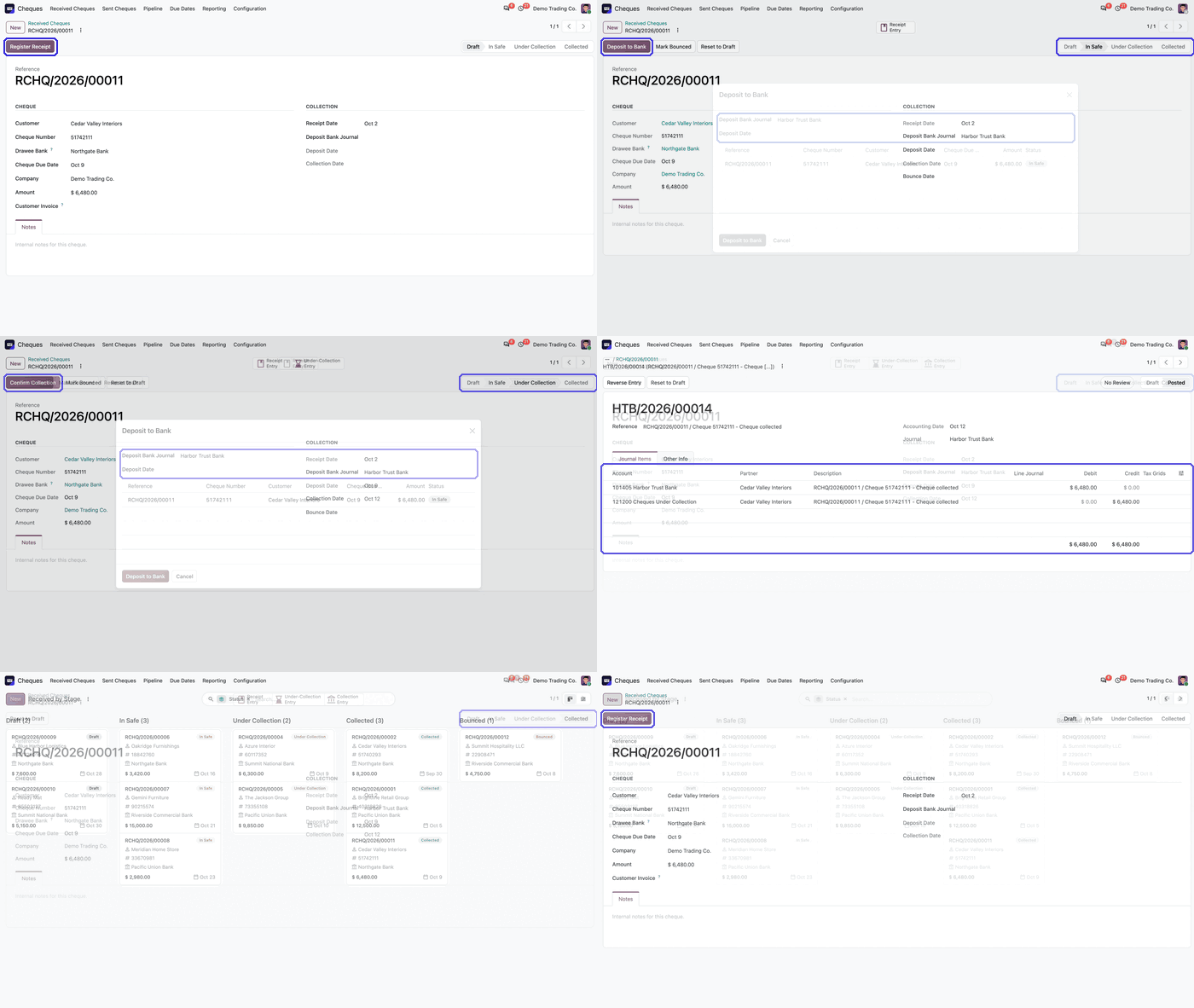
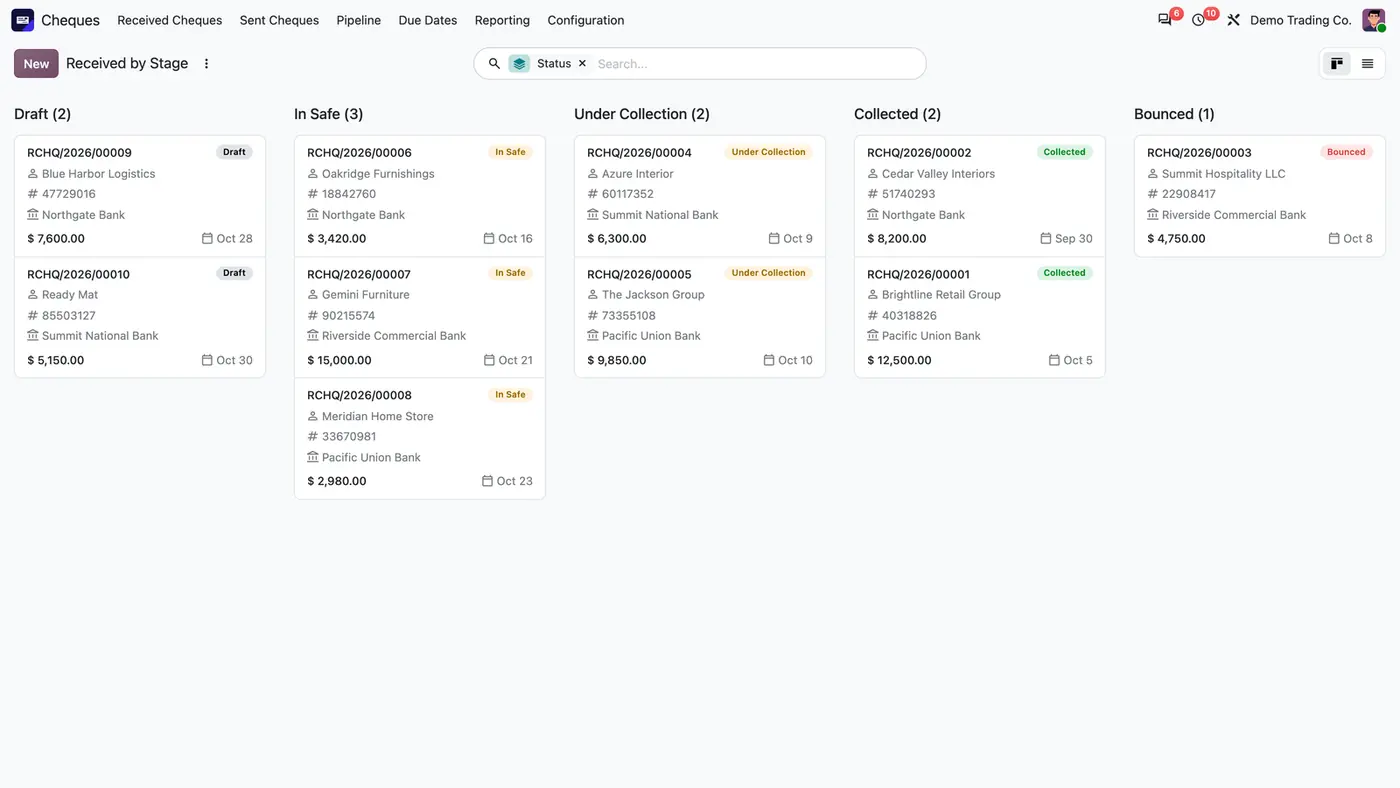
The received cheque pipeline shows every cheque in a column per stage, with customer, cheque number, bank, amount and due date.A collected cheque keeps its receipt, deposit and collection dates, and each step opens its own journal entry.Sent cheques take their numbers from the bank journal's cheque book, and the total excludes cancelled cheques.The calendar places every received cheque on its due date, so deposits can be planned. Play demoThe demo registers a received cheque and moves it through its stages.
What it does
Full cheque lifecycle with audit-correct accounting
Received cheques move through Draft, In Safe, Under Collection, Collected and Bounced. Sent cheques move through Draft, Issued, Cashed and Cancelled.
Book every journal entry on the date you enter for the event. Entries are draft by default, or posted at once when auto-post is on for the company.
Mark a received cheque Bounced to move its value back to the customer. An invoice paid by that cheque is open again.
Cheque-book numbering
Add one cheque book per bank journal with a first and last number.
Sent cheques take the next free number of their cheque book and skip numbers already used.
Get a clear error when a cheque book runs out.
Notes and under-collection accounts
Book through Notes Receivable, Cheques Under Collection and Notes Payable accounts. Collection and cashing entries go to the bank journal, so they can be matched with the bank statement.
Accounting integration
Pay a customer invoice by cheque from Register Payment. The invoice stays In Payment until the cheque is collected.
Reconcile partner lines automatically against the linked invoices.
Multi-currency
Keep the original cheque amount in its own currency.
Compute company-currency debit and credit at the exchange rate of the event date.
Due dates, pipelines and report
See a Due Status badge, due filters, a Due Dates menu and a calendar by due date for received and sent cheques.
Follow cheques in kanban pipelines by stage.
Print a Cheque Report in PDF or view it on screen, with the company logo and colour.
Automation and multi-company
Refresh due buckets and dashboard flags every day with a scheduled action.
Set accounts, journals, sequences and cheque books per company.
Use the app in English, German or Arabic, with right-to-left support.
Who it is for
A good fit for
Accountants and finance managers who handle many customer and vendor cheques.
Companies in Egypt, the wider MENA region and other markets where post-dated cheques are normal.
Businesses whose auditors expect journal entries dated on the real event.
Groups that run several companies, banks and cheque books in one Odoo database.
Not a fit for
Databases on Odoo Online (SaaS), which cannot install third-party apps.
Teams that need cheques printed on bank stationery or cleared electronically through a bank connection.
Lifecycle
Draft
In Safe
Under Collection
Collected
Bounced
Each step books its journal entry on the date you enter, in draft by default or posted at once when auto-post is on. A bounced cheque moves its value back to the customer and re-opens the invoice it paid.
Install
Requires: Discuss (mail), Invoicing (account)
Buy Cheque Management on the Odoo Apps Store for your Odoo version (18.0, 19.0 or 20.0).
Add the module to your Odoo.sh project or to the addons path of your on-premise server.
Update the apps list in Odoo and install Cheque Management. Odoo installs Discuss and Invoicing with it if they are missing.
Odoo Online (SaaS) does not allow third-party apps, so Cheque Management cannot be installed there. Use Odoo.sh or an on-premise Odoo database, Community or Enterprise.
Every purchase includes 90 days of free support from FlexCode Systems.
Configure
Under Cheques > Configuration > Cheque Accounts, set the Notes Receivable, Cheques Under Collection and Notes Payable accounts and the Cheque Lifecycle Journal.
Give each user a cheque role under Settings > Users & Companies > Users > Accounting > Cheque Management. Cheque Manager moves cheques, Cheque Read Only only views them.
Under Cheques > Configuration > Cheque Books, add a cheque book per bank journal with its first and last number.
Setting
What it does
Cheque book
One per bank journal, with a first and last number. Sent cheques take the next free number.
Cheque accounts
Notes Receivable, Cheques Under Collection and Notes Payable accounts and the Cheque Lifecycle Journal.
Company accounts and journals
Accounts, journals, sequences and cheque books are set per company in a multi-company database.
How to use it
Register a cheque
Pay a customer invoice with Pay by Cheque, which creates a received cheque In Safe, or record a cheque by hand.
Enter the bank, the dates and the amount. Each cheque has its own due date, so post-dated cheques are tracked one by one.
Move a cheque through its lifecycle
Use Deposit to Bank, Confirm Collection, Mark Bounced, Mark Cashed or cancel as each event happens. Several cheques can be selected and moved at once from the Actions menu.
Each cheque books its own journal entry on the date you enter.
For a bounced received cheque, the value moves back to the customer and the invoice it paid is open again.
Monitor and reconcile
Check the Due Status badge, the due filters, the Due Dates menu and the calendar by due date.
Use the kanban pipelines by stage and the Cheque Report to see what is open.
Partner lines reconcile automatically against the linked invoices.
Limits
It cannot be installed on Odoo Online (SaaS).
The price covers one Odoo major version. It is sold for Odoo 18, 19 and 20.
It does not print cheques on bank stationery and does not clear cheques electronically through a bank connection.
FAQ
How do I manage post-dated cheques in Odoo?
Each received or sent cheque is its own record with its own due date. A Due Status badge, due filters, a Due Dates menu and a calendar show what falls due, and each step books its journal entry on the date you enter.
How are bounced cheques handled in Odoo with this app?
Mark Bounced moves the value from Notes Receivable or Cheques Under Collection back to the customer. An invoice paid by that cheque is open again.
What is the Cheques Under Collection account for?
It holds a received cheque between deposit and collection, so the bank balance only rises when the cheque is actually collected. Sent cheques wait in Notes Payable until they are cashed.
Can I number cheques from a cheque book in Odoo?
Yes. Add a cheque book per bank journal with a first and last number. Sent cheques take the next free number of their book, skip numbers already used, and show a clear error when the book runs out.
Does Cheque Management support several companies and currencies?
Yes. Accounts, journals, sequences and cheque books are set per company. The cheque keeps its original currency amount, and the company-currency amounts use the exchange rate of the event date.
Which Odoo versions and editions does Cheque Management support?
It is sold for Odoo 18, 19 and 20, for Community and Enterprise, on Odoo.sh and on-premise. Odoo Online does not allow third-party apps, so it cannot be installed there.