Keep quoting, counting and logging hours when the internet drops
Offline Mode keeps five Odoo screens working without a connection: draft quotations, leads, activities, timesheets and inventory counts. The device keeps the user's data encrypted and sends every change when the server answers again, and the server saves each change once, with the user's own access rights. A record changed on the server in the meantime is shown field by field instead of being overwritten.
Odoo needs a connection for every click. At a customer site, in a warehouse corner or on the road, the network drops and the salesperson cannot write the quotation, the technician cannot log hours and the stock count stops. The work ends up on paper and is typed in later, if at all.
Screenshots
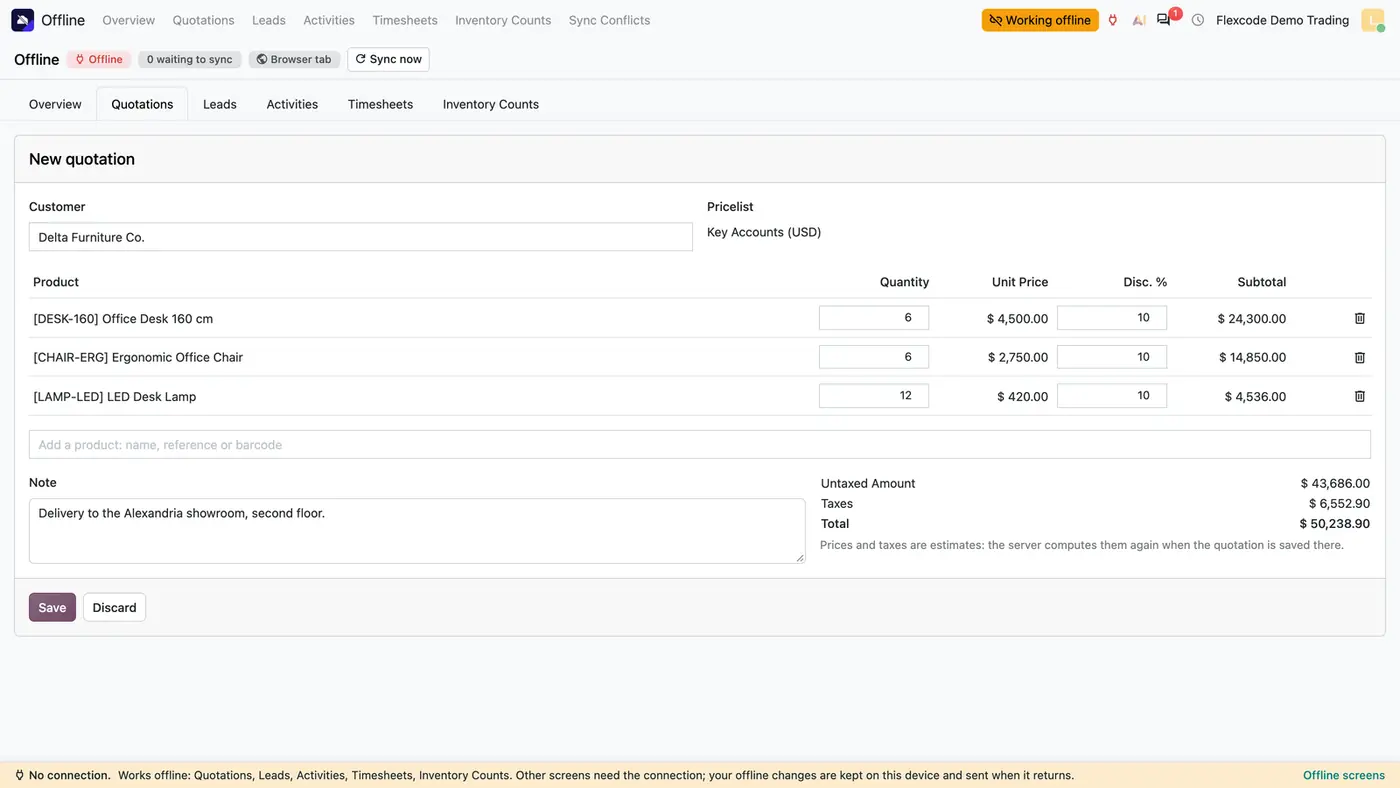
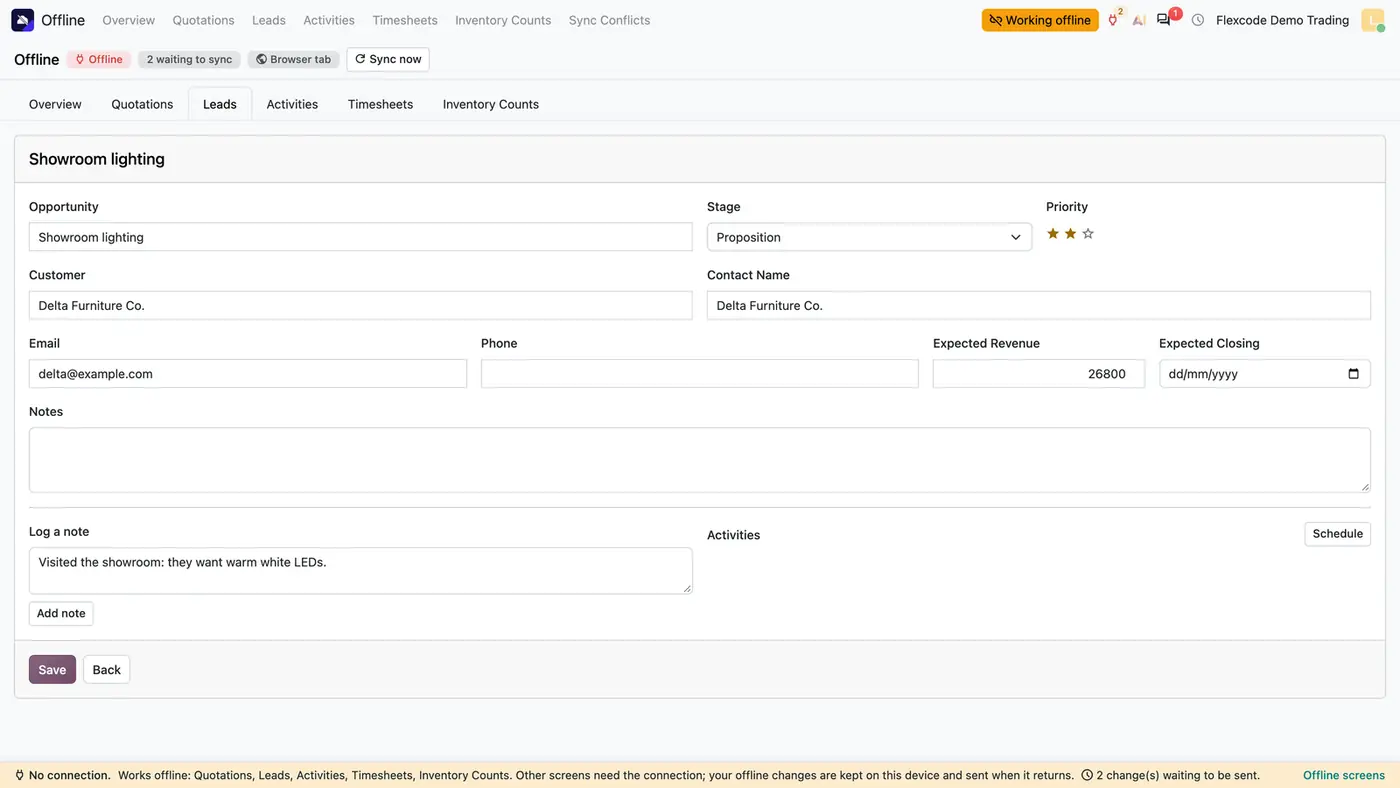
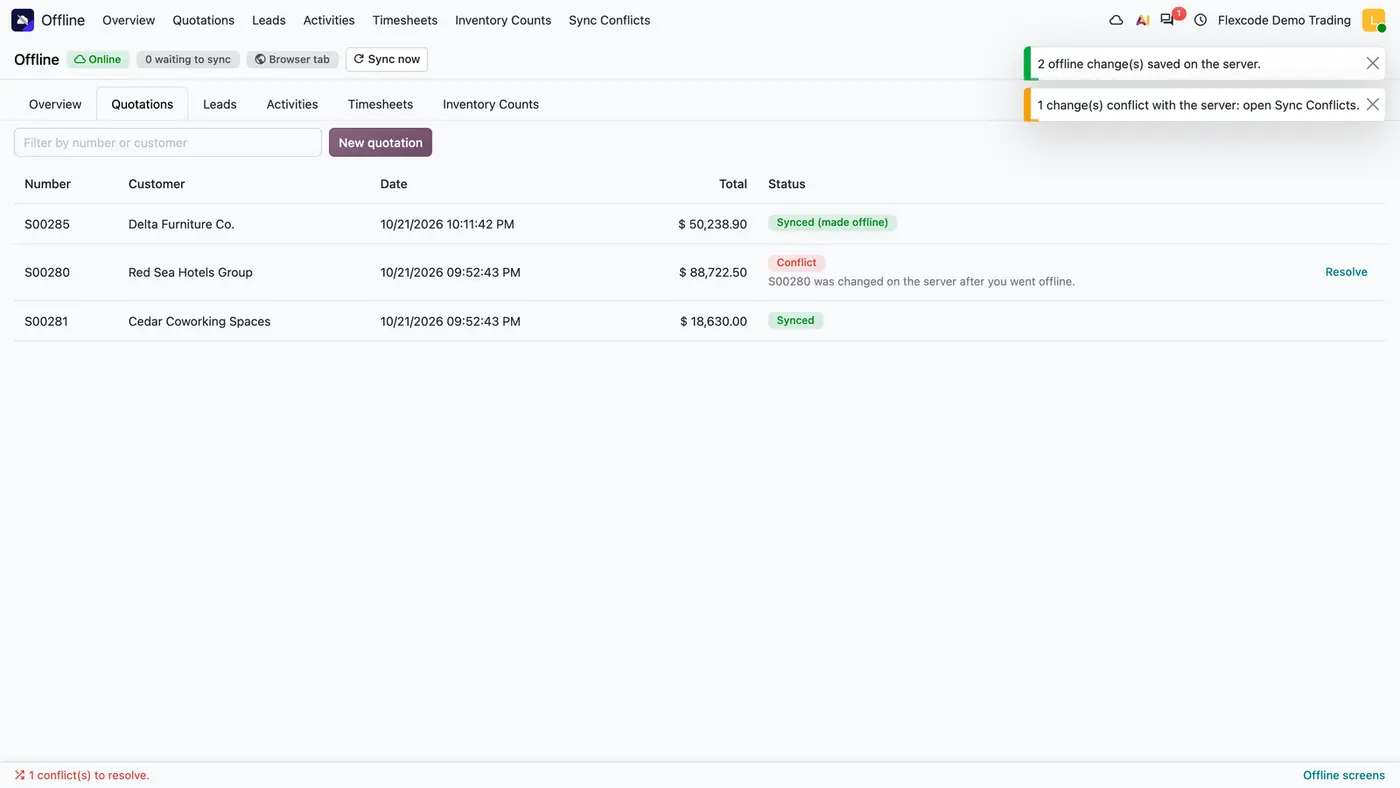
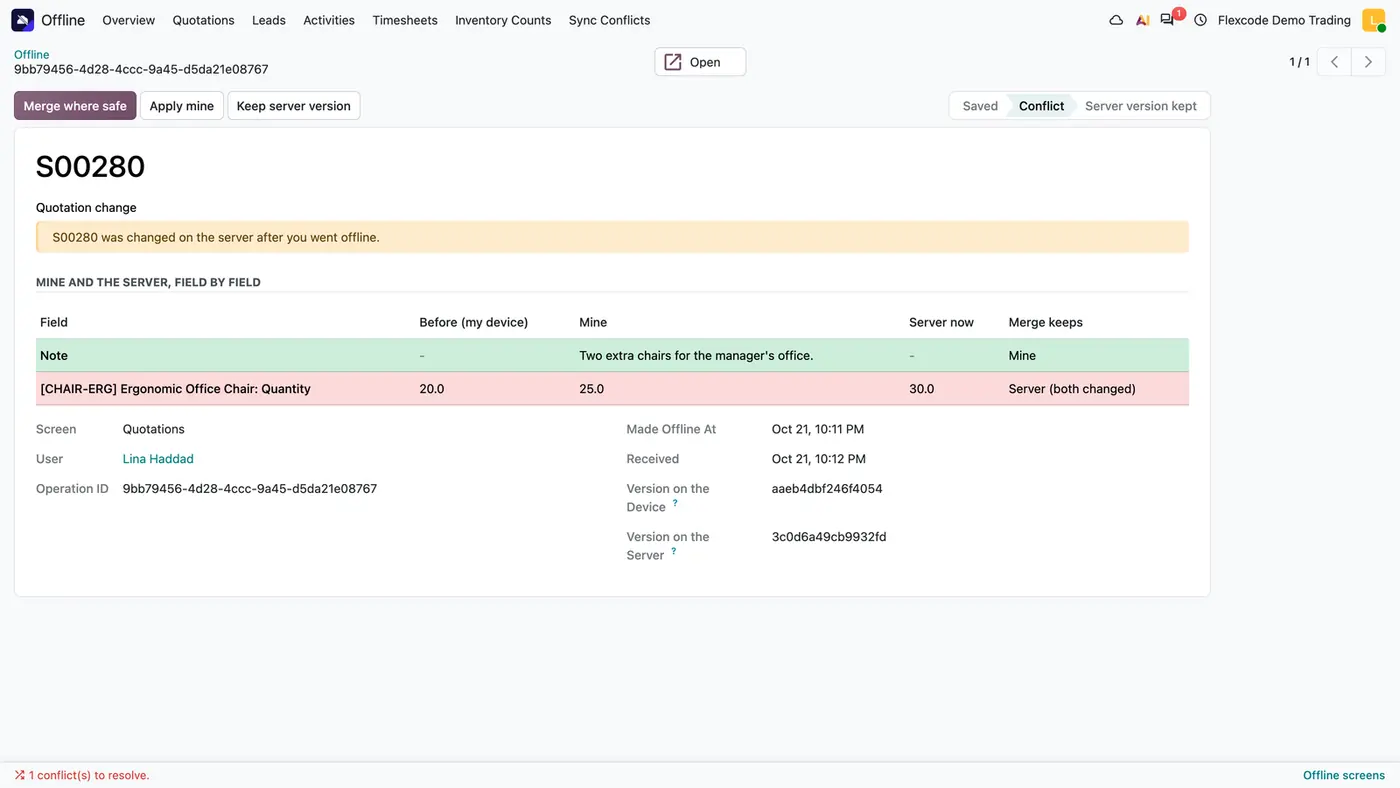
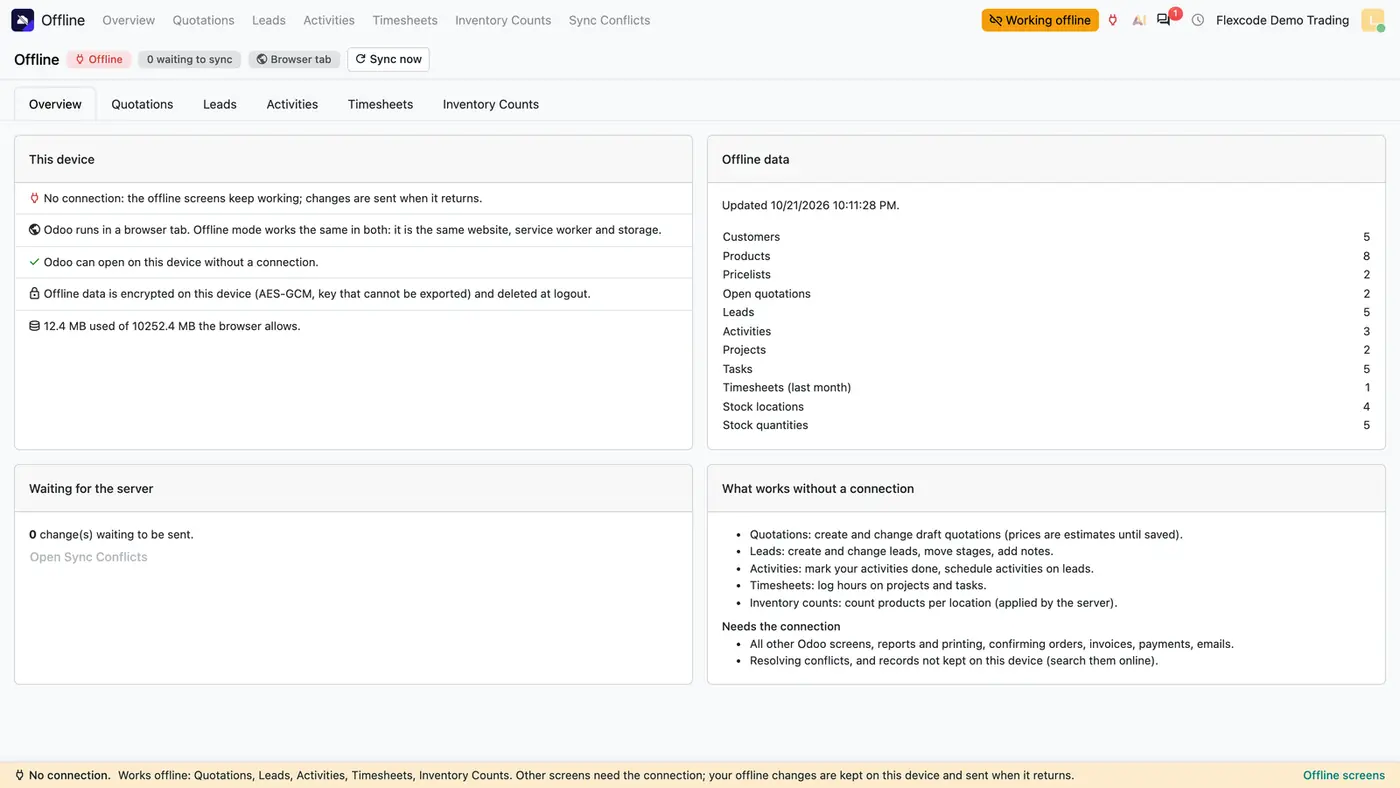
Odoo opens from the device without a connection, and the Overview says what works offline.A quotation made offline uses the customer's pricelist; prices are estimates until the server saves it.Leads can be moved, rated and noted offline; the status bar counts waiting changes.Back online, waiting changes are saved once and a conflicting record is flagged.Sync Conflicts shows each field side by side and what a merge keeps.
What it does
Five screens that work offline
Create and change draft quotations from the customers, products and pricelist rules on the device. Prices and taxes are estimates until the server saves the quotation.
Create and change leads, move stages and add notes.
Mark your activities done and schedule activities on leads.
Log hours on projects and tasks, and count products per location; the count is applied by the server.
A status bar says what works offline and how many changes are waiting.
Saved exactly once
Waiting changes are sent on reconnection, every 30 seconds while something waits, or with Sync now.
Every change has an id the server logs. A change sent again is answered from the log, so nothing is saved twice.
The server saves each change with the user's own access rights. A new quotation gets its real number then.
Conflicts field by field
A record changed on the server in the meantime is not overwritten.
Sync Conflicts shows the value before, mine and the server's value now for every field, and what a merge keeps.
Choose Merge where safe, Apply mine or Keep server version.
Encrypted on the device
Records, waiting changes and the session copy are encrypted with AES-GCM using a key the browser cannot export.
The key is deleted at logout.
After the first load only changes are fetched. Up to 20,000 records of each kind are kept by default.
Safe for the server
Every offline call is limited in size and time, and each user has a rate limit.
Offline calls share a pool of server slots of half the workers by default, so the other half always serves everybody else.
While offline mode is switched off, Odoo's own service worker runs and a page load makes no extra request.
Who it is for
A good fit for
Field sales teams that write quotations and update leads at customer sites with poor coverage.
Service staff who log hours on projects and tasks away from the office.
Warehouse teams that count stock in areas without a stable connection.
Companies that use Odoo in a browser tab or installed as an app.
Not a fit for
Making every Odoo screen work offline: reports, printing, confirming orders, invoices, payments and emails need the connection.
A separate native app: it runs in Odoo itself, in a browser tab or in Odoo installed as an app.
Databases on Odoo Online (SaaS), which cannot install third-party apps.
Buy Offline Mode on the Odoo Apps Store for your Odoo version (18.0, 19.0 or 20.0).
Add the module to your Odoo.sh project or to the addons path of your on-premise server.
Update the apps list in Odoo and install Offline Mode. The Sales app is installed with it if it is missing.
Odoo Online (SaaS) does not allow third-party apps, so the module cannot be installed there. Use Odoo.sh or an on-premise Odoo 18, 19 or 20 database, Community or Enterprise.
Every purchase includes 90 days of free support from FlexCode Systems.
Configure
Go to Sales > Configuration > Settings and switch on Offline Mode for the company.
Under Settings > Users & Companies > Users, give the Offline Mode right on the Sales line to the people who work offline. They keep their normal rights for Sales, CRM, Timesheets and Inventory.
Prepare each device once while online: open Offline > Overview and press Sync now. The Overview says when Odoo can open on this device without a connection.
Setting
What it does
Offline Mode
Switched on per company in the Sales settings.
Offline Mode user right
Given per user on the Sales line of the user form.
How to use it
Write a quotation offline
Open Offline > Quotations and press New quotation.
Pick the customer and add products. Prices follow the customer's pricelist rules and are shown as estimates.
Save. The quotation waits on the device and gets its real number when the server saves it.
Come back online
When the connection returns, waiting changes are sent and a message confirms how many were saved.
Quotations made offline show Synced (made offline). A record changed on the server meanwhile shows Conflict.
Resolve a conflict
Open Offline > Sync Conflicts and the conflict.
Compare before, mine and the server's value for each field.
Press Merge where safe, Apply mine or Keep server version.
Limits
Only quotations, leads, activities, timesheets and inventory counts work offline. All other screens need the connection.
Confirming orders, invoices, payments, emails, reports and printing need the server.
Records not kept on the device have to be searched online.
Safari may delete the data of a site that was not opened for about 7 days. Open Odoo online at least once a week and before going offline.
Encryption does not protect against someone using the browser while the user is logged in. Use a device lock and log out on shared devices.
FAQ
What happens to a change made offline?
It waits on the device, encrypted, and is sent when the server answers again: on reconnection, every 30 seconds while something waits, or with Sync now. The server saves it with the user's own access rights, exactly once, and a new quotation gets its real number then.
What if someone changed the same record in the meantime?
The change is not applied over theirs. Sync Conflicts shows the value before, mine and the server's value now, field by field, with Merge where safe, Apply mine and Keep server version.
Which data is kept on the device?
The user's customers, the products that can be sold or counted, pricelist rules, taxes, open quotations, open leads, own activities, projects with their open tasks, the last month of own timesheets and the stock quantities that can be counted: up to 20,000 records of each kind by default.
Does it work in Odoo installed as an app?
Yes. It is the Odoo website itself, with the same service worker and storage, so it works the same in a browser tab and in Odoo installed as an app.
Can it slow Odoo down for everybody else?
Offline calls are limited in size and time, each user has a rate limit, and offline calls share at most half of the workers by default. While offline mode is switched off, a page load makes no extra request.