
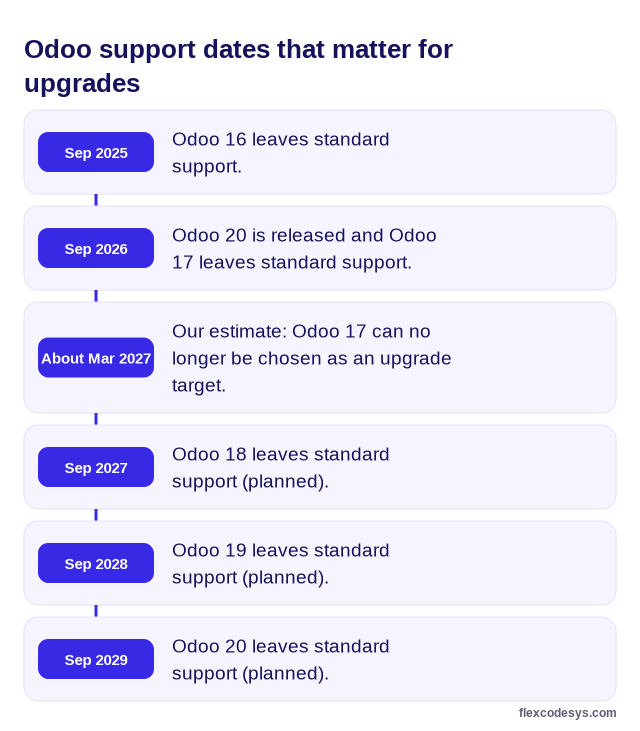
When to upgrade Odoo depends on your version. If you run Odoo 16 or 17, you are already outside standard support: no more security updates, and on Odoo Online no support at all. Plan the upgrade now and go straight to Odoo 20. If you run Odoo 18, you are covered until September 2027 (planned), which means testing in the first half of 2027.
FlexCode Systems is an Odoo Silver Partner in Germany. Odoo appears throughout this article because it is the system we implement, alongside an honest look at the problem it solves.
Key points
- Odoo gives each major version three years of standard support, so in late 2026 only Odoo 18, 19 and 20 are covered.
- Extended support costs extra, exists only on Odoo.sh and on-premise, and brings no security updates.
- You can upgrade directly to any version still in standard support, so 16 and 17 can go straight to Odoo 20.
- Odoo 18 leaves standard support in September 2027 (planned), so planning should start in early 2027.
- Custom and third-party modules decide most of the effort: a database cannot be upgraded until every module exists for the target version.
This article explains Odoo's support policy as published in its documentation, what each hosting type requires, which Odoo 20 changes add upgrade work, and a practical decision guide per version. For a full feature overview, see our separate Odoo 20 articles.
Which Odoo versions are still supported in 2026?
According to Odoo's standard and extended support page, every major version gets standard support for the first three years after release, on Odoo Online, Odoo.sh and on-premise. Odoo's release notes overview lists version 20 as released in September 2026. The dates for older versions come from Odoo's supported versions table.
| Version | Released | End of standard support | Status in November 2026 |
|---|---|---|---|
| Odoo 20.0 | September 2026 | September 2029 (planned) | Standard support |
| Odoo 19.0 | September 2025 | September 2028 (planned) | Standard support |
| Odoo 18.0 | October 2024 | September 2027 (planned) | Standard support, next to end |
| Odoo 17.0 | November 2023 | September 2026 | Not supported on Odoo Online; paid extended support elsewhere |
| Odoo 16.0 | October 2022 | September 2025 | Not supported on Odoo Online; paid extended support where offered |
Partner reviews published after the release, for example by Cybrosys, report that Odoo's live table now shows 17.0 as ended. Check the current table on odoo.com for your own planning, because planned dates can move.
What does extended support mean in Odoo?
Extended support starts when standard support ends. Odoo's documentation says it requires an additional fee. The Odoo Enterprise Subscription Agreement sets that fee at 25% of the annualized subscription price for databases older than the three most recent major versions, so check your own agreement before budgeting.
Both phases include helpdesk access and bug fixes. In extended support, Odoo fixes bugs only where technically feasible. Security updates are delivered only during standard support.
Note: Extended support does not include security updates. A database on Odoo 16 or 17 is paying to stay on a version that no longer receives security fixes from Odoo.
How hosting changes the rules
| Topic | Odoo Online | Odoo.sh | On-premise |
|---|---|---|---|
| After standard support | No extended support | Paid extended support for a limited number of versions | Paid extended support for any version |
| Who triggers the upgrade | Odoo, after a notice in the database a few weeks before; mandatory every two years on a major version | You; Odoo notifies you when an upgrade is required | You; staying indefinitely is possible but not recommended |
| Where you start it | Database manager | The Odoo.sh project | Upgrade script on a test database, then production |
Odoo's upgrade documentation adds that Odoo.sh projects get two more years after the three years of support to finish the upgrade. SaaS versions such as 19.1 or 19.2 exist only on Odoo Online, come out every two to three months, and never get extended support.
Can you upgrade Odoo 16 or 17 directly to Odoo 20?
Yes. Odoo's support page says you can upgrade from any version to any major version that is still in standard support, or that left standard support less than six months ago. Odoo 20 is in standard support, so it is a valid target from 16, 17 and 18. There is no need to stop on 19 first.
What blocks an upgrade is rarely the version number. Odoo's upgrade documentation states that a database with custom modules cannot be upgraded until a version of those modules is available for the target version. With an Enterprise subscription the upgrade itself is free, including help with problems in the upgraded database, but porting custom code is not included.
Which Odoo 20 changes add upgrade work?
Some changes in Odoo 20 affect the effort more than others. Check each against your setup:
- Field Service moved into Planning. Odoo's Meet Odoo 20 post confirms it is no longer a separate app. Teams need retraining and reports may need rebuilding.
- Access rights. Odoo's Odoo 20 release notes describe simplified access rights: record rules are removed and a domain sits directly on the access right. Custom security groups and record rules need a review.
- Accounting structure. The Odoo 20 release notes state that parent accounts replace account groups and depreciation models replace asset models. Custom financial reports may need adjusting.
- Server stack on-premise. Odoo's 20.0 install guide raises the minimums to Python 3.12 and PostgreSQL 16. Servers built for 16 or 17 may need their own upgrade first.
- Frontend and notifications. Custom views using old icon sets and custom push notification setups need testing.
When should you upgrade from Odoo 16, 17 or 18?
Odoo 16: plan now
No security updates since September 2025, no support on Odoo Online, paid extended support elsewhere. Go straight to 20. Expect the most work: a four-version gap, and on-premise usually a server upgrade too.
Odoo 17: start now, finish in 2027
Standard support ended in September 2026. Move directly to 20 and aim to finish during 2027. Check how the extended support fee applies to your subscription in the meantime.
Odoo 18: test in the first half of 2027
You are covered until September 2027 (planned). Target 20 rather than 19: for similar work you get support until September 2029 instead of September 2028. Test early so the deadline does not force a rushed cut-over. On Odoo 19 there is no pressure; upgrade when a specific Odoo 20 change helps you.
The version number sets the deadline, but your custom modules and integrations set the effort.
How the upgrade works in Odoo
On Odoo Online, Odoo's Upgrade Team runs a silent test upgrade of databases that should be upgraded; on every hosting type, requests go through the upgrade service at upgrade.odoo.com. The documented order is the same on every hosting type:
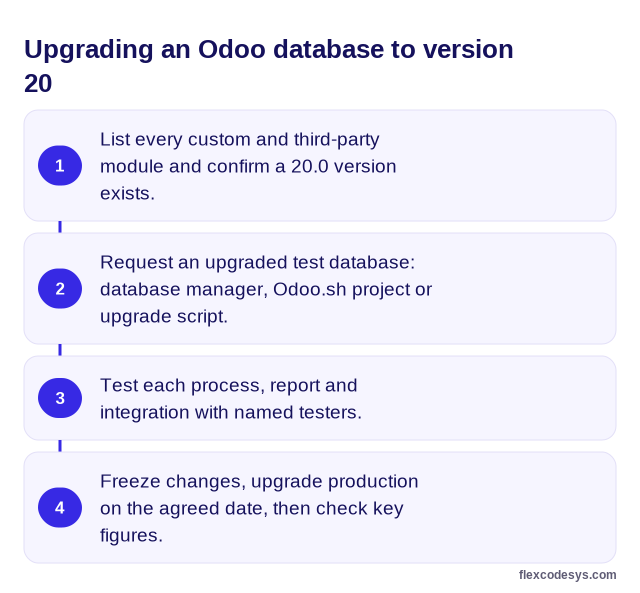
On-premise, the script runs against a test database first, for example python <(curl -s https://upgrade.odoo.com/upgrade) test -d yourdb -t 20.0, and later against production. If you run several FlexCode apps, the Suite Upgrade Controller helps keep them aligned on Odoo 20. For your own custom code, our custom modules team can port and test it.
What to do now
The size of the job falls into three levels. Light: Odoo Online with standard apps only, where you test processes and train users. Medium: a few custom modules and one or two integrations, which must all exist for 20.0 before testing. Heavy: on-premise, many custom modules, custom access rules, Field Service and a gap from 16 or 17, with server work and several test rounds.
- List installed custom and third-party modules and check for 20.0 versions.
- List integrations and connectors and who maintains them.
- Check Python and PostgreSQL versions on-premise.
- Review custom security groups and record rules.
- Check whether you use Field Service.
- Check custom financial reports and account groups.
- Request an upgraded test database and assign testers per process.
- Agree a cut-over date and a freeze window.
If you want a second view, our ERP readiness check is a quick start. For testing and cut-over help, post-go-live support offers an audit of a system set up by another partner for EUR 990, and our service plans include support hours, with extra hours at EUR 120, all plus VAT. To discuss your upgrade path, book a free 30-minute ERP check through our contact page.
Frequently asked questions
Do we have to install every version between 16 and 20?
No. Odoo's upgrade service moves a database directly to the target version, as long as that target is in standard support or left it less than six months ago. Your modules must exist for the target version, not for the versions in between.
Is an Odoo upgrade free?
With an Enterprise subscription, Odoo upgrades the database to the latest version at no charge and helps with problems in the upgraded database. Porting custom modules, reworking integrations, testing and training are not included and are paid separately to whoever does that work.
What happens to our data when Odoo Online upgrades us automatically?
Odoo shows a notice in the database a few weeks before a mandatory upgrade, and you control the process until the deadline. Use that time to request a test upgrade and check reports and processes, so the automatic upgrade holds no surprises.
Is paying for extended support a sensible long-term option?
It buys time, not safety. You keep helpdesk access and feasible bug fixes, but no security updates, and you pay an extra fee. It suits a short bridge while modules are ported, not a plan to stay on an old version.
What about databases on a SaaS version such as 19.1 or 19.2?
SaaS versions exist only on Odoo Online and have no extended support. Odoo moves them forward as new versions arrive, so watch for upgrade notices in the database and test each upgrade when it is offered.
This article is also available in: Deutsch
FlexCode configures Odoo for your business
We fit the system to your workflows and train your team on every module. Odoo Silver Partner, based in Germany.