From 1 December 2026, FlexCode Systems carries out the Odoo 20 upgrade for customer databases on Odoo Online, Odoo.sh and on-premise servers. The service includes migrating your custom work and a test upgrade before your live database is touched. Odoo 20 was released in September 2026, and according to Odoo's own documentation you can upgrade to it directly from any older version.
FlexCode Systems is an Odoo Silver Partner in Germany. Odoo appears throughout this article because it is the system we implement, alongside an honest look at the problem it solves.
Key points
- From 1 December 2026, FlexCode upgrades databases to Odoo 20 on Odoo Online, Odoo.sh and on-premise, including custom module migration and a test upgrade.
- Odoo's documentation allows a direct upgrade to Odoo 20 from any older version, but as of late November 2026 Odoo has not yet opened 20.0 as an upgrade target.
- Odoo 17 reached the end of standard support in September 2026, so it no longer receives security updates under standard support.
- Odoo describes an upgrade as irreversible: always run a test upgrade and keep a full backup before touching production.
- Custom modules must be ported to Odoo 20 before the database upgrade can complete.
This guide explains who should upgrade now, how Odoo's official upgrade process works on each hosting type, what FlexCode does in the project and how to prepare your team. Note that 1 December 2026 is the start date of FlexCode's service, not a deadline set by Odoo. As of late November 2026, Odoo has not yet opened 20.0 as an upgrade target: in the Odoo forum, an Odoo employee names late December or January as the target. Until then, we begin with the inventory and with porting custom code.
Which Odoo versions can upgrade to Odoo 20?
Odoo's 20.0 documentation on standard and extended support says you can upgrade from any version to any major version still under standard support, or one that left standard support less than six months ago. Odoo 20.0 is under standard support, so a database on Odoo 14, 16 or 18 can target 20.0 in one upgrade. There is no need to pass through each version in between.
The table below shows the support status of recent major versions as listed by Odoo.
| Version | Released | End of standard support |
|---|---|---|
| 20.0 | September 2026 | September 2029 (planned) |
| 19.0 | September 2025 | September 2028 (planned) |
| 18.0 | October 2024 | September 2027 (planned) |
| 17.0 | November 2023 | September 2026 |
| 16.0 | October 2022 | September 2025 |
| 15.0 | October 2021 | October 2024 |
Why the upgrade matters if you run Odoo 17 or older
Standard support covers the first three years after a release, on Odoo Online, Odoo.sh and on-premise. After that, Odoo offers extended support for an additional fee: on Odoo.sh for a limited number of versions and on-premise for any version. Odoo states that security updates come only during standard support. During extended support, fixes are provided only where technically feasible.
Odoo 17 left standard support in September 2026, and Odoo 16 a year earlier. If your business runs on one of these versions, you are now outside the period in which Odoo ships security updates. The online-only versions such as 19.1 to 19.4 are a separate case: Odoo releases them every two to three months, and they are not eligible for extended support at all.
What FlexCode does in an Odoo 20 upgrade
FlexCode Systems is an official Odoo Silver Partner based in Düsseldorf, with FlexCode Middle East in Cairo for Egypt and the Gulf. From 1 December 2026 our upgrade service covers all three hosting types and includes:
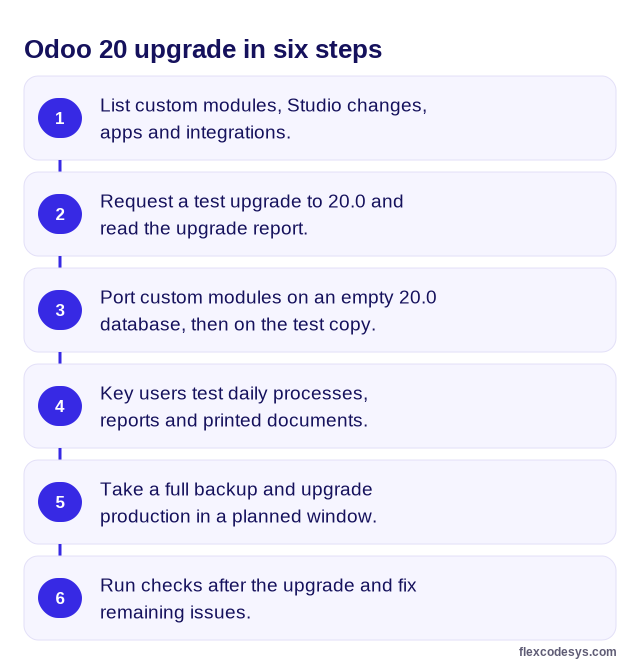
- Inventory: a list of your custom modules, Studio changes, App Store apps and integrations, with a check that each one has a 20.0 version.
- Test upgrade: an upgraded copy of your database, requested through Odoo's upgrade platform, before production is touched.
- Custom module migration: porting your own code to Odoo 20, first on an empty 20.0 database, then on the upgraded test copy. See Custom Modules & Integrations.
- User testing: guided tests of your real daily processes with your key users.
- Production upgrade and checks: a planned go-live window, a full backup first and checks afterwards.
On Odoo Online the scope is different. Odoo states that modules containing Python files cannot be installed on Odoo Online, so there is no custom Python code to migrate there. On Online, our work covers Studio customisations, data, reports and email templates. Our own 62 apps (58 of them on the Odoo App Store) are documented at /apps, and many list compatibility with Odoo 18, 19 and 20. If you run several FlexCode apps, see the Suite Upgrade Controller.
How the Odoo 20 upgrade works in Odoo
Odoo separates updating (a new code revision of the same version) from upgrading (moving to a new major version). On Odoo Online, where upgrades can be mandatory, its upgrade team runs a silent test upgrade of every database that should be upgraded. If that test succeeds and takes under 20 minutes, the customer can start the upgrade directly from the database. The general route depends on hosting.
Odoo Online
Open the database manager, choose Manage, then Upgrade, select the target version and confirm. The Upgrade option appears only when Odoo offers an upgrade for your database.
Odoo.sh
Odoo.sh is integrated with the upgrade platform. The upgraded test database lands on a staging branch, custom modules are ported and tested on a branch, and production is upgraded once tests are clean.
On-premise
You use Odoo's upgrade script from the command line, first in test mode and then in production mode, with the database name and target version 20.0. After restoring the upgraded dump, custom modules are updated with odoo-bin and the -u option.
When an upgrade request completes, Odoo attaches an upgrade report to the success email. It also appears in Discuss for users in the Administration / Settings group. Read it before testing.
Note: Odoo describes an upgrade as irreversible, because it permanently changes the structure and contents of the database. Never upgrade production first. Keep a full backup and complete a clean test upgrade before go-live.
How to prepare your database for Odoo 20
Odoo's upgrade documentation recommends requesting the upgraded test database while porting code in parallel. A database with custom modules cannot be upgraded until those modules exist for the target version. According to Odoo's guide for customised databases, testing custom modules on an empty database first helps avoid side effects from Studio changes, custom website pages, email templates and translations. These steps prepare your side:
- Note your current version and hosting type, and look up your support status in Odoo's table.
- List all custom modules, Studio changes, App Store apps and integrations such as shops, shipping, banks or n8n.
- Confirm that every third-party app has a 20.0 version, or plan a replacement.
- Remove modules nobody uses before the upgrade.
- Name key users for sales to invoice, purchase to payment, stock moves, month-end close and reports.
- Report standard issues found in testing to Odoo support, and fix custom issues before the next test run.
- Agree a go-live window, a configuration freeze and the checks to run afterwards.
For the functional changes in Odoo 20, read Odoo's official release notes and add the affected processes to your test plan. Changes in access rights, payment methods or reports are easier to handle in a test copy than after go-live.
A good Odoo 20 upgrade is decided in the test copy, not on go-live day.
What to do now
Start with your version and your list of customisations. Then book the free 30-minute ERP check and we will look at your upgrade path together. If another partner built your system, we offer an audit for EUR 990 plus VAT before planning the upgrade. For help after go-live, our service plans include support hours (2 a month in Business, 5 in Growth), and extra hours cost EUR 120, plus VAT. All prices are on Odoo Pricing, and ongoing help is described under Post-Go-Live Support.
Frequently asked questions
We are on an Odoo Online version such as 19.2. Can we move to Odoo.sh or our own server during the upgrade?
Odoo.sh and on-premise do not support the intermediary Online versions. Odoo's hosting documentation says the database must first be upgraded to the next major version, so a 19.x Online database goes to 20.0 before it can move.
Is 1 December 2026 a deadline set by Odoo?
No. It is the date FlexCode starts its Odoo 20 upgrade service. Odoo's own dates are the release and end of support dates in its support table. You can book the free check before December to plan your project.
How much does Odoo's extended support cost?
Odoo's documentation only says extended support requires an additional fee and is available on Odoo.sh for a limited number of versions and on-premise for any version. Ask Odoo for the current amount for your subscription.
Do we need to upgrade if our current version still works?
Not immediately in every case, but outside standard support Odoo no longer provides security updates, and Online databases can face a mandatory upgrade depending on version. Planning a tested upgrade early avoids a rushed one later.
This article is also available in: Deutsch
FlexCode configures Odoo for your business
We fit the system to your workflows and train your team on every module. Odoo Silver Partner, based in Germany.