
In Odoo 20, AI is neither free nor unlimited. Every native AI feature, from Ask AI to AI agents and AI fields, is paid for with Odoo 20 AI credits: prepaid credits bought inside Odoo through its In-App Purchase (IAP) service. Odoo's AI credits page lists a price of EUR 1.00 per credit, 20 free credits to start, and packs from 10 to 1,000 credits.
FlexCode Systems is an Odoo Silver Partner in Germany. Odoo appears throughout this article because it is the system we implement, alongside an honest look at the problem it solves.
Key points
- Odoo 20 bills native AI through In-App Purchase credits, listed by Odoo at EUR 1.00 each with 20 free credits to start (checked on 26 November 2026).
- How many credits a request uses depends on the feature, the task and the size of the request, so measure usage before you set a budget.
- A daily scheduled action, active by default, fills empty AI fields, so AI fields can use credits without anyone opening a chat.
- Companies on Odoo.sh or their own server that used their own AI key on Odoo 19 should add AI credits to their Odoo 20 upgrade budget.
- An outside AI tool can work with your database through the Odoo MCP server, using the access rights of the user who created the key.
The cost stays under control if you know which features draw credits, where to see your balance, and when an outside AI tool connected through Odoo's MCP server is the better choice. This guide covers all three.
How do Odoo AI credits work?
Odoo 20 was presented at Odoo Experience in Brussels on 24 September 2026, according to partner recaps such as the Solvve event summary. The Odoo 20.0 AI documentation states that Odoo AI uses the In-App Purchase service and that AI usage consumes IAP credits. The AI agents documentation confirms that agent requests are paid the same way.
According to the Odoo AI credits page (prices checked on 26 November 2026), credits belong to one service and one database, and they do not expire. Odoo issues an invoice for each pack. The page gives no fixed number of credits per question: usage depends on the feature, how complex the task is and how large the request is. The currency shown may depend on your country, so check the price in your own Odoo account before you budget.
Which Odoo 20 features use AI credits?
The Odoo 20 release notes are the official reference. Partner guides that summarise them, such as the iVenture cost breakdown, list the features below as credit consumers. Treat the table as a starting point and check it against your own database.
| Feature | What triggers it | Uses credits? |
|---|---|---|
| Ask AI, chat and voice | A user asks a question | Yes, per request |
| AI agents | A user, a schedule or an automated action | Yes, per run |
| AI fields | A daily scheduled action that fills empty AI fields, active by default, or a manual refresh | Yes, when a field is filled |
| AI server actions | A button or an automation | Yes |
| Documents AI and AI live chat | Uploaded files, website visitors | Yes |
| Vendor bill scanning | An uploaded bill | Separate digitisation credits |
Bill scanning existed before Odoo 20 and has its own credit service. The Odoo 20.0 documentation places the purchase under Accounting, Configuration, Settings, Digitization. One partner, Hors du Commun, believes bills received through Peppol use no digitisation credits, but says Odoo has not confirmed this. Do not plan on it.
Tip: According to the Odoo 20.0 AI fields documentation, a scheduled action runs once a day, is active by default and fills text and property AI fields that are still empty. A new AI field on thousands of records can therefore use credits without anyone opening a chat. Review the action "AI Fields: Compute AI fields" in developer mode under Settings, Technical, Automation, Scheduled Actions and switch it off where nobody reads the result. When credits run out, the AI feature stops and Odoo prompts you to buy more, according to Odoo's IAP pages.
Is Odoo AI free on Odoo.sh or your own server?
Not in Odoo 20. The Odoo 19 documentation on AI API keys says that databases on Odoo.sh or on your own server need the company's own OpenAI or Gemini key, and that the provider may charge fees for it. The Odoo 20 release notes state that all AI features now need credits bought via IAP. Partner guides from iVenture and Aarav Solutions add that the settings for your own key are gone and that Odoo selects the model. Odoo's 20.0 page on AI API keys was still under construction on 26 November 2026.
This moves a budget line. A company that paid a small monthly API bill to its AI provider now pays Odoo per credit instead. If you are planning an upgrade, put an AI credit estimate next to the licence and project costs. Licence prices for the Standard and Custom plans are on our Odoo pricing page. Also check what your plan includes: the Odoo pricing page lists "Odoo Studio / Agentic AI" under the Custom plan, and the 20.0 AI documentation warns that installing the AI app on a Standard plan database automatically triggers an upsell to the Custom plan.
How to check and control AI usage in Odoo 20
The settings sit in a few places. Menu names below follow the 20.0 documentation and partner guides and can differ slightly by edition and language.
Where to see and buy credits
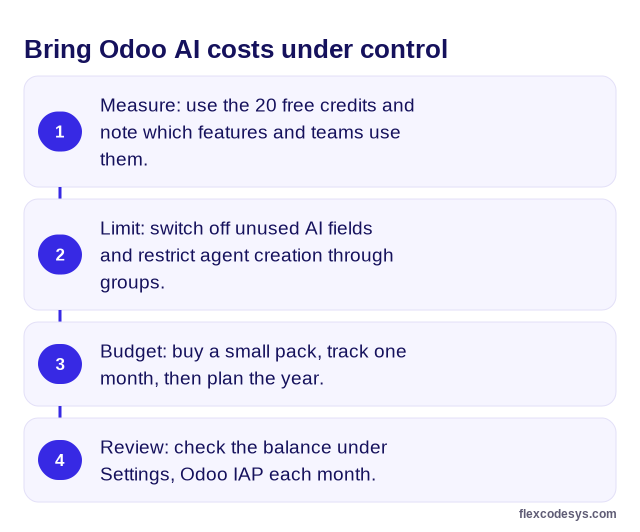
Go to Settings, Odoo IAP, View My Services to see the balance per service and buy packs. The Odoo AI credits page also describes a warning email before the balance reaches a threshold you set, and an optional auto-refill that buys a new pack automatically. Decide deliberately whether you want auto-refill on. Bill scanning credits are handled in the Accounting settings under Digitization.
Who may use AI and agents
Install the AI app only if you want agents, and check your plan first: on the Standard plan, installing it triggers the upsell to Custom mentioned above. Each agent has a system prompt, skills (instructions and tools) and sources such as uploaded files, web links, Documents files or Knowledge articles. According to iVenture, many AI features work without the AI app but still use credits; Odoo's documentation does not list which ones. Use user groups so only the people who need agents can create them, and give each agent narrow sources and tools.
Odoo AI agents or an outside AI tool through MCP?
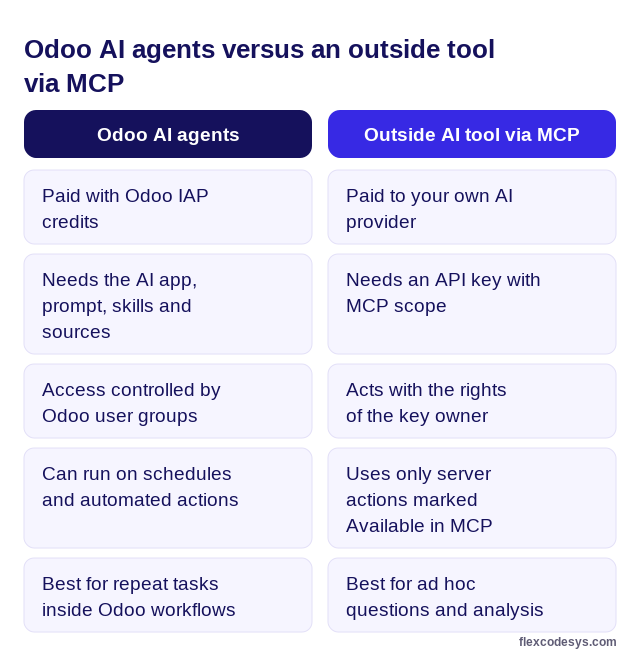
The 20.0 AI documentation presents the Odoo MCP server as an alternative to Odoo's own AI: an outside agent such as Claude or ChatGPT connects to your database and works with its data. The Odoo 20.0 MCP server documentation describes the setup: under My Preferences, Security, click Create API Key, set the scope to MCP and an expiry period, and connect the client to your database URL followed by /mcp. The outside tool can only use server actions with "Available in MCP" ticked on their Usage tab, plus a few read tools that are exposed by default, and it acts with the rights of the user who created the key. A partner walkthrough from Octura shows the same steps on a pre-release build. Odoo's documentation does not say whether MCP use draws Odoo credits; iVenture reports that an outside tool is paid through your own AI account, not with Odoo credits.
- Create one API key per person, with the MCP scope only.
- Connect through a user with limited rights, never an administrator.
- Tick "Available in MCP" only on server actions you have tested.
- Remove keys for people who left or no longer need them.
- Read your AI provider's data terms before sending business data.
If the goal is a repeat process across several systems, a workflow tool can be cheaper than an agent that runs on every record. We build such flows with n8n automation and help companies choose between native agents and outside tools as part of our AI integration work.
AI in Odoo 20 is a metered service: measure it for a month before you budget it for a year.
What to do now
- List the AI features each team really uses and switch off the rest, starting with AI fields nobody reads.
- Use the 20 free credits, then buy a small pack of 10 or 100 credits and track usage for one month.
- Restrict the AI app and agent creation to the people who need them.
- If you run Odoo.sh or your own server with your own AI key, add AI credits to your Odoo 20 upgrade budget.
- Before connecting an outside AI tool, work through the MCP checklist above.
If you want a second opinion on your AI setup or your upgrade budget, contact us and book the free 30-minute ERP check.
Frequently asked questions
Can I use the same AI credits in a test database and in production?
According to Odoo's AI credits page, credits belong to one service and one database. A separate test or staging database may need its own credits, so buy a small pack for testing or ask Odoo how duplicated databases are handled before you test agents at scale.
Does Odoo 20 Community include the AI features?
A partner guide from Nanti reports that Odoo 20 Community has no AI or MCP module. Check the Odoo 20 release notes and the Apps list of your edition before you plan AI work on Community.
Are AI agents included in the Odoo Standard plan?
Not on Odoo's current pages. The Odoo pricing page lists Studio and agentic AI under the Custom plan, and the 20.0 AI documentation says that installing the AI app on a Standard plan database triggers an upsell to Custom. Check the pricing page for your country, and see our Odoo pricing overview for current Standard and Custom licence prices in EUR.
How should I estimate a yearly AI credit budget?
Track one normal month after switching off unused features, then multiply by twelve and add a buffer for busy periods such as month-end or seasonal peaks. Because credits do not expire, a slightly larger pack is not lost if usage drops.
This article is also available in: Deutsch
FlexCode configures Odoo for your business
We fit the system to your workflows and train your team on every module. Odoo Silver Partner, based in Germany.