An Odoo 20 upgrade from Odoo 17, 18 or 19 follows the same loop on every hosting type: request an upgraded test database, port your custom modules, test with real users, then upgrade production. What changes between Odoo Online, Odoo.sh and on-premise is who runs each step and which tools you use.
FlexCode Systems is an Odoo Silver Partner in Germany. Odoo appears throughout this article because it is the system we implement, alongside an honest look at the problem it solves.
Key points
- Odoo 17 left standard support in September 2026, and Odoo 18 follows in September 2027.
- Custom and third-party modules block the upgrade until each one has a working 20.0 version.
- Odoo's upgrade service converts standard modules and data, but not data cleaning, custom module porting or training.
- Plan at least two test rounds, with each key process tested by the person who owns it.
- Keep your own backup, including the filestore, before you upgrade production.
Before you set dates, check whether 20.0 is already offered as an upgrade target for your hosting type. Odoo released 20.0 in September 2026, but in an Odoo forum thread, an Odoo employee wrote that upgrades to 20.0 are targeted for late December or January, on all hosting types. Prepare now, and run the first test as soon as 20.0 appears.
How the Odoo 20 upgrade works
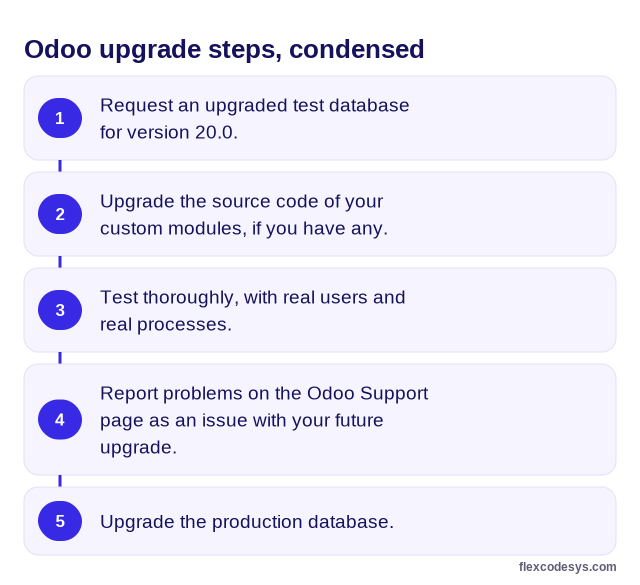
Odoo's official upgrade documentation lists seven steps, which the diagram below condenses to five. You can request several test databases, and Odoo recommends porting custom code while the test database is being prepared, not afterwards. A database with custom modules cannot be upgraded until those modules exist for the target version.
Timing matters for older databases. According to Odoo's standard and extended support page, each major version gets three years of standard support. Odoo 17 left standard support in September 2026, Odoo 18 is planned to leave in September 2027 and Odoo 19 in September 2028. Extended support costs extra and is only available on Odoo.sh and on-premise.
Upgrading on Odoo Online vs Odoo.sh vs on-premise
| Step | Odoo Online | Odoo.sh | On-premise |
|---|---|---|---|
| Test database | Database manager, Upgrade, choose the version | UPGRADE tab on a staging branch, Test Upgrade | upgrade.odoo.com script with the test option |
| Custom code | Standard apps and Studio only, no custom or App Store modules | Ported modules in the branch, upgrade scripts run on module update | You port modules and run odoo-bin -u yourself |
| Production upgrade | Requested by you, run by Odoo | UPGRADE tab on the production branch; starts with the next commit, or at once without custom modules | Same script with the production option |
| Backup | Download your own backup first; Odoo says a completed upgrade cannot be reverted | Platform keeps a pre-upgrade backup and reverts a failed upgrade; also download your own with filestore | Your own database dump and filestore |
| Server | Managed by Odoo | Managed by the platform | Python 3.12+ and PostgreSQL 16+ |
On-premise teams should check the server first. The Odoo 20 installation guide raises the minimum to Python 3.12 and PostgreSQL 16, and the AI features need the pg-vector extension. On Odoo.sh, a test upgrade uses the latest daily production backup, not a manual backup, so make sure recent data has been captured before you start.
What happens to custom modules, Studio and third-party apps
Custom modules
Odoo's guide for upgrading a customised database recommends installing each custom module, one at a time, in an empty Odoo 20 database and fixing every traceback and warning. Then restore the upgraded dump and run odoo-bin -u with your modules. Upgrade scripts and the Upgrade utils helpers move data where fields or models changed. If you need help porting, see our custom modules and integrations service.
Studio customisations
Odoo's 20.0 upgrade documentation covers Studio customisations as long as Studio is still installed and the respective subscription is still active. Keep Studio installed through the upgrade, and still test every Studio view, field and report in the test database.
Third-party apps
Odoo does not port apps from other vendors. Check that each vendor publishes a 20.0 version on the Odoo App Store before you book the test. Our own app documentation shows the supported versions per app, which is the kind of information to look for.
Data checks and user testing before go-live
Compare the test database with production on the same cut-off date. Each key process should be run by the person who owns it, not only by an administrator.
- Open customer invoices, vendor bills and payments match before and after
- Trial balance and key account balances are identical
- Stock quantities and stock valuation per warehouse match
- Open sales orders and purchase orders are complete
- Recurring documents and subscriptions still generate correctly
- Invoice, quotation and delivery PDF layouts look right
- Access rights work for each user role, not only for admin
- Outgoing email and scheduled actions behave as expected once re-enabled
- Integrations, API keys and webhooks are tested against the new database
Run a second test round after fixing what the first one found. Fixes in custom code often change behaviour elsewhere.
The go-live weekend and rollback plan
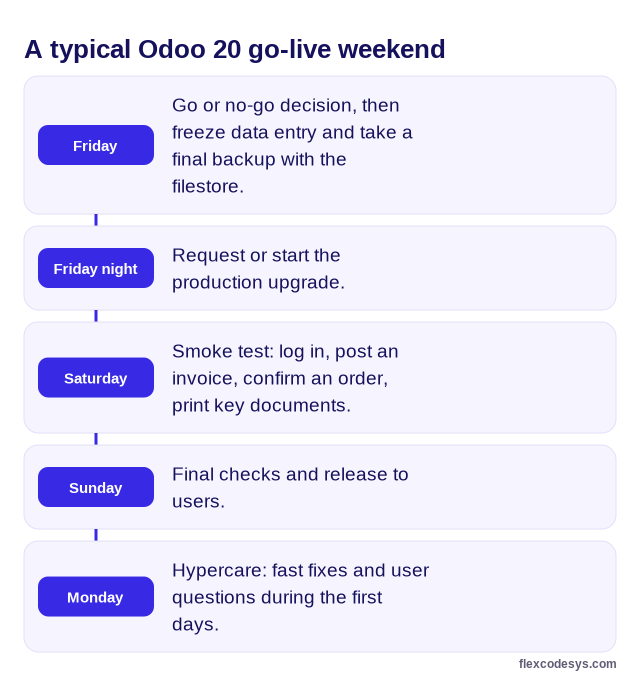
Rollback depends on hosting. On Odoo Online, Odoo states that a completed upgrade cannot be reverted. On Odoo.sh, the platform reverts a failed upgrade automatically. On-premise, you restore your own pre-upgrade backup. Data entered after the freeze is lost in a restore, so the freeze must be real. For the weeks after cut-over, plan who handles issues, for example through post-go-live support.
Note: Odoo's upgrade service does not include cleaning your data or configuration, porting modules built in-house or by partners and third parties, or training. Budget time for these yourself.
Why Odoo 20 upgrades fail
- Custom or third-party modules without a 20.0 version
- Dirty data, duplicates and old configuration that nobody cleaned
- Testing with admin users only, so access rights problems appear on Monday
- Skipping the second test round
- On-premise servers below Python 3.12 or PostgreSQL 16
- Mixing SaaS and major versions when changing hosting: the Odoo hosting documentation says Online intermediary versions such as 19.x are not supported on Odoo.sh or on-premise
- Integrations left untested, with old credentials or endpoints
- No real data freeze during cut-over
How it works in Odoo: menus and commands
- Inventory of modules: open the Apps app, remove the Apps filter and filter by Installed to see every module and its author.
- Odoo Online: open the database manager, choose Upgrade and select the target version.
- Odoo.sh: open the project, select the staging branch, go to the UPGRADE tab and use Test Upgrade; for production, use the same tab on the production branch.
- On-premise test: python <(curl -s https://upgrade.odoo.com/upgrade) test -d your_db -t 20.0
- On-premise production: the same command with production instead of test, then odoo-bin -u for your custom modules.
An upgrade is only as good as the test that came before it.
What to do now
- Note your current version and hosting type, and check whether 20.0 is offered as a target.
- Export the list of installed modules with their authors.
- Ask every app vendor for a 20.0 version and a release date.
- Set up a local or staging 20.0 build and start porting custom code.
- Clean master data and close what can be closed in old periods.
- Book the first test upgrade as soon as 20.0 is available, and plan the second round now.
If your system was built by another partner, an independent audit (EUR 990 plus VAT) shows what blocks the upgrade before you commit to a date. Contact us to plan your test upgrade.
Frequently asked questions
Can I go from Odoo 17 straight to Odoo 20 without upgrading to 18 and 19 first?
Yes. Odoo's support page says you can upgrade from any version to any major version still under standard support, so you request 20.0 directly once it is offered as a target. A larger version gap usually means more changes in custom code and more testing.
Does Odoo Community get the official upgrade service?
Odoo describes its upgrade service as part of the Enterprise offer. Community users usually rely on the open-source OpenUpgrade project or on a partner to migrate data and modules.
How long does the database conversion take?
Odoo publishes no current fixed figure; it depends on database size and installed modules. Measure the duration during your test upgrade and use it to plan the production window.
Can I move from Odoo Online to Odoo.sh during the upgrade?
Changing hosting type is not part of the upgrade service and changes your subscription. Because the Odoo hosting documentation does not support Online intermediary versions on Odoo.sh or on-premise, the path is to upgrade to 20.0, not a later 20.x SaaS release, and then import, with custom modules already ported.
Do users need training after the upgrade?
Training is not covered by Odoo's upgrade service. Use the test database to show key users the changed screens, and plan short sessions per team before go-live.
This article is also available in: Deutsch
FlexCode configures Odoo for your business
We fit the system to your workflows and train your team on every module. Odoo Silver Partner, based in Germany.