If your company files a balance sheet in Germany, the electronic version you send to the tax office (the E-Bilanz) must follow a new data schema from 2027. The German Federal Ministry of Finance (BMF) has published E-Bilanz taxonomy 6.10, which generally applies to financial years starting after 31 December 2026. Because the E-Bilanz also requires account-level detail with unaggregated balances, the chart of accounts you use in Odoo decides how much rework your tax adviser faces later.
FlexCode Systems is an Odoo Silver Partner in Germany. Odoo appears throughout this article because it is the system we implement, alongside an honest look at the problem it solves.
Key points
- Taxonomy 6.10 generally applies to financial years that start after 31 December 2026.
- You may use 6.10 voluntarily for 2026, but you are not required to.
- According to Haufe, filing with 6.10 is expected to be possible for test cases from November 2026 and for live cases from May 2027.
- According to Ecovis, the non-objection rule for missing account-level detail ends with taxonomy 6.10, so each Odoo account should map clearly to a taxonomy position.
- Odoo does not file the E-Bilanz itself, but its trial balance and DATEV export give your tax adviser a clean basis.
Odoo does not create or file the E-Bilanz itself. It does produce the trial balance and the DATEV export that your tax adviser or a dedicated E-Bilanz tool uses to build the filing. That makes the weeks before the new financial year starts on 1 January 2027 the right time to prepare.
What is new in E-Bilanz taxonomy 6.10?
The taxonomy is the officially required data schema under section 5b of the German Income Tax Act (EStG). It defines which line items the balance sheet and the profit and loss statement contain when they are sent electronically. The BMF published taxonomy 6.10 with a letter dated 8 June 2026 (reference IV C 6 - S 2133-b/00067/002/023); the taxonomy itself is dated 1 April 2026. This was reported by the IHK Hannover chamber of commerce, which also provides the BMF letter as a PDF.
According to the BMF letter, the individual changes are listed in a change log published on the tax authority's portal esteuer.de. The letter also announces that the taxonomy is being modernised in line with the current XBRL data model; XBRL is the standard format in which the E-Bilanz is transmitted. For version 6.10, the new data formats and structures are only provided as a preview for testing, not for filings, and the full switch is planned for the next taxonomy version. Mappings that worked until now should still be checked once against the change log, ideally by your tax adviser.
When does taxonomy 6.10 apply, and can you still use 6.9 for 2026?
According to Haufe, taxonomy 6.10 applies as a rule to financial years starting after 31 December 2026. That covers the 2027 calendar year as well as a non-calendar financial year such as 2027/2028. Opening balance sheets drawn up after that date are included too. For 2026 or 2026/2027, the tax authority will not object if you use 6.10 early. So you may switch, but you do not have to.
| Financial year | Taxonomy | Note |
|---|---|---|
| 2025 or 2025/2026 | 6.9 voluntarily | 6.9 is mandatory only from 2026 (source: Kleeberg) |
| 2026 or 2026/2027 | 6.9 or voluntarily 6.10 | Early use will not be objected to |
| Starting after 31 Dec 2026 (2027, 2027/2028) | 6.10 | Mandatory, including opening balance sheets |
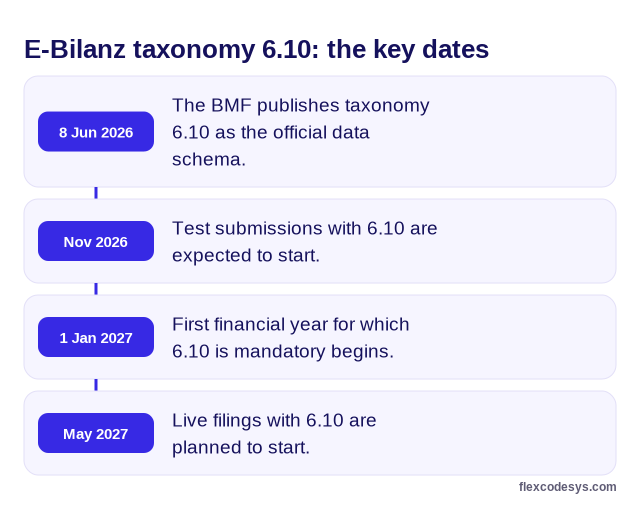
According to Haufe, the tax authority expects filing with the new taxonomy to be possible for test cases from November 2026 and for live cases from May 2027. If you want to use 6.10 for 2026 already, you can therefore expect to file no earlier than May 2027.
What does account-level detail mean for your chart of accounts?
According to the advisory firm Ecovis, section 5b EStG requires the balance sheet and P&L to be filed with unaggregated account balances, known in German as the Kontennachweis, for financial years starting after 31 December 2024. Ecovis states that the BMF specified this in a letter dated 10 June 2025 and that, for filings with taxonomy 6.9, it did not object if the account detail was missing, for example because software still had to be adapted. According to Ecovis, this non-objection rule ends with taxonomy 6.10, and an exception is then only possible for individual line items. Ask your tax adviser to confirm exactly how this applies to your company.
In practice, the tax office no longer sees only totals per line item, but the individual accounts behind them, with number, name and balance. A catch-all account such as "Other" or "Miscellaneous", where advertising, repairs and bank fees all end up together, is then visible as such. It is also hard to map cleanly to a single taxonomy position. Vague account names can lead to questions from the tax office, and wrongly mapped accounts to manual rework at your tax adviser.
Three rules of thumb for an E-Bilanz-ready chart of accounts
- One account, one position: each general ledger account should, where possible, map to exactly one taxonomy position.
- No mixed accounts: catch-all accounts that blend several positions should be split up.
- Agree on your own accounts: accounts you added on top of the German standard charts SKR03 or SKR04 should have a mapping agreed with your tax adviser.
Your 2027 E-Bilanz is not prepared in December 2027, but on 1 January 2027, with the chart of accounts you post to all year.
How do you prepare the E-Bilanz from Odoo?
Note: As far as we know, Odoo has no built-in generation of the XBRL file and no direct electronic filing of the E-Bilanz with the tax authority. In practice, the filing runs through your tax adviser (usually with DATEV) or a separate E-Bilanz tool that imports the trial balance from Odoo. Your job in Odoo is a clean, clearly mapped data basis.
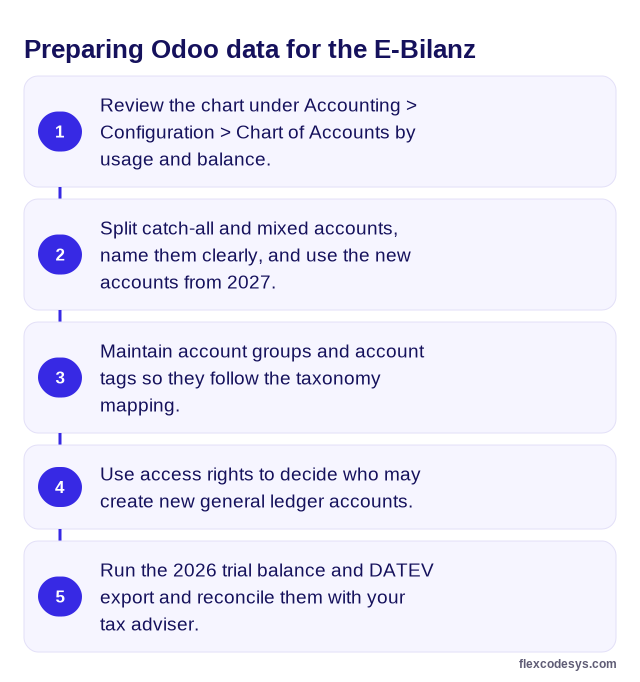
Odoo's German localisation includes the SKR03 and SKR04 charts of accounts. Odoo Enterprise also provides German balance sheet and P&L reports. The steps below refer to Odoo 19 and 20; menu names may differ slightly depending on your version and language settings.
Trial balance and DATEV export
You will find the trial balance under Accounting > Reporting. The DATEV export can be started from the General Ledger report. Run one complete test handover with your 2026 figures: do the balances, account numbers and names match what your tax adviser sees in their software? If you want to set up the chart of accounts and the export together with a partner, our team supports you with Odoo accounting for German requirements, including DATEV and GoBD.
Stop new catch-all accounts from appearing
A cleaned-up chart of accounts only helps if it stays clean. Decide that only the head of accounting creates new general ledger accounts, and record the taxonomy position for each new account. For systems already in daily use, an outside review can help; that is what our post-go-live support is for.
Checklist before 1 January 2027
- Ask your tax adviser or E-Bilanz provider whether they will use taxonomy 6.9 or, voluntarily, 6.10 for 2026.
- Ask when their software will support 6.10.
- List every account in Odoo that has postings and record the taxonomy position for each.
- Split catch-all and mixed accounts for 2027.
- Agree the mapping of any accounts you created outside SKR03 or SKR04 with your tax adviser.
- Name accounts so that a third party understands them without asking.
- Restrict the rights to create new accounts.
- Send a test trial balance and DATEV export for 2026 and reconcile the figures.
What to do now
Book a meeting with your tax adviser in December, bring the current chart of accounts from Odoo and agree the mapping to taxonomy 6.10. Then make the changes in Odoo before the first 2027 entry is posted. To see how well your system is set up overall, try our free ERP Readiness Check.
If you would like help cleaning up your chart of accounts or testing the DATEV export, book the free 30-minute ERP check or contact us.
Frequently asked questions
Do I need to do anything if my tax adviser files the E-Bilanz?
Yes. Your tax adviser does the filing, but they work with your bookkeeping data. If accounts in Odoo are not clearly mapped, they have to do extra work, which you usually pay for. The chart of accounts remains your responsibility.
Does the E-Bilanz apply to businesses that use cash-basis accounting?
The E-Bilanz under section 5b EStG applies to businesses that determine their profit through a balance sheet. Businesses that prepare a cash-basis income surplus statement file the Anlage EÜR form instead. Check with your tax adviser which obligation applies to you.
Can I change the chart of accounts in the middle of the financial year?
Technically yes, but you then have to reclassify and document amounts already posted. Switching at the start of the financial year is usually simpler and easier to document. With a non-calendar financial year, that is the first day of your financial year starting after 31 December 2026.
Does this preparation work with Odoo Community?
You can maintain the chart of accounts, account groups and tags in the Community edition too. As far as we know, the German balance sheet and P&L reports and the DATEV export are part of Odoo Enterprise. Check which exports your tax adviser expects.
What does support from FlexCode cost?
The first 30-minute ERP check is free. For a limited clean-up, extra hours at EUR 120 each plus VAT are one option. You will find our service plans on the Odoo pricing page at /odoo-pricing.
This article is also available in: Deutsch
FlexCode configures Odoo for your business
We fit the system to your workflows and train your team on every module. Odoo Silver Partner, based in Germany.